

Muddy mixes are one of the most common complaints in music production, yet the advice you'll find most often, "cut the low-mids with EQ," only scratches the surface. The real culprit behind a muddy mix is usually frequency masking, where multiple sources compete in the same frequency range and blur each other into an indistinct wall of sound. EQ is just one tool in a much larger kit. This guide walks you through the actual causes of muddiness and gives you a practical, stage-by-stage approach to achieving mixes that are clear, punchy, and defined.
Table of Contents
- What is muddiness in a mix?
- Understanding frequency masking and overlap
- Arrangement and source control: preventing mud at the root
- Effects: the sneaky cause of muddiness
- Workflow for a clear, defined mix
- The expert's view: why chasing frequencies alone is not enough
- Get pro-level feedback to banish muddiness for good
- Frequently asked questions
Key Takeaways
| Point | Details |
|---|---|
| Frequency masking is key | Muddiness is mainly due to overlapping frequencies, not just poor EQ use. |
| Source and arrangement matter | Fixing issues during recording and arrangement stops mud before mixing. |
| Effects can add mud | Reverb and delay can reintroduce muddiness if not carefully managed. |
| Practical workflow wins | A structured workflow combining arrangement, EQ, and smart effects clears up mixes efficiently. |
What is muddiness in a mix?
Muddiness is not a single problem. It's a symptom of several overlapping issues that accumulate across your session. At its core, a muddy mix lacks clarity, particularly in the low-mid frequency range, roughly 200 to 500 Hz. This is the zone where warmth lives, but also where things go wrong fast.
When producers describe a muddy mix, you'll hear words like "boxed-in," "cloudy," "swamped," or "thick in a bad way." These descriptions all point to the same experience: instruments that should be distinct are blurring into each other. Vocals lose their presence. Kick drums lose their punch. The mix feels like it's being heard through a wet blanket.
"A muddy mix is rarely the result of one bad EQ decision. It's almost always the result of multiple elements competing in the same frequency space, each masking the others until nothing cuts through."
The symptoms are easy to spot once you know what to listen for:
- Kick and bass merge into a single low-end blob
- Vocals sound distant or indistinct even when pushed up in level
- Guitars or pads feel like they're "filling" the mix rather than sitting in it
- The overall mix lacks punch and transient definition
- Low-end sounds boomy rather than tight and controlled
The key insight is that frequency crowding, not just poor EQ, is the core mechanism behind muddiness. You can spend hours cutting frequencies and still have a muddy mix if you haven't addressed the number of elements competing in the same space.
Understanding frequency masking and overlap
Frequency masking happens when one sound makes another sound inaudible or unclear because they share too much of the same frequency range. It's a psychoacoustic phenomenon, meaning your ears and brain physically cannot separate two similar sounds when they overlap too closely in frequency and time.
The most dangerous zone for masking in a typical mix is 200 to 500 Hz. This is where the body of the kick drum lives, where the fundamental of the bass guitar sits, where pads and rhythm guitars add warmth, and where the chest resonance of a vocal comes from. Put all of those together without careful management and you get a wall of low-mid energy that produces muddiness regardless of how well-recorded each individual element was.
Here's a breakdown of common frequency masking culprits in a typical arrangement:
| Instrument | Primary mud zone | Common conflict |
|---|---|---|
| Kick drum | 200–300 Hz | Bass guitar, pads |
| Bass guitar | 250–400 Hz | Kick, rhythm guitar |
| Rhythm guitar | 300–500 Hz | Pads, bass, vocals |
| Synth pads | 200–500 Hz | Almost everything |
| Lead vocal | 300–500 Hz | Guitars, keys |
| Piano/keys | 200–400 Hz | Bass, pads, vocals |
The problem compounds quickly. In a dense arrangement, you might have five or six instruments all contributing energy to the same 200 to 500 Hz window. Even if each element sounds great in isolation, together they create overlapping low-mid content that smothers the mix.
The solution is not to cut everything. It's to decide which instrument owns a frequency band and then carve space for it specifically.
Pro Tip: Use your arrangement evaluation framework to identify which tracks are simultaneously active in the mud zone. Mute everything except the kick and bass, listen for clarity, then add elements one by one. The moment the mix starts to cloud over, you've found your masking culprit.
Subtractive EQ is your primary tool here. Rather than boosting an instrument to make it cut through, reduce the competing frequencies in the elements surrounding it. If the kick needs to punch at 250 Hz, gently reduce that same band in the bass guitar and pads. This creates contrast without removing energy from the mix overall.
Arrangement and source control: preventing mud at the root
Understanding masking is essential, but the most effective place to prevent muddiness is before you even open your EQ plugin. Arrangement choices and recording practices determine how much low-mid energy enters your session in the first place.

Arrangement is the first line of defence. When multiple instruments play simultaneously in the same register, you're stacking low-mid energy before a single plugin is loaded. Think about whether every element in your arrangement actually needs to be playing at the same time. A simple arrangement with clear space between elements will always mix more cleanly than a dense arrangement where everything competes.
Recording problems compound the issue significantly. Mic placement and room acoustics are two of the most overlooked contributors to mix muddiness. Poor room acoustics cause low-mid frequencies to build up in the recording space, and that energy gets captured in the mic signal. Proximity effect, where close-miking a source boosts low-end output, can push extra low-mid energy into your recordings that you'll fight in the mix for hours.
Studies show that recording stage issues like proximity effect and poor room acoustics can push extra low-end into the signal, which later becomes low-mid mud in the mix. Fixing it at source saves significant time downstream.
Here are the essential recording practices to minimise future mud:
- Treat your recording space, even basic acoustic panels make a measurable difference to low-mid build-up
- Use a high-pass filter (HPF) on every source that doesn't need sub-bass content, including guitars, vocals, and room mics
- Watch mic distance carefully, especially with directional microphones where proximity effect is strongest
- Record at appropriate gain levels to avoid low-mid saturation from preamp colouration
- Listen critically to each recorded track in solo before committing, if it sounds thick or boomy alone, it will be worse in a full mix
- Avoid layering too many similar-sounding elements in the same frequency register
Pro Tip: Apply a gentle HPF at 80 to 100 Hz on nearly every track except kick and bass as a starting point. You'll be surprised how much low-end clutter disappears before you've touched a single EQ band.
Effects: the sneaky cause of muddiness
You've managed your arrangement. You've recorded cleanly. You've applied careful subtractive EQ. And yet the mix still sounds muddy. This is where effects come in, and they're one of the most frequently overlooked causes of low-mid build-up.
"Many muddy mixes are not the result of bad EQ at all. They're the result of over-processing with reverb and delay that fills every gap in the mix with low-mid energy."
Reverb and delay are the biggest offenders. Long reverb tails, particularly on instruments with significant low-mid content, can add low-mid energy that accumulates across the mix and reduces the contrast between elements. When every instrument has a generous reverb tail, those tails overlap and create a constant low-mid fog beneath the mix.
Here's a comparison of clear versus muddy mix approaches to effects:
| Aspect | Clear mix | Muddy mix |
|---|---|---|
| Reverb pre-delay | 20–40ms, creates separation | None, blurs with dry signal |
| Reverb tail length | Short to medium, controlled | Long, fills all gaps |
| HPF on reverb return | Applied at 200–300 Hz | None, full-range reverb |
| Number of reverbs | 1–2 shared spaces | Different reverb on every track |
| Delay feedback | Controlled, fades quickly | High feedback, builds up |
| Effects on bass/kick | Minimal or none | Heavy reverb/delay |
The fix for effects-related muddiness is straightforward once you know what to look for:
- Apply a high-pass filter to every reverb and delay return, cutting below 200 to 300 Hz removes the low-mid build-up while preserving the sense of space
- Use pre-delay on reverbs to create separation between the dry signal and the reverb tail
- Keep reverb tails shorter than you think you need, especially on low-mid-heavy instruments
- Use a single shared reverb for multiple instruments rather than individual reverbs on every track
- Avoid adding reverb or delay to kick drums and bass guitars unless you have a very specific creative reason
- Automate effects sends so that reverb only appears where it's musically needed, not constantly throughout the track
Managing mix effects carefully is one of the fastest ways to clean up a mix that's already been EQ'd but still sounds unclear. The reverb return is often the last place producers look, and the first place the mud is hiding.
Workflow for a clear, defined mix
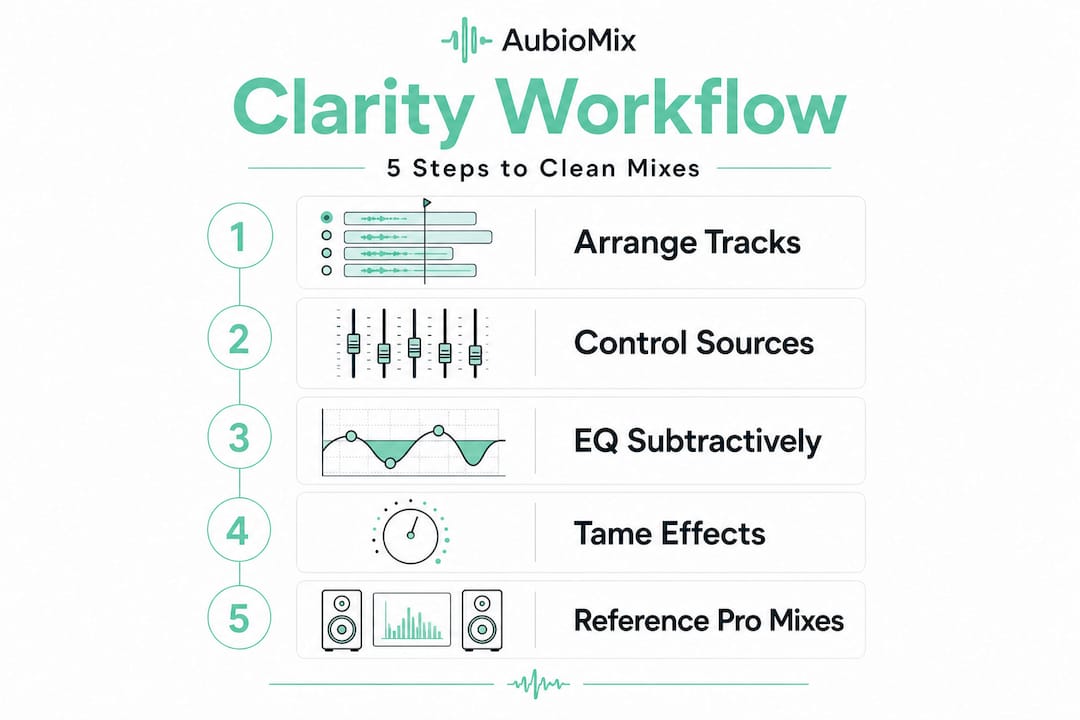
Now that you understand the causes, here's a practical workflow you can follow from the start of every session to ensure clarity at every stage.
- Audit your arrangement first. Before touching any processing, identify which tracks are simultaneously active in the 200 to 500 Hz range. Reduce the number of competing elements or stagger them rhythmically so they don't all hit at the same time.
- Control low-end at the source. Apply HPFs during tracking or immediately after importing files. Every track that doesn't need sub-bass content gets a HPF. This is non-negotiable.
- Use subtractive EQ, not additive. When an instrument needs more presence, find what's masking it and reduce that frequency in the competing element. Boosting rarely solves masking; it usually makes it worse.
- Carve the 200 to 500 Hz range deliberately. Decide which instrument owns each sub-band. The kick owns 200 to 250 Hz. The bass owns 250 to 350 Hz. Guitars sit above 400 Hz. Make those decisions consciously and enforce them with gentle cuts in the competing tracks.
- Process your effects returns. HPF every reverb and delay return. Keep tails short. Use pre-delay. This single step can transform a muddy mix into a clear one surprisingly quickly.
- Reference against commercial tracks. A practical workflow that many experienced engineers use involves checking the mix against two or three commercial references in the same genre at every stage. Your ears adapt to your mix; references reset your perspective.
- Check in mono. Mono playback reveals masking that stereo imaging can hide. If the mix sounds muddy in mono, it has a masking problem that stereo width is masking.
Pro Tip: Always compare your mix with commercial references at matched loudness levels. Louder always sounds better to the human ear, so match levels first. If your mix sounds muddy next to the reference at the same volume, you have a real problem to solve, not a loudness issue.
The expert's view: why chasing frequencies alone is not enough
Here's the uncomfortable truth that most EQ-focused tutorials won't tell you: you can cut every frequency in the 200 to 500 Hz range and still have a muddy mix. We've seen it happen countless times. Producers spend hours notching out frequencies, and the mix still sounds thick and undefined. Why? Because they've addressed the symptom without touching the cause.
EQ is a corrective tool. It works best when you're cleaning up a small amount of excess energy in an otherwise well-organised mix. When the mix is fundamentally overcrowded, EQ becomes a game of whack-a-mole. You cut the bass, and the pad becomes more obvious. You cut the pad, and the guitar muddies the vocal. There's no end to it because the root problem is too many elements competing in the same space.
The bigger picture involves arrangement, recording, and effects working together. Even if you reduce mud EQ-wise, excessive reverb or too many overlapping sources can reintroduce a perceived loss of definition through masking and reduced dry/wet contrast. The mix will still feel unclear even though your EQ moves were technically correct.
The producers who consistently achieve clear, professional mixes are not necessarily better at EQ. They're better at arrangement. They make decisions earlier in the process that prevent muddiness from building up in the first place. They record with care, apply HPFs early, keep their arrangements lean, and treat their effects returns as carefully as their dry tracks.
The shift in mindset is this: stop thinking of mixing as fixing problems and start thinking of it as maintaining clarity. Every decision, from which instruments play together to how long your reverb tail is, either adds to or subtracts from the clarity of your mix. EQ is the last resort, not the first.
Get pro-level feedback to banish muddiness for good
Knowing the theory is one thing. Hearing exactly where your mix is losing clarity is another. That's where professional, objective feedback makes a genuine difference to your development as a producer or engineer.

AubioMix gives you detailed, actionable feedback on your mixes, pinpointing the exact causes of muddiness, masking, and frequency imbalance in your specific session. Rather than generic advice, you get a clear picture of what's happening in your mix and concrete steps to fix it. You can explore the AubioMix evaluation framework to understand how mixes are assessed, and review a AubioMix sample report to see the depth of analysis you'll receive. Upload your track and get the clarity your mix deserves.
Frequently asked questions
What frequency range causes mud in a mix?
Muddiness usually builds up in the 200 to 500 Hz range, where many instruments and vocals overlap and mask each other, reducing overall clarity and definition.
Can I fix muddy mixes just by using EQ?
EQ helps, but a complete fix requires addressing arrangement, recording technique, and effects density alongside any EQ moves you make.
Do room acoustics affect muddiness?
Yes, poor room acoustics cause low-mid build-up during recording that gets captured in the signal and becomes difficult to remove cleanly in the mix.
How do effects like reverb cause muddiness?
Reverb and delay tails add low-mid energy across the mix, especially when used generously on multiple tracks, reducing contrast and making the overall sound blurry and indistinct.