

What does mastering in music actually mean?
Mastering is the final stage of audio production where a finished stereo mix is polished, optimised, and prepared for distribution across every playback format imaginable. Think of it as the last pair of ears on your track before the world hears it. Where mixing is about balancing individual elements, mastering takes that finished stereo file and refines it as a whole, ensuring it sounds consistent, loud enough, and tonally balanced whether it plays through a club sound system, a pair of earbuds, or a car stereo.
The typical mastering signal chain moves through a logical sequence of processors, each serving a specific purpose:
- Corrective EQ: Addresses tonal imbalances in the mix, such as a muddy low-mid build-up or a harsh top end.
- Bus compression or saturation: Adds gentle glue and density, bringing the track together without squashing its dynamics.
- Stereo imaging: Widens or tightens the stereo field to suit the genre and playback context.
- True-peak limiting: Sets the final loudness ceiling and prevents distortion during digital encoding.
Mastering also covers quality control. A good mastering engineer catches clicks, dropouts, phase issues, and level inconsistencies that slipped through the mix session. For albums and EPs, it includes sequencing the tracks in the right order, adjusting the gaps between songs, and embedding metadata such as ISRC codes so that streaming platforms and distributors can identify your music correctly.
Why mastering matters in music production
Mastering is where your track earns its place alongside professional releases. Without it, even a well-mixed song can sound thin, inconsistent, or simply quiet compared to everything else on a playlist. The importance of music mastering goes beyond loudness; it is about ensuring your creative work translates faithfully across every listening environment.
One of the most practical reasons to master is loudness normalisation. Streaming platforms measure loudness in LUFS (Loudness Units relative to Full Scale) and normalise to approximately -14 LUFS integrated to preserve dynamics. Commercial pop tracks often push louder than the streaming platforms' target, but pushing beyond this means the stream gets turned down automatically, and you lose punch in the process.
Loudness standard: Streaming platforms normalise playback to approximately -14 LUFS integrated. Mastering to this target preserves your track's dynamics and prevents automatic gain reduction on services like Spotify and Apple Music.
Beyond loudness, mastering serves several other functions that producers often overlook:
- Tonal consistency across an album: Every track on a release should feel like it belongs together, with matched brightness, warmth, and weight.
- Technical quality control: Catching mix artefacts, phase problems, and encoding issues before they reach the listener.
- Metadata and delivery: Embedding ISRC codes, track titles, and artist information into the master file, and formatting it correctly for digital distribution or CD replication.
- Format preparation: Delivering the right file type for each destination, whether that is a 24-bit WAV for streaming, a DDP image for CD pressing, or a high-resolution master for archiving.
How the mastering process works, step by step
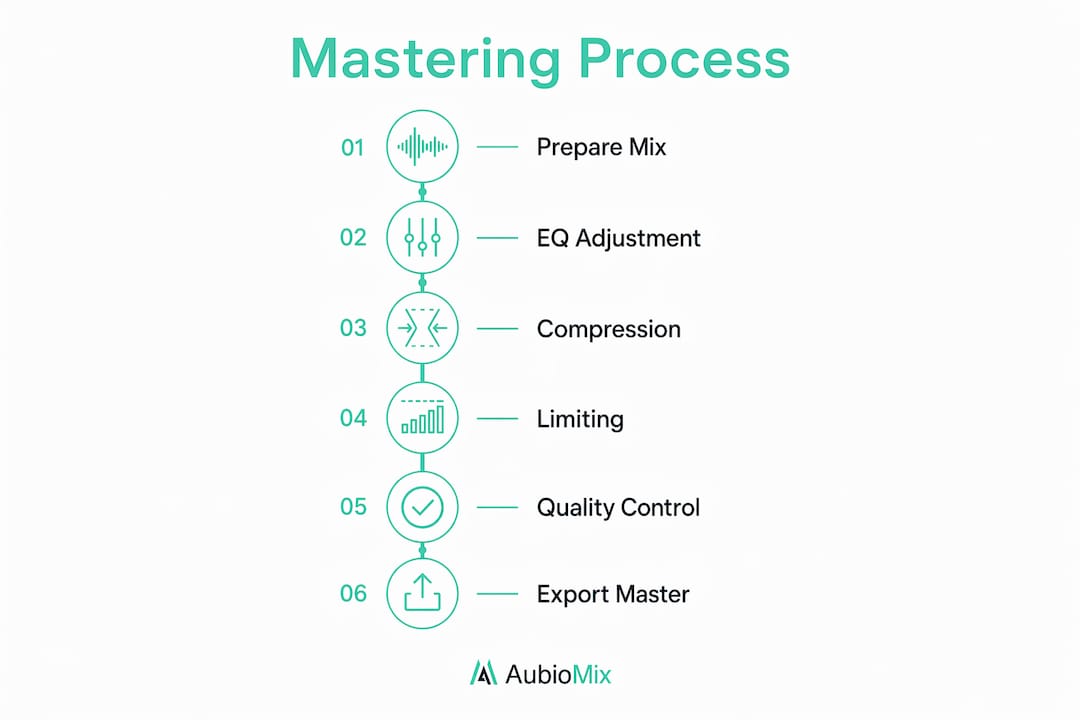
Understanding the music mastering process helps you prepare better mixes and communicate more clearly with a mastering engineer. The workflow follows a deliberate order, and each stage builds on the last.
Mixes submitted for mastering should arrive with peaks sitting between -3 and -6 dBFS and no aggressive limiting or heavy bus compression already applied. That headroom gives the mastering engineer room to work without fighting against processing that is already baked in.
- Import and level check: The engineer imports the stereo file, checks for technical issues, and sets a comfortable monitoring level before touching anything.
- EQ for tonal correction: Subtle boosts or cuts address frequency imbalances. A small shelf boost at 12 kHz can add air; a gentle cut around 200–300 Hz can clear up muddiness.
- Compression for dynamics: Light bus compression adds cohesion and controls the dynamic range without flattening the life out of the track.
- Stereo field adjustment: Stereo imaging tools widen the mix for a bigger feel or narrow it slightly to improve mono compatibility.
- Limiting for peak control: A true-peak limiter sets the final ceiling, typically at -1.0 dBTP, to prevent intersample peaks causing distortion when the file is transcoded to MP3, AAC, or Ogg.
- Level matching and referencing: The engineer compares the processed version against commercial references at matched loudness to check tonal balance objectively.
- Sequencing and metadata: For multi-track releases, songs are ordered, gaps are set, and metadata is embedded before final export.
- File formatting and delivery: The master is exported in the required formats, whether WAV, DDP, or high-resolution files, ready for distribution.
Pro Tip: Always reference your master at the same loudness as the original mix. Louder nearly always sounds better to our ears, so matching levels is the only way to judge whether your processing is genuinely improving the track.
Top tips for getting great mastering results
Getting mastering right is as much about discipline as it is about technique. The best results come from restraint, good monitoring, and knowing when to stop.
- Set up your monitoring environment properly: A treated room with accurate speakers makes every decision more reliable. If you are working on headphones, use a reference tool to cross-check your low-end decisions.
- Match levels before comparing: Level-matching references to within 0.5 dB removes loudness bias and lets you hear tonal differences clearly rather than just reacting to volume.
- Keep your tool count low: Two or three well-chosen processors will outperform a chain of ten. Each plugin you add introduces phase shift and potential artefacts.
- Use EQ and compression subtly: A 1 dB boost or cut can be transformative at the mastering stage. You are refining, not rebuilding.
- Do not try to fix the mix: Mastering is not a second mix. If the vocals are buried or the kick lacks punch, go back to the mix session. Mastering cannot solve fundamental balance problems.
- Set your true-peak limiter to -1.0 dBTP: This prevents intersample distortion when streaming platforms transcode your WAV to a lossy format.
- Take breaks: Ear fatigue is real. Step away for ten minutes and your perspective on the track will sharpen noticeably when you return.
Pro Tip: Always apply true-peak limiting rather than standard peak limiting as your final stage. Standard peak meters miss intersample peaks, which can cause audible distortion after MP3 or AAC encoding even when your meters show no clipping.
Mastering glossary: key terms you need to know
Getting comfortable with mastering vocabulary makes the whole process less intimidating. Here are the terms you will encounter most often.
- EQ (Equalisation): Adjusts the balance of frequencies in the audio signal, boosting or cutting specific ranges to correct tonal imbalances.
- Compression: Reduces the dynamic range by turning down the loudest parts of a signal, adding consistency and density to the sound.
- LUFS (Loudness Units relative to Full Scale): The standard measurement for perceived loudness used by streaming platforms to normalise playback levels.
- True-peak limiter: A limiter that catches intersample peaks, preventing distortion during digital encoding to lossy formats.
- Stereo imaging: The width and placement of audio elements across the left-right stereo field, adjusted during mastering to suit the genre and playback system.
- Loudness normalisation: The automatic adjustment streaming platforms apply to bring all tracks to a consistent playback level, typically around -14 LUFS.
- Dynamic range: The difference in level between the quietest and loudest parts of a track. Higher dynamic range means more contrast; heavy limiting reduces it.
- Metadata: Embedded information within an audio file, including track title, artist name, ISRC code, and album details, used by streaming platforms and distributors.
- Sequencing: The process of ordering tracks on an album or EP and setting the gaps between them to create a cohesive listening experience.
- dBFS (decibels relative to Full Scale): The measurement scale for digital audio levels, where 0 dBFS is the maximum before clipping.
- dBTP (decibels True Peak): A measurement that accounts for intersample peaks, used when setting true-peak limiters during mastering.
Understanding these terms also helps you prepare your mix for mastering with the right headroom and technical settings, which makes the mastering engineer's job considerably easier.
How mastering shapes the way your track sounds on any system

Translation is the word mastering engineers use to describe a track's ability to sound balanced and impactful across different playback systems. A track with good translation holds its energy on a phone speaker, retains its low-end weight on studio monitors, and stays clear on earbuds. Achieving that is the real craft of mastering.
Subtle compression and EQ are often imperceptible when you listen to them in isolation, yet cumulatively they transform how a track sits in the world. A 0.5 dB high-shelf boost might add just enough air to make a vocal cut through on a laptop speaker. A gentle low-cut below 30 Hz removes sub-bass energy that wastes headroom without adding anything audible on most systems.
- Mono compatibility: Checking how the track sounds in mono reveals phase issues and frequency cancellations that stereo listening hides.
- Multiple playback checks: Professional engineers listen on large monitors, small nearfields, headphones, and even a phone speaker before signing off.
- Preserving the mix's character: Good mastering enhances what is already there. If the mix has a warm, analogue feel, mastering should protect that quality, not strip it away.
- Mastering vs mixing perspective: Mixing is creative and detailed, working with individual tracks. Mastering takes an objective, bird's-eye view of the finished stereo file, which is why many producers benefit from having a separate engineer handle it.
Pro Tip: Avoid stacking too many plugins in your mastering chain. The best masters typically use two to three processors. Every additional plugin introduces phase shift and risks degrading the character of the mix you worked so hard to create.
The differences between mixing and mastering are worth understanding clearly, because confusing the two leads to over-processing at the mastering stage. Mixing shapes the individual elements; mastering shapes the whole. That distinction changes everything about how you approach each stage.

For producers working within the music production workflow, mastering sits at the very end of the chain, after all creative decisions have been made. Treating it as a polishing stage rather than a problem-solving stage keeps the process clean and the results consistent.
What mastering at Abbey Road Studios teaches us about the craft
Abbey Road Studios in London is arguably the most famous recording facility in the world, and its mastering suite has shaped the sound of records across every genre for decades. The mastering team there has worked on releases spanning classical, pop, rock, and electronic music, earning a reputation for technical excellence and a deep respect for the artist's original vision.
What sets professional mastering engineers at facilities like Abbey Road apart is not the gear, though the equipment is exceptional. It is the combination of a world-class monitoring environment, years of critical listening experience, and an understanding of how music behaves across formats and playback systems.
- Award-winning engineers: Abbey Road's mastering team includes engineers with decades of experience across genres, bringing both technical knowledge and musical sensitivity to every session.
- Monitoring precision: The mastering rooms at Abbey Road are acoustically treated to a standard that makes every frequency decision reliable, something that is very difficult to replicate in a home studio.
- Loudness and translation standards: Professional engineers there work to the same loudness targets and audio delivery standards that streaming platforms and physical media manufacturers require.
- Sequencing and metadata: At a professional level, sequencing an album is treated with the same care as the sonic processing. The order of tracks, the length of silences, and the embedded metadata all contribute to how the release is received.
- Final quality gatekeeping: The mastering engineer is the last person to hear the music before it reaches the public. That responsibility shapes how they approach every decision, with caution, objectivity, and a commitment to the artist's intent.
The lesson from Abbey Road is not that you need a world-famous studio to master well. It is that mastering demands a particular mindset: objective, patient, and focused on the whole rather than the parts. Whether you are working in a professional facility or a home studio, those principles apply equally.
Key takeaways
Mastering is the final, non-negotiable stage of audio production that transforms a finished mix into a release-ready track by refining tonal balance, controlling loudness, and ensuring consistent playback across every system.
| Point | Details |
|---|---|
| Mastering is the final stage | It polishes a stereo mix and prepares it for distribution, covering EQ, compression, limiting, and metadata. |
| Loudness targets matter | Streaming platforms normalise to approximately -14 LUFS; mastering to this target preserves dynamics and prevents automatic gain reduction. |
| Headroom is required | Submit mixes with peaks between -3 and -6 dBFS and no heavy bus limiting so the mastering engineer has room to work. |
| True-peak limiting prevents distortion | Setting your limiter to -1.0 dBTP stops intersample peaks from causing audible distortion after lossy encoding. |
| Mastering cannot fix a poor mix | If the mix has fundamental balance problems, revise it before mastering rather than trying to correct it at the final stage. |
Take your mix further with Aubiomix

Knowing what mastering in music involves is one thing. Knowing exactly what your track needs before it reaches that stage is another. Aubiomix gives you professional-grade feedback on your mix in minutes, with detailed, specific guidance on what to adjust and why. Upload your track, get a clear breakdown of your mix's strengths and weaknesses, and go into mastering with confidence. You can also explore how hit records score to see what professional-level mixing and mastering actually looks like in practice.