

The quickest way to get honest feedback on a mix is to take people's faces, names and feelings out of the exchange. That means blind listening, a focused question, a clean file with no personal details in its name, and a way to sort the replies afterwards. Below, I walk through each step, from where anonymous feedback comes from to how to name your bounces so nobody (including future you) gets confused.
TL;DR
- Anonymous feedback is more candid because the listener has no friendship to protect and you have no ego to defend. Research on double-blind mix reviews shows it produces a distinct kind of insight.
- Ask one specific question, give genre and stage context, and send a file with a neutral name.
- One opinion is data, several similar opinions are a trend. Act on trends, not on single comments.
- Name every bounce with the song, stage, version number and date, and never call anything "final".
- If you want private, judgement-free notes tied to measurements, an analysis report is anonymous by design.
Table of Contents
- Why Anonymous Feedback Tells You More
- Where Anonymous Feedback Comes From
- How to Ask So You Get Notes You Can Use
- Making Sense of Conflicting Comments
- File Naming for Mix Feedback
- Version Control for Mixes
- Our Perspective
- Try It on Your Next Bounce
- A Simple Anonymous Feedback Routine
- FAQ
- Sources
Why Anonymous Feedback Tells You More
Most of us have shared a rough mix with a friend and heard "sounds great, mate." It's kind, and it's useless. Friends know you, they know how long you've worked on the track, and they don't want to deflate you.
Anonymity removes that social pressure on both sides. The listener can say the vocal is buried without worrying about your reaction. You can read the comment without picturing who wrote it.
There's research behind this. A study by Brecht De Man and Joshua D. Reiss analysed 1,397 comments from 1,498 evaluations of anonymised mixes by trained listeners. Of the statements, 33% were about the mix in general, 31% concerned vocals and 19% related to drums and percussion. In their double-blind setup, listeners didn't know who made which mix, and engineers didn't know who wrote which comment. The authors found this gives a unique type of feedback, particularly useful in education, where normally only a teacher comments on a student's mix.

Two takeaways for your own work. First, listeners naturally gravitate to the big picture and the vocal, so if you want notes on the low end or the snare, you need to ask. Second, blind review is not just a nicety. It's a recognised method for getting different information than you'd get from people who know you.
Where Anonymous Feedback Comes From
You have a handful of routes, and they suit different jobs. I'll describe them by type rather than by name, because the right one depends on what you need.
Open Communities and Forums
Producer forums and social communities let you post under a throwaway handle. You get volume and a mix of skill levels. The catch is that replies tend to be short, uneven and sometimes contradictory, and you'll often get the same "sounds good" energy you were trying to escape. Great for a gut check, thin for detail.
Trusted Listeners, Blind
Send the file to two or three people whose ears you trust, without telling them who made it or what you're proud of. A fellow producer who doesn't know it's yours will say things a friend won't. You can even swap files with a peer: you each review the other's mix without names attached.
Your Own Blind Test
You can anonymise yourself. Bounce the mix, let it sit for a few days, then listen in a different place (car, earbuds, kitchen speaker) without looking at the session. This is not a replacement for other ears, but it strips out the attachment you feel to your decisions.
Analysis-Based Feedback
The fourth route is feedback from a tool. You upload the file, nobody sees you, and nobody's mood or taste colours the answer. This is the model we built AubioMix around, and I'll come back to it below.
How to Ask So You Get Notes You Can Use
Anonymous doesn't mean vague. A stranger who knows nothing about your track will answer whatever you ask, so ask well.
- Ask something narrow. "Does the energy drop in the breakdown feel intentional, or does it kill the momentum?" beats "What do you think?" every time.
- Give context. Say the genre, what stage the track is at, and which aspects you want help with. A listener who knows it's an unfinished demo won't waste your time pointing out missing parts.
- Send the right quality. Share a bounce that represents the mix properly, so people focus on what you need rather than on obvious unfinished elements.
- Name the references. Telling people which commercial track you're aiming at gives them something concrete to compare against.
When you're on the receiving end of notes, keep your guard down. Defending a choice in the moment makes the person feel their input isn't wanted. Read, write it down, say thanks and process it later.
Asking for Timestamps
If you're the one writing feedback, or you're asking others to, use exact times. Mix-notes advice from working engineers suggests pointing to a precise range, such as "at 3:12 to 3:29, bring the guitar down," rather than a section name. It also helps to say why you want a change, so the engineer or producer can solve the underlying problem rather than just nudging a fader.
Sound on Sound's Neil Rogers makes a related point about vague requests. Being told to make a mix "more exciting" can feel deflating, but it's about working out what you control and what the client actually means. Often it's a matter of pushing things further with saturation and parallel compression, or misreading genre-specific conventions such as distorted vocals or drum samples. The same translation skill applies when you read anonymous comments: look past the adjective to the thing underneath.
Making Sense of Conflicting Comments
Anonymous feedback comes in bulk, and it will disagree with itself. Here's how I sort it.
- Count. A single person's opinion is data, not truth. Several people saying the same thing is a trend.
- Wait for a pattern before big moves. Gather feedback from several sources before you make significant changes.
- Let contradictions cancel. When two trusted listeners directly contradict each other, they effectively cancel out, and your own judgement decides.
- Triage. Split notes into must-fix (noise, intelligibility), taste-based preferences, and things you want to try both ways.
- Change one category at a time. Group edits (balance, tone, space) and bounce a new version after each round, so you can hear what helped.
A written scoring structure can help here. If you want to see how educators turn listener impressions into scores and then into a plan, a music assessment rubric is a handy model. You can borrow the idea: rate each mix on the same few criteria every time, and you'll see your progress rather than just a pile of opinions.
File Naming for Mix Feedback
When you send a file out for anonymous review, the filename is the first thing a listener sees, and it can give you away or confuse them. Here's what I recommend.
Keep It Neutral on the Outside
For blind feedback, remove your name, your artist name and your studio from the file and from the metadata. Use something like a short working title plus a version tag. The listener gets what they need and nothing more.
Keep It Informative on Your Side
Internally, a good name carries the song, the stage, the version and the date. Songkeeper suggests a pattern of SongName_STAGE_v#_MIXTYPE, where the stage is DEMO, PROD, MIX or MASTER, the version number goes up within a stage and resets to v1 when you move on, and the mix type tags alternates such as INST, ACA, TV or CLEAN.
An example you could use:
| Purpose | Example filename |
|---|---|
| Sent out for blind feedback | Track-A_v3.wav |
| Your own archive copy | NightDrive_MIX_v3_2026-11-06.wav |
| Instrumental alternate | NightDrive_MIX_v3_INST.wav |
| Vocal-up alternate | NightDrive_MIX_v3_VOCALUP.wav |
Song-organising guidance from Songcase agrees on the essentials: give every bounce a version number and a date, keep each version in its own folder with its stems, write down what changed, never overwrite an old version, and never name anything "final". We've all seen "final_FINAL_v2_reallyfinal.wav". Don't be that producer.
The Session-File Trick
Sound on Sound's Mike Senior describes saving the project with incremental suffixes, and bouncing mixes under the same name with a draft suffix, so the first feedback version is D1 and the second is D2. That way the bounce always points back to the exact session file that made it. If someone's comment on D2 makes you want to go back, you know precisely where.
Version Control for Mixes
Feedback only helps if you can tell which version the comment was about. A simple system keeps this clean.
- One folder per version, holding the bounce, the stems and a short text note.
- A "sent" folder for every file you've shared, so you never wonder what a listener actually heard.
- A revision log. One line per version, such as "v2: vocal up 1.5 dB in the chorus, tighter kick low end, more reverb on the bridge." Future you will be grateful.
- Separate folders by deliverable. The folder hierarchy from the Recording Academy separates Reference Mixes, Final Mixes, Approved Mixes, Stems and Mastered Mixes, with subfolders for versions such as Master Mix, Vocal Up, No Lead Vocal and Instrumental.
When you collect notes from several people, nominate yourself as the one who merges them: remove duplicates, resolve contradictions and produce a single list of changes. Then work through it by category, not in the order the comments arrived.
Our Perspective
We built AubioMix because we kept seeing the same problem: producers who can't get a straight answer about their mix. Friends are too nice, forums are noisy, and a stranger's one-line comment rarely tells you what to do on Monday morning.
Our approach combines audio intelligence analysis with the real-world experience of our founder, a multi-award-winning mix engineer with 20+ years in the business. You upload a file, and nobody sees you or judges you. The report covers 15+ areas of mixing and mastering, including compression, EQ, frequency masking, effects, stereo width, phase, loudness, noise and clipping, mastering prep and device translation. Each one comes with specific, actionable steps.
Every report gives both subjective guidance and objective measurement, so you get the "feel" notes a good engineer would give alongside numbers you can check. We regularly update our evaluation framework to reflect current genre standards, so your mix is judged against where the genre is now.
Our view is that anonymous feedback works best when it's repeatable. With progress tracking, visual and written reports and downloadable PDFs, you can run version 3 through the same analysis as version 1 and see what moved. That turns feedback from an opinion into a workflow.
AubioMix
Try It on Your Next Bounce
If you want private, structured feedback you can act on straight away, upload your mix to AubioMix. You get a written and visual report across the areas above, with steps for what to change.
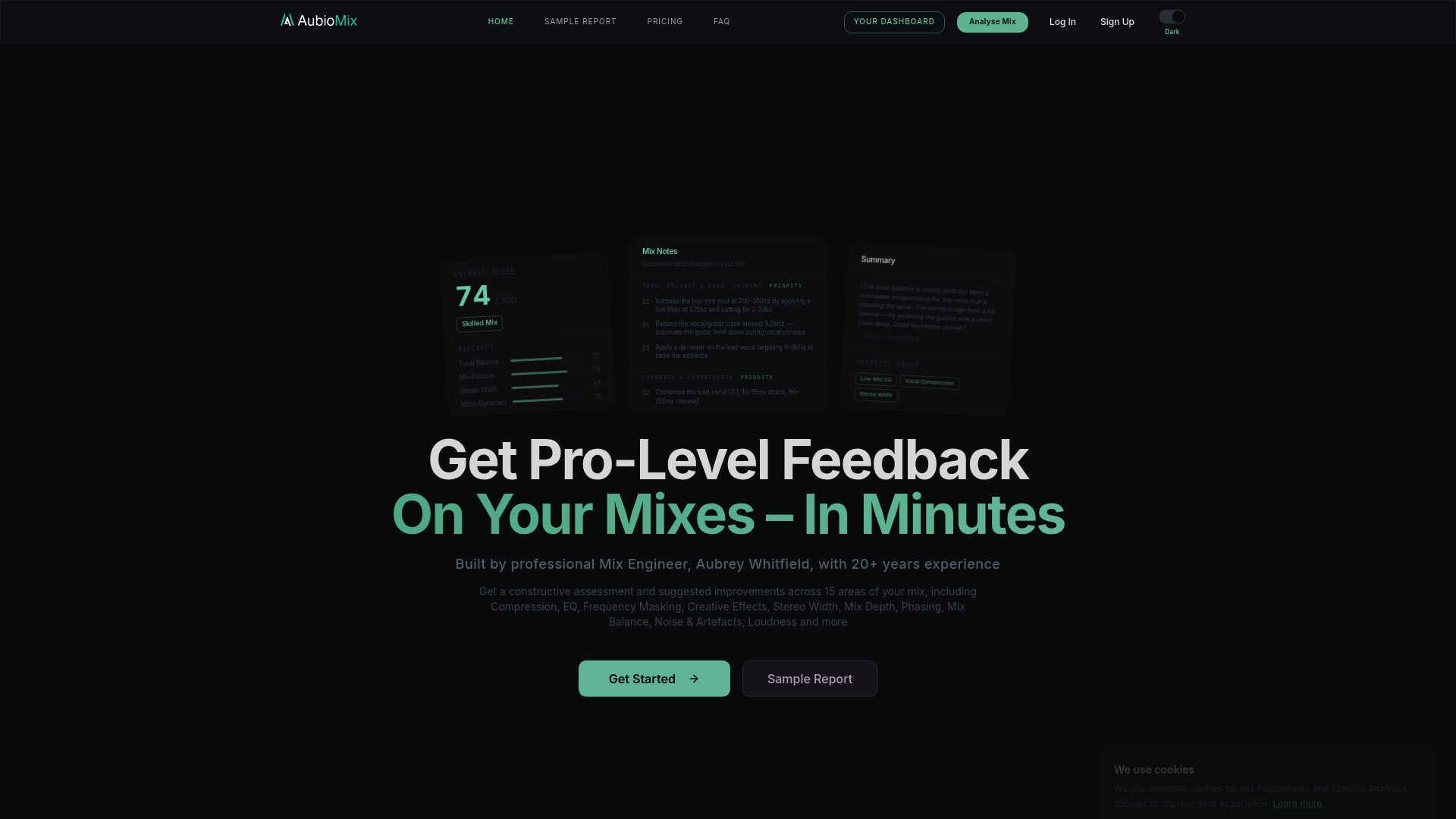
Pricing is simple. A single Mix Review is £4.99 one-off, and a Reference Pass is £2.99 one-off. If you're mixing regularly, the Professional plan is £19.99 per month and Professional + is £34.99 per month, and both include a fixed number of mix reviews. Check the pricing page for what each plan includes.
For a feel of what the reports cover, you can look at our techno benchmark page, or read our guide to getting feedback on your mix that actually helps. Our post on reviewing your mix objectively pairs well with a blind listening session.

A Simple Anonymous Feedback Routine
Here's a routine that puts everything together, and you can run it on any track.
- Finish a stable bounce and save it with your internal name (song, stage, version, date).
- Make a neutral copy with no names in the filename or metadata.
- Write one narrow question and two lines of context: genre, stage, and a reference.
- Send it to a small group of listeners, or run it through an analysis report, or both.
- Wait, then collect. Read everything once without reacting. Thank people.
- Sort the notes into trends, single opinions and contradictions.
- Fix one category at a time, bounce a new version, and log what changed.
- Re-check the new version the same way, so you can see whether the trend improved.
By the third round you'll find the process faster than it sounds, and your mixes will show it.
FAQ
Is anonymous feedback better than feedback from friends?
It's usually more candid, because nobody is protecting a relationship. Research on double-blind mix reviews found that it provides a distinct, useful type of feedback. Friends are still valuable for encouragement, so use both for different jobs.
What should I put in the filename when I send a mix out for review?
Keep the version you send neutral: a working title and a version tag, with no names. Keep a fuller internal name for your archive, with song, stage, version number and date, and avoid the word "final".
How many opinions do I need before changing my mix?
One opinion is a data point, so don't rebuild a mix on it. When several listeners point to the same issue, treat it as a trend and act. If two trusted listeners disagree, trust your own judgement.
Can I get anonymous feedback without posting my music publicly?
Yes. You can swap files privately with a peer, run a blind listening test on yourself, or upload to an analysis app, where only you see the report. That last route also gives you measurements and specific steps.
Sources
- Analysis of Peer Reviews in Music Production, Journal on the Art of Record Production
- Understanding Client Feedback, Sound on Sound
- Q. What's In A Name?, Sound on Sound
- How to Track Song Versions Without Losing Your Mind, Songkeeper
- How to keep every version of a song organized, Songcase
- Recording Academy folder definitions, Barry Rudolph
- Music Assessment Rubric That Turns Scores Into Practice Plans, Allegro