

AI mix feedback gives you instant, measurement-led, prioritised suggestions that speed up your revisions and help your mix translate properly across every playback system. That's the whole pitch, and it holds up: in a randomised trial, students who got AI-mediated feedback produced significantly higher-quality revisions than those relying on human-only feedback alone, an effect size (Cohen's d ≈ 0.50) roughly equivalent to jumping from the 50th to the 70th percentile of work quality. Swap "student essay" for "rough mix" and the logic transfers cleanly. A tool like AubioMix analyses your stereo file and hands back objective readings, LUFS included, rather than a vague "needs more punch."
Here's the quick verdict on what you actually get:
- Speed: reports land in seconds, not days.
- Objectivity: measurements replace guesswork on loudness, masking, and balance.
- Repeatable QA: the same checks every time, so nothing slips through on a tired Tuesday.
- A learning signal: track your metrics over months and watch your instincts sharpen.
If you're a self-mixing producer polishing a demo, an engineer doing early revisions, or anyone running a pre-master sanity check, this is squarely built for you.
Key Takeaways
AI mix feedback works because it replaces subjective guesswork with fast, measurable, prioritised diagnostics that you can act on immediately or use to sharpen your own ears over time.
| Point | Details |
|---|---|
| Speed beats waiting | Reports return in minutes versus the days a human review can take. |
| Objectivity fixes guesswork | LUFS, masking, and correlation readings replace vague impressions like "needs more punch." |
| Treat suggestions as hypotheses | Audition every fix in context and keep human judgement for taste and arrangement calls. |
| Build a workflow, not a habit | Bounce, upload with genre context, prioritise fixes, re-check, and log the metric changes. |
| AubioMix as your checkpoint | Use AubioMix for instant, prioritised reports with PDF exports and progress tracking across projects. |
Table of Contents
- What are the benefits of AI mix feedback in practice?
- What does an AI mix analysis actually check?
- What practical benefits do producers actually gain?
- Where does AI help most, and where do humans still matter?
- How should you build AI feedback into your workflow?
- What do LUFS, true peak, and other metrics actually mean?
- What are the limits of AI mix feedback?
- Try instant, measurement-led feedback on your next mix
- Frequently asked questions
- Sources
What are the benefits of AI mix feedback in practice?
The practical benefit is simple: you find problems in minutes that might otherwise survive three rounds of "does this sound right?" emails. Before you get there, it helps to understand what's actually happening between upload and report, because that's what makes the output trustworthy rather than a black box spitting numbers at you.
Most tools follow a similar pipeline:
- File checks — sample rate, bit depth, clipping, and format validation.
- Channel analysis — mono compatibility and left/right balance.
- Spectral analysis — frequency content mapped against genre norms.
- Loudness measurement — LUFS, true peak, and dynamic range.
- Masking detection — frequency and time-domain overlaps between instruments.
- Stereo and phase metrics — correlation and width across the spectrum.
- Style conditioning — adjusting expectations based on genre tags you provide.
Picture it as three layers: your audio goes in, a stack of analysis engines (spectral, loudness, spatial) chews through it in parallel, and out comes a visual report alongside written, prioritised notes.
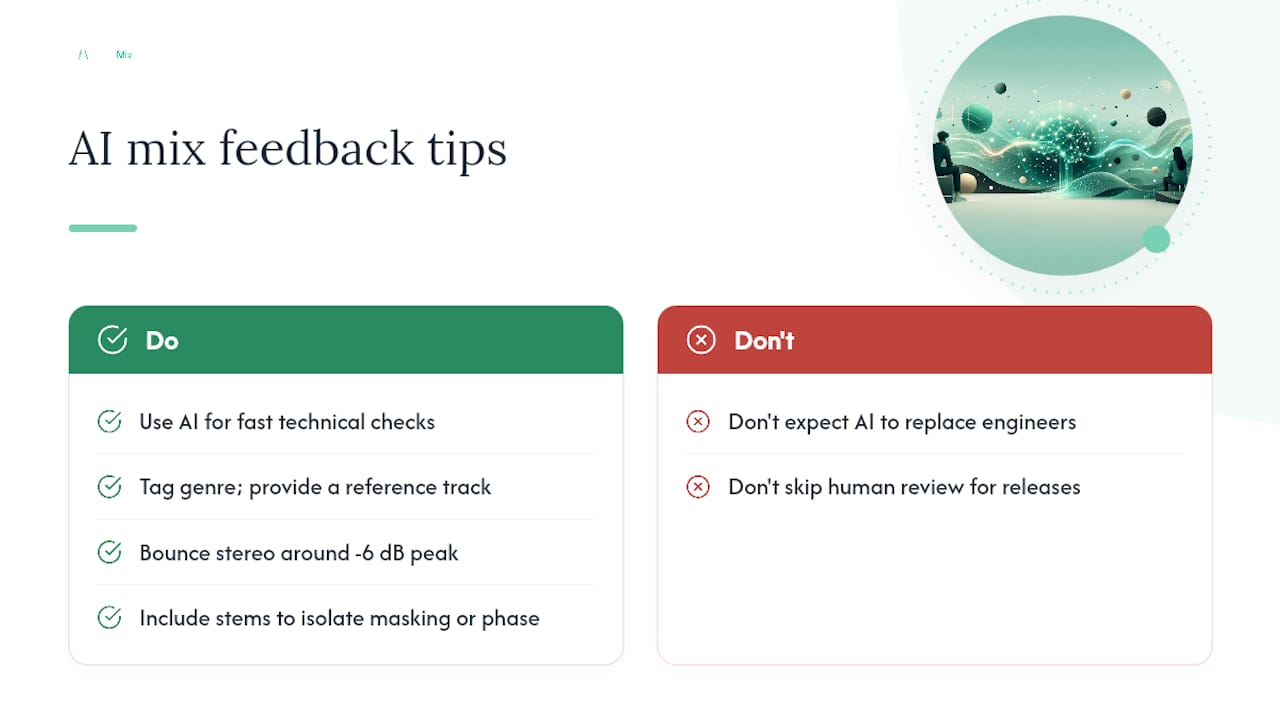
Pro Tip: Render at a healthy headroom (around minus 6 dB peak, no limiter on the master bus) and label your file with genre and reference track. Analysers read raw dynamics far better than a mix already squashed flat, and genre context stops the tool flagging a deliberately dark mix as "too dull."
What does an AI mix analysis actually check?
A typical report blends spectral, dynamic, loudness, and spatial diagnostics into one readable summary, not a wall of raw numbers.
Expect checks across:
- LUFS (integrated loudness)
- True peak (inter-sample overshoot risk)
- LRA (loudness range, or dynamic variation)
- Crest factor (peak-to-average ratio, a punch indicator)
- Spectral balance against genre-typical tonal curves
- Masking between competing instruments
- Compressor gain reduction patterns (over-squashing or pumping)
- Transient clarity on drums and percussive elements
- Stereo width and correlation
- Phase inversion warnings
- Device-translation flags (how the mix behaves on phone speakers vs studio monitors)
| Report flag | What it usually means |
|---|---|
| "Low-end masking, bass vs kick, around 80 to 120 Hz" | Bass and kick are fighting for the same space; try EQ carving or sidechain compression |
| "Integrated loudness above streaming target" | Your master will likely get turned down and lose some perceived punch on release |
| "Stereo correlation below 0.2 in low frequencies" | Bass content is too wide and may cause phase cancellation on mono systems |
| "Limited transient clarity on snare" | Over-compression may be flattening the hit; check attack and release times |
What practical benefits do producers actually gain?
The gains are faster iteration, an objective checklist instead of guesswork, better cross-device translation, and a running record you can learn from. None of that is theoretical.
Real-world use cases where this pays off fastest:
- Pre-master checks that catch loudness or peak issues before you send to mastering.
- Early masking detection, so you fix a muddy low end in minute five instead of discovering it after three failed collaborator listens.
- Fewer revision rounds with co-producers, because you've already resolved the objective issues before anyone else hears the file.
- Self-directed learning, since your metric history shows whether your mixes are actually improving or just changing.
A small before/after: a producer uploads a mix and gets flagged for masking between the vocal and a synth pad around 2 to 4 kHz. A 2 dB dip on the pad at that frequency clears space, and the vocal suddenly sits forward without turning up the fader. Similarly, a kick buried under bass gets resolved with a tight low-end EQ cut on the bass around 60 Hz, and the low end goes from mushy to punchy in one pass.
The turnaround gap matters too. Where a human mix review might take a day or more depending on your engineer's schedule, GenAI-enhanced feedback delivers personalised, near-instant results, and satisfaction with that speed runs high among people who've actually used tools like this.
Where does AI help most, and where do humans still matter?
AI is decision support. It's brilliant at catching technical problems fast and consistently, but a human engineer still wins on taste, arrangement, and the subtle calls that make a mix feel like something rather than just measure correctly.
Where AI excels:
- Spotting technical issues at speed (masking, phase, loudness)
- Applying the same standard every single time, no bad-day inconsistency
- Giving you objective metrics you can track over a project
Where humans still lead:
- Musical taste and creative balance decisions
- Arrangement choices that affect the mix before you even reach for a fader
- Subtle timbral judgement, the difference between "technically correct" and "moves you"
Pro Tip: Treat flagged issues as hypotheses, not orders. If a suggestion contradicts your artistic intent, audition the fix in context before rejecting it outright. Sometimes the "problem" is the character of the record. If three or more structural issues keep recurring across revisions, that's usually your cue to bring in a human mix review rather than keep iterating solo.
How should you build AI feedback into your workflow?
Use it as an objective checkpoint after your first rough balance and before you commit to detailed creative decisions. Too early and you're analysing chaos; too late and you've already locked in choices that are hard to undo.
- Bounce a balanced stereo file (or key stems if issues are ambiguous).
- Upload with context — genre tag and a reference track sharpen the analysis.
- Review the prioritised suggestions, not just the raw numbers.
- Implement the highest-priority fixes first, rather than everything at once.
- Re-check and A/B against your reference, ears open, volume matched.
- Log the metric changes so you can see what actually moved the needle.
Keep a simple checklist in your DAW session notes: starting LUFS, top three flagged issues, fixes applied, re-check result. That log becomes your own rubric over time, and design research backs this up: hybrid feedback approaches that preserve your own judgement tend to produce more durable improvement than blindly applying every AI suggestion.
Pro Tip: Re-upload stems, not just the stereo mix, when a masking or phase warning is ambiguous. The extra resolution often reveals exactly which two elements are clashing, saving you a guessing game.
What do LUFS, true peak, and other metrics actually mean?
Quick definitions first, because half the confusion around AI feedback comes from unfamiliar acronyms, not the tool itself.
- LUFS (Loudness Units Full Scale): perceived loudness, measured integrated (whole track) or short-term (a few seconds).
- True peak: the highest signal level including inter-sample peaks, critical for avoiding distortion after conversion.
- LRA (loudness range): how much your mix varies dynamically from quiet to loud sections.
- Crest factor: the gap between peak and average level, a rough proxy for punch and transient impact.
- Spectral centroid: the "centre of mass" of your frequency content, brighter mixes sit higher.
- Stereo correlation: how similar your left and right channels are, low values signal mono compatibility risk.
- Masking: when two elements compete for the same frequency and time space.
- Headroom: the gap between your peak level and digital maximum, your safety margin.
| Context | Typical integrated LUFS target |
|---|---|
| Streaming platforms (general) | Around minus 14 LUFS |
| Club or dance-focused masters | Often minus 8 to minus 10 LUFS |
| Broadcast (television) | Around minus 23 to minus 24 LUFS |
Genre and platform normalisation both shift these targets, so treat them as starting points, not gospel. Full definitions and worked examples live in AubioMix's metrics glossary if you want to go deeper.
What are the limits of AI mix feedback?
AI is powerful but imperfect. Expect occasional genre bias, the odd false positive, and suggestions that clash with a deliberately unconventional artistic choice.
Common failure modes worth watching for:
- Overfitting to a single loudness target regardless of genre character.
- Misdiagnosed masking caused by intentional production choices (think lo-fi, sound design-heavy genres).
- Phase issues misreported on complex multi-mic or heavily processed stems.
- Privacy concerns around uploading unreleased material.
Mitigate these by keeping human verification in the loop, holding onto a trusted reference mix, uploading stems when a flag seems ambiguous, and keeping versioned files so you can roll back. Expert panels reviewing AI feedback tools consistently stress that human oversight remains essential, particularly around nuanced or subjective calls. Before uploading unreleased stems anywhere, check the platform's terms of service on data rights and retention.
A quick look at an upload-to-report loop
A producer uploaded a finished pop mix and the report flagged three issues: excessive loudness relative to streaming targets, low-end masking between bass and kick, and a stereo correlation dip in the low frequencies. After a 2 dB bass EQ cut at 90 Hz and a gain reduction on the master to bring integrated loudness into range, the re-check showed cleaner mono compatibility and a punchier, less cluttered low end. You can see a published example of this kind of report on AubioMix's hit records page.
How do you use AI feedback without losing your artistic voice?
I treat every AI suggestion as a hypothesis, not a commandment. Two habits keep the craft central: audition every proposed fix in the context of the full mix before committing, and always check against a reference track rather than the numbers alone. One fix I've genuinely kept: a masking flag between vocal and pad led to a narrow EQ notch that let the vocal breathe without me ever touching the fader.
Try instant, measurement-led feedback on your next mix
Rather than waiting on a friend's schedule or guessing whether your low end translates, AubioMix gives you a full analysis in minutes, covering LUFS, masking, stereo correlation, and more than fifteen other checks in one report.

You get a visual and written breakdown, prioritised fixes ranked by impact rather than a flat list of jargon, a downloadable PDF for your session notes, and progress tracking so you can watch your metrics improve release over release. It's built as decision support, the kind of second opinion that's available at 2am when nobody else is answering your messages. If you want to see the format before committing, browse a published mix analysis to get a feel for the report style. When you're ready, head to AubioMix and run your next mix through a free check or grab a credit pack to start tracking your progress properly.
Frequently asked questions
What are the main benefits of AI mix feedback compared with waiting for a human review? Speed and consistency top the list. You get objective, measurement-based diagnostics in minutes rather than days, and the same standard is applied every time rather than varying with someone's mood or schedule.
Can AI feedback replace a professional mixing engineer? No, and it isn't meant to. AI excels at catching technical issues quickly, but arrangement decisions, creative balance, and subtle timbral choices still benefit from human judgement, especially on releases where artistic intent matters as much as technical correctness.
How accurate is AI feedback on genre-specific mixes? Accuracy improves significantly when you tag genre and provide a reference track, since tools condition their analysis against genre-typical spectral and dynamic norms. Without that context, expect more false positives on unconventional or experimental mixes.
What file format gives the best results for AI mix analysis? An unlimited stereo bounce with healthy headroom, around minus 6 dB peak, gives analysers the clearest picture of your actual dynamics. Stems help further when a masking or phase flag needs isolating to a specific element.
Is it safe to upload unreleased tracks for AI mix feedback? Check the platform's terms of service around data rights and retention before uploading unreleased or sensitive material, since policies vary between providers on how uploaded audio is stored and used.
Sources
- AI-Mediated Feedback Improves Student Revisions: A Randomized Trial with FeedbackWriter
- Generative AI feedback designs: multisite experiment on hybrid, reflective and direct GenAI feedback
- Evaluating the potential of generative artificial intelligence to innovate feedback processes