
Which tools are the best CheckMyMix.com alternatives right now?
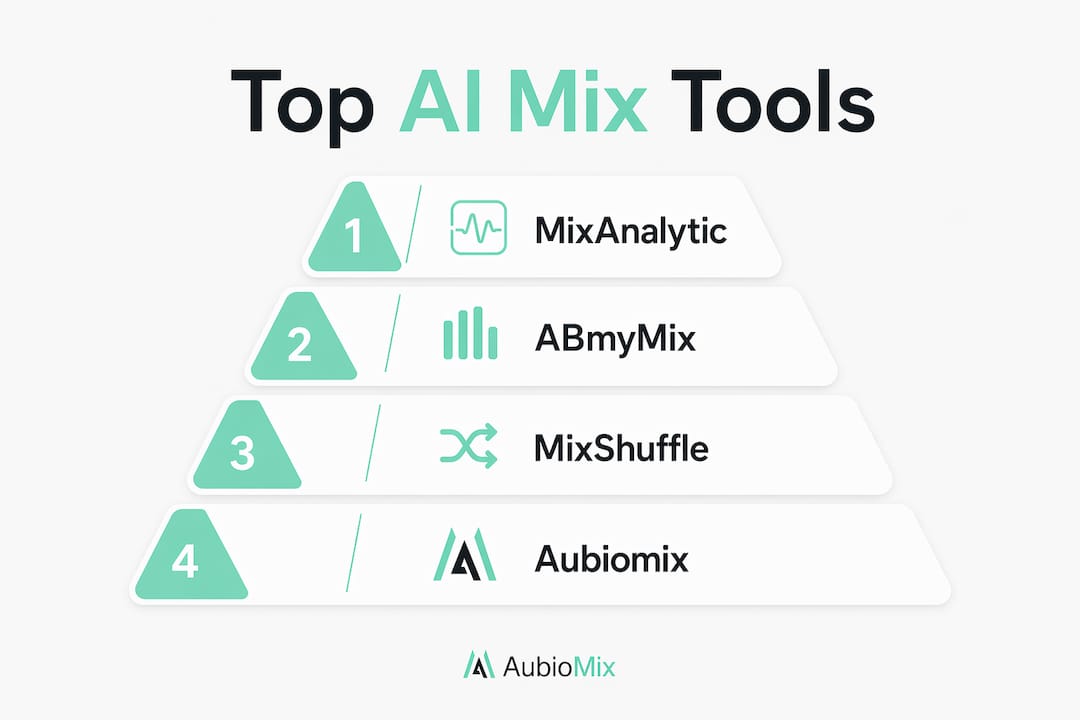
The strongest alternatives to CheckMyMix.com for automated mix analysis are MixAnalytic, ABmyMix, MixShuffle, and Aubiomix. All four run in the browser, require no downloads, and are fully accessible to UK producers. Each takes a slightly different angle on mix feedback, from deep AI frequency analysis to blind A/B comparison, so the right pick depends on what stage of your workflow you are in.
| Tool | Features | Pricing | Limitations | Best For | UK Availability |
|---|---|---|---|---|---|
| MixAnalytic | AI frequency, loudness, stereo analysis; streaming compliance checks | Tiered plans (free tier available) | No A/B comparison; upload size limits apply | Comprehensive automated reports | Yes |
| ABmyMix | Multi-track playback, blind-test modes, auto level-matching, time-stamped notes | Completely free | No AI frequency analysis | Collaborative blind A/B testing | Yes |
| MixShuffle | multiple-track playback, blind A/B, RMS gain matching, local processing | Completely free | No AI feedback; no cloud storage | Platform-independent mix comparison | Yes |
| Aubiomix | AI mix analysis, detailed feedback, actionable steps, collaboration sharing | Tiered plans | — | Rapid pro-grade AI feedback with collaboration | Yes |
MixAnalytic focuses on professional mastering standards, giving you a detailed breakdown of frequency balance, LUFS loudness, and stereo width against streaming targets. ABmyMix, created by independent developer Neil Thomas, is purpose-built for comparing mix versions outside your DAW, with shareable setups and time-stamped client notes. MixShuffle handles up to six tracks simultaneously with local audio processing, so your audio never leaves your browser. Aubiomix sits at the intersection of AI accuracy and workflow-friendly collaboration, making it the strongest pick for producers who want both detailed analysis and a clear path to fixing what they find.
What do AI-powered online mix analysers actually offer?
AI mix analysers have moved well beyond simple peak metering. The best tools now check LUFS loudness, frequency balance, stereo width, and phase coherence in one pass, flagging specific problem areas with natural-language recommendations rather than raw numbers you have to interpret yourself. Streaming platforms normalise tracks to approximately –14 LUFS, and hitting that target without losing punch is one of the trickiest parts of finishing a mix. A good AI analyser tells you exactly where you stand before you submit.

Format choice matters more than most producers realise. Uploading WAV or FLAC gives the analyser the cleanest possible signal to work with; compressed formats like MP3 introduce artefacts that skew high-frequency readings and can produce misleading feedback. Always export a full-resolution file for analysis, even if your final delivery format is compressed.
Here is what each tool brings to the table in terms of unique strengths:
- MixAnalytic: Deep AI frequency reporting with streaming platform compliance checks, ideal for producers preparing masters for Spotify or Apple Music.
- ABmyMix: Automatic level-matching and blind-test modes across multiple mix versions, plus shareable time-stamped notes for client feedback.
- MixShuffle: Multiple-track simultaneous playback with RMS gain matching and full local processing, completely free with no sign-up.
- Aubiomix: AI-driven analysis paired with step-by-step guidance, so you know not just what is wrong but what to do about it.
Pricing across these tools ranges from fully free (ABmyMix and MixShuffle) to tiered subscription plans that unlock cloud storage, higher upload limits, and collaborative features. For producers on a tight budget, the free tools cover the core comparison workflow well. If you need persistent project storage or deeper AI reporting, a paid tier from MixAnalytic or Aubiomix is worth considering. User interfaces across all four are drag-and-drop friendly, which keeps the barrier low for home studio producers who want results without a steep learning curve.
Pro Tip: Always check your mix on a reference track you know well before running any AI analysis. A familiar reference gives you a human baseline that the AI score can then sharpen, rather than replace.
How do you use A/B audio comparison tools effectively?
Blind A/B testing is one of the most honest ways to evaluate a mix, because it removes the psychological edge that familiarity gives to the version you just finished. The principle is straightforward: you load two or more mix versions, the tool hides which is which, and you judge purely on what you hear. The catch is volume. Our ears consistently perceive louder audio as better, which means any comparison without automatic level-matching is biased before you have even pressed play.
Both ABmyMix and MixShuffle solve this with automatic gain matching. Blind A/B testing with RMS gain matching removes the louder-sounds-better bias and lets you make genuinely objective mix decisions. MixShuffle uses RMS-based matching across up to six tracks simultaneously, with track randomisation and blind testing built in. ABmyMix handles the same task and adds looping, sync points, and the ability to sum to mono, which is particularly useful for checking how your low end translates.
Best practices for audio comparison sessions:
- Match levels automatically before you begin; never compare at different volumes.
- Use blind-test mode so you cannot see which version is playing.
- Listen on at least two different playback systems, such as studio monitors and headphones.
- Take notes during playback rather than relying on memory after the session.
- Check the mono sum to catch phase issues that only appear when stereo is collapsed.
For collaborative work, ABmyMix lets you share your entire session setup with time-stamped notes, which means a client or bandmate can hear exactly the same comparison you did and leave feedback at specific moments. That kind of structured sharing is far more useful than sending a file and waiting for a vague email response.
How should you check your mixes and get useful feedback?
The most reliable mix-checking routine combines multiple listening environments with both AI analysis and human critique. Start on your studio monitors, then move to headphones, then play the mix through a phone speaker or in a car. Each environment reveals different problems: headphones expose stereo width issues, car speakers show up low-end imbalances, and a phone speaker is brutally honest about whether your mid-range is carrying the track.
AI tools accelerate this process by catching technical issues you might miss after hours of listening fatigue. Feed your mix to an AI analyser early in the revision process, not just at the end, so you can address frequency and loudness problems while you still have the session open. Combine that with objective mix review practices to build a repeatable checking routine.
Steps to verify mix readiness before release:
- Run an AI analysis for LUFS, frequency balance, stereo width, and phase coherence.
- Compare against a commercial reference track using a blind A/B tool.
- Listen on at least three different playback systems.
- Share a time-stamped session with a trusted collaborator or engineer for a second opinion.
- Check the final export file, not the DAW bounce preview, for any format-related artefacts.
Collaboration features in tools like ABmyMix and Aubiomix make the feedback loop faster and more specific. Time-stamped notes mean feedback is anchored to a precise moment in the track, which cuts out the ambiguity of comments like "the chorus feels a bit heavy." You get actionable, located feedback rather than general impressions.
What do professionals say about online mix analysis tools?
Independent developer Neil Thomas, creator of ABmyMix, has highlighted that sharing setups with time-stamped notes is what separates a professional collaborative workflow from an isolated technical check. That insight reflects a broader shift in how producers and engineers work: the tools that matter most are the ones that fit into a shared process, not just a solo session.
Privacy is a genuine concern when uploading audio online, particularly for unreleased material. MixShuffle addresses this directly: all processing runs locally in the browser, meaning your audio never leaves your device. ABmyMix takes the same approach, with no uploads to external servers. For producers working on commercially sensitive material, that local-processing model is a meaningful advantage over cloud-dependent tools.
The volume bias issue in listening tests is well-documented. Automatic RMS gain matching, as used in both MixShuffle and ABmyMix, is the standard method for eliminating it. Without that matching, even experienced engineers tend to favour the louder version, which can lead to over-compressed masters that sacrifice dynamic range for perceived punch. Tools that build gain matching in by default protect you from that trap without requiring any extra steps.
For producers exploring open-source audio tools alongside these browser-based platforms, combining free analysis tools with a structured feedback workflow gives you a professional-grade checking process at minimal cost.
Key takeaways
The four strongest CheckMyMix.com alternatives each serve a distinct need: AI analysis, blind comparison, privacy-first local processing, or a combination of all three.
| Point | Details |
|---|---|
| Top alternatives | MixAnalytic, ABmyMix, MixShuffle, and Aubiomix cover AI analysis, blind A/B testing, and collaborative feedback. |
| Format matters | Upload WAV or FLAC for accurate AI analysis; MP3 artefacts skew frequency readings. |
| Gain matching is essential | Automatic RMS gain matching removes louder-sounds-better bias in blind A/B tests. |
| Privacy via local processing | MixShuffle and ABmyMix process audio entirely in the browser, keeping unreleased material secure. |
| Aubiomix for AI plus guidance | Aubiomix combines AI frequency analysis with step-by-step fix guidance, suited to producers who want analysis and direction in one place. |
The tools are getting better, but the workflow still matters most
There is a tendency in the producer community to treat AI mix analysis as a final authority, a score to chase rather than a tool to think with. That framing misses the point. The best AI analysers, whether MixAnalytic, Aubiomix, or any of the others, are most useful when they sit inside a broader checking routine that includes blind comparison, multi-environment listening, and human feedback. A perfect LUFS score on a mix that sounds flat on a car speaker is not a win.
What genuinely excites me about where these tools are heading is the convergence of AI accuracy with collaboration features. Time-stamped notes, shareable sessions, and local processing are not minor conveniences. They are the features that make it possible to run a professional feedback loop without a shared studio or a budget for mixing engineers. For home studio producers in the UK, that shift is significant. You can now get the kind of structured, specific feedback that used to require either a professional relationship or a lot of back-and-forth emails, all from a browser tab.
The tools that will matter most over the next few years are the ones that combine technical depth with genuine usability, and that treat privacy as a default rather than a premium feature. We are already seeing that with MixShuffle and ABmyMix on the free end, and with Aubiomix on the AI-plus-collaboration side. The gap between home studio quality and professional release standards is narrowing, and these tools are a big part of why.
Aubiomix gives you pro-level mix feedback without the wait
If you have worked through the tools in this article and want AI analysis combined with clear, step-by-step guidance on what to actually fix, Aubiomix is built for exactly that. Upload your mix, get a detailed breakdown of frequency balance, loudness, stereo width, and phase coherence, and receive specific recommendations you can act on immediately in your DAW. No vague scores, no raw data to decode on your own.

Aubiomix also supports collaborative sharing, so you can bring in a second opinion from a bandmate or engineer without leaving the platform. For UK producers who want pro-grade mix analysis in minutes rather than days, it is a genuinely practical next step. You can also explore the mix-checker.com alternatives guide for a broader look at what is available in 2026. If you are working in rap or hip-hop, pairing AI analysis with professional mixing and mastering services gives you the best of both worlds.