
Use delay on a send, tempo-synced, filtered on the return, and automated through the arrangement. Those four moves are the difference between delay that adds space and delay that turns your mix to mud. Start conservative: low wet levels, modest feedback, filtering dialled in before you even touch the wet fader. Everything below shows you exactly how.
TL;DR:
- Keep delay on a send with filtering to prevent low-end buildup and harsh repeats that clutter the mix.
- Use tempo-synced delay times between 60 and 130 milliseconds to align repeats rhythmically with the song.
- Automate delay send levels, feedback, and filter cutoff to adapt to different arrangement sections and avoid clutter.
- Maintain delay return gain between 10 and 30 percent to preserve clarity, and check mono compatibility to prevent cancelation.
- Regularly use objective tools like AubioMix to diagnose masking conflicts and ensure delay enhances rather than harms the mix.
Table of Contents
- What causes a delay clutter mix and how do you fix it?
- Delay routing and gain staging: send/return best practices
- Timing, tempo sync and rhythmic placement to prevent smearing
- Automation and arrangement: when to push delay and when to pull it back
- Common mistakes, diagnostic checklist and quick fixes for delay clutter
- Quick workflow checklist: a repeatable sequence to set a non-cluttering delay
- How AubioMix supports faster, less cluttered mixes
- Practical perspective: delay versus reverb in dense arrangements
- Get a targeted mix review before you commit to a delay setting
- Sources
- FAQ
What causes a delay clutter mix and how do you fix it?
A delay clutter mix usually comes down to one thing: repeats piling up in frequency ranges the rest of the arrangement still needs. Delay isn't inherently messier than reverb, in fact it tends to preserve intelligibility better, because it repeats the source discretely rather than smearing every transient into a wash of diffuse reflections. The problem isn't the tool. It's how most producers set it up.
Here's what actually works.
- Route delay on a send, not an insert. Keep the dry signal untouched, and you can push the wet return around without ever compromising the original source.
- Filter the return aggressively. A high-pass filter around 100 to 200Hz on the return, plus a low-pass in the feedback path around 7 to 9kHz, stops low-end accumulation and tames harsh repeats before they ever become a problem.
- Keep wet level and feedback conservative by default. Save the bigger, more dramatic settings for sparse breakdowns or outros where there's actual space for them to live.
- Tempo-sync the delay time. Slapback for thickness, dotted-eighth or triplet for groove, and sub-40ms Haas-style delays when you want stereo width without an audible echo.
- Check mono compatibility. Ping-pong delays that sound huge in stereo can collapse or cancel entirely in mono, which is a nasty surprise on club systems and phone speakers alike.
Pro Tip: Bypass the delay entirely for two seconds while listening to the full mix, then bring it back in. If you can't immediately hear what it's contributing, either the setting is too subtle to matter or it's buried in a masking conflict you haven't found yet.
The most professional delay work is often nearly invisible. You should only notice it when you switch it off, not when it's running.
Delay routing and gain staging: send/return best practices
Get the routing right and half your clutter problems disappear before you've touched a single knob. Here's the sequence that keeps delay returns controllable instead of chaotic.
- Build a dedicated delay bus. Put your EQ and filtering on the return channel, never on the source track. This way one bus can serve multiple sends without duplicating processing.
- Choose pre-fader or post-fader deliberately. Post-fader sends make the delay follow your fader automation naturally, which suits ambient tails that should fade with the source. Pre-fader sends keep the delay level independent of the dry signal, which gives you more control when you want the echo to persist after a fader pulls down.
- Keep return gain inside a sane range. For dense mixes, 10 to 30% wet on the return is a solid starting point. Send/return routing rather than inserting the effect keeps the dry signal fully intact while you dial this in.
- Avoid stacking delay on multiple tracks that share frequency space. Two instruments both running long delays in the same octave will fight for the same sonic real estate every time.
- Split buses by role. A rhythmic slapback on a guitar and a lush ambient tail on a vocal are doing completely different jobs. Give them separate buses so automating one never accidentally drags the other along with it.
This structure pays off the moment you need to change something mid-mix. One clean bus per role means one automation lane, one filter chain, and no guessing which delay instance is causing the smear you just heard.
Timing, tempo sync and rhythmic placement to prevent smearing
Get the timing wrong and even a perfectly filtered delay will smear the next phrase. Get it right, and the repeats become part of the groove instead of fighting it.
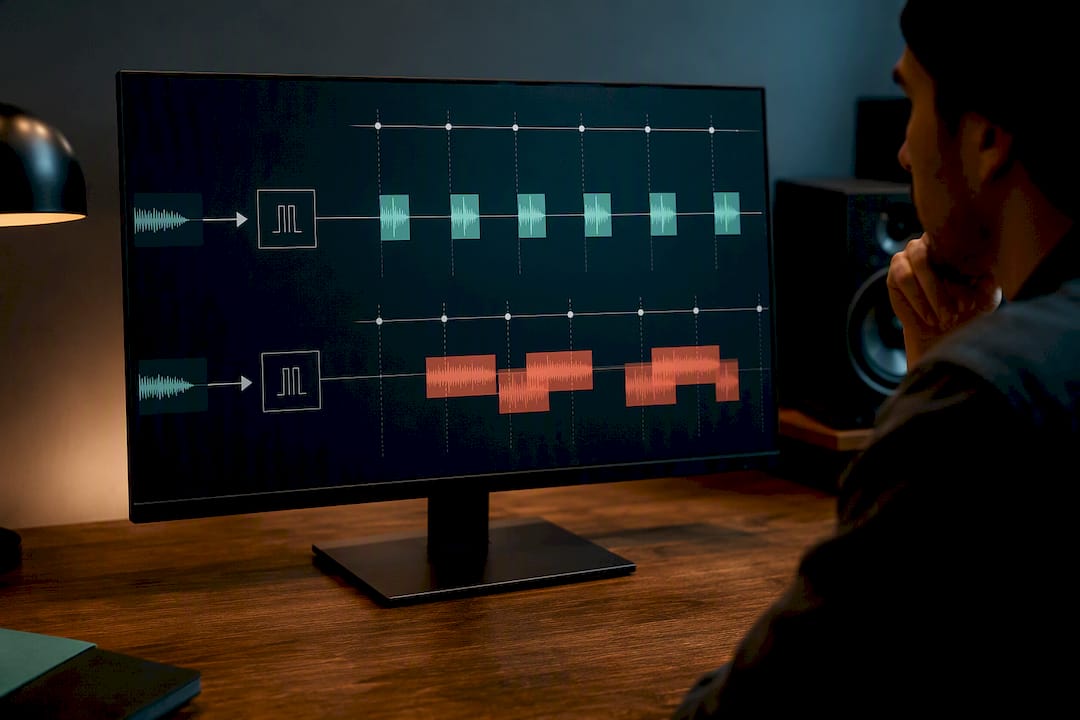
Sync your delay time to BPM rather than trusting your ear on a raw millisecond value. Quarter notes give you an obvious rhythmic echo, dotted-eighth adds a syncopated bounce that suits a lot of electronic and pop production, and triplet feels create a looser, swung pocket. Tempo-synced delay times and short slapback settings between 60 and 130ms let repeats sit musically instead of fighting the groove, giving thickness without anything you'd call an audible echo.
For stereo width without obvious repeats, stay under roughly 40ms. That's Haas territory, where the ear perceives a wider image rather than a distinct second hit.
- Set feedback so the tail resolves within two to four bars, not longer.
- Solo the return and count the bars out loud. If you're still hearing meaningful repeat energy past bar four, pull feedback down.
- Mute the dry signal, listen to the return alone, then bring the full mix back in. This single move exposes masking problems that are invisible when you're only listening in context.
Pro Tip: Run this audition method on every vocal delay before you commit to it: solo the return, then reintroduce the mix at full volume. If consonants suddenly disappear when the full arrangement returns, your delay is eating intelligibility, not adding space.
Automation and arrangement: when to push delay and when to pull it back
A static delay setting that sounds perfect on the verse will almost always clutter the chorus. Automating send, feedback and filtering is essential, since fixed settings that work in one section tend to cause problems the moment the arrangement gets busier.
- Automate send level across sections. Raise it on sustained notes and sparse passages, pull it back the moment the arrangement gets rhythmically dense.
- Use "throws" at phrase ends. A short automation boost on the last word of a vocal line, or the last hit of a riff, creates emphasis without running delay constantly through the verse.
- Automate the return's filter cutoff. Sweeping the high-pass or low-pass over a section adds movement and stops repeat energy from accumulating the same way in every bar.
- Group parameters into one macro lane. Bundling wet level, feedback, and HPF frequency under a single automation control lets you shift the whole delay character in one move instead of hunting through three separate lanes mid-session.
Think of automation as the difference between a delay that's always "on" at one setting and a delay that behaves like a musician, holding back when the arrangement is busy and stepping forward when there's room to breathe.
Common mistakes, diagnostic checklist and quick fixes for delay clutter
Most delay-related mud comes down to four recognisable symptoms. Learn to spot them and you'll fix the problem in minutes instead of hours.
Listen for low-mid buildup that makes the mix feel thick without adding any actual weight. Listen for muffled transients on drums or plucked instruments. Listen for smeared consonants on vocals, where words start blurring into each other. And always check for phase cancellation when you fold a stereo delay down to mono.
Diagnostic checklist:
- Solo the delay return on its own and listen critically.
- Temporarily bypass any filters to hear what the repeats sound like unfiltered.
- Check the tail length against the phrase length. A four-bar phrase doesn't need a six-bar tail.
- Fold to mono and listen for cancellation or a sudden volume drop.
- Reduce wet level and feedback incrementally rather than yanking both to zero and starting over.
Quick fixes worth trying first: add an HPF between 100 and 300Hz on the return, add an LPF in the feedback path around 6 to 9kHz, reduce feedback until the conflict clears, or simply move the effect to a different bus entirely. Keeping feedback moderate, around 20 to 35% in dense mixes, avoids the overlapping tails that smear whatever comes next.
If you notice intelligibility loss specifically on vocal consonants, fix timing and HPF on the return first. That combination resolves the majority of clutter complaints before you need to touch anything else.
Quick workflow checklist: a repeatable sequence to set a non-cluttering delay
Run this sequence every session and you'll rarely need to troubleshoot delay clutter after the fact.
- Set a tempo-synced delay time (quarter, dotted-eighth, or triplet, depending on the groove).
- Set feedback so the tail resolves within two to four bars.
- High-pass the return between 100 and 200Hz.
- Low-pass the feedback path between 6 and 10kHz.
- Set wet level to 10 to 30% for dense mixes, higher only in sparse sections.
- Automate send, feedback, and filter cutoffs through the arrangement.
Genre and density change the exact numbers, but not the sequence. A sparse ballad can push wet level higher; a dense electronic arrangement needs tighter filtering and shorter feedback tails. Practical defaults like HPF at 100 to 400Hz, feedback LPF at 6 to 10kHz, and 10 to 30% wet cover most sessions as a starting point.
| Parameter | Starting value | Adjust for |
|---|---|---|
| Delay time | Tempo-synced (quarter/dotted/triplet) | Groove and genre feel |
| Feedback | 20–35% | Denser mixes need less |
| HPF on return | 100–200Hz | Push higher (up to 400Hz) in busy arrangements |
| LPF on feedback | 6–10kHz | Brighter genres can push slightly higher |
| Wet level | 10–30% | Sparse sections can go higher |
Always finish with an A/B and a mono check. Flip the delay off and on, and fold to mono, before you call the setting finished.
How AubioMix supports faster, less cluttered mixes
The AubioMix blog covers this in more depth if you want the extended theory behind what's summarised here:
- The role of delay in mixing: a producer's guide walks through feedback, filtering, and how delay interacts with reverb.
- Delay in music production: the complete producer's guide goes deeper on BPM matching and rhythmic gating.
- 5 Minute Triage for Mixers is a fast diagnostic checklist for buried vocals, a symptom that overlaps heavily with delay-driven masking.
If you suspect delay is the culprit in a specific mix, upload a version with the delay return soloed alongside your full mix, and note in your submission exactly which section feels cluttered. That focused context turns a general review into a targeted diagnosis of the actual masking conflict.
Practical perspective: delay versus reverb in dense arrangements
Delay earns its place in a dense mix because it keeps transients and consonants intact, and it occupies less low-mid space than reverb typically does in the same role, a genuine advantage in busy arrangements. Reverb still wins when you need a diffuse wash or a natural sense of room, something delay was never built to deliver on its own. Combine them carefully: feeding a delay return into reverb glues repeats together and softens their brightness without raising wet levels further.
Try this on your next vocal: solo the delay return alone, then solo the reverb return alone. Whichever preserves the words more clearly is the one that should carry more weight in that particular arrangement.
— AubioMix
Get a targeted mix review before you commit to a delay setting
AubioMix is the alternative to guessing your way through a delay setting late at night with fresh ears you no longer trust. Where trial and error means bouncing, listening, and second-guessing yourself for an hour, a single upload gives you an objective read on frequency buildup, tail length, and masking conflicts in minutes.

A 1 Mix Review costs £4.99, a fair trade for catching a delay problem before it ships on a release you can't easily undo. For the clearest read on a delay-specific issue, upload a version with the return soloed and note which section feels cluttered, whether that's a chorus where repeats pile up or a vocal where consonants seem to vanish. If you're working through a full mix and want ongoing feedback across sessions, the Professional plan at £19.99 a month includes a set number of reviews each month rather than paying per track. Head to the pricing page, pick the option that matches how often you mix, and get specific, actionable notes on exactly where your delay is helping and where it's working against you.
Sources
- Musicproductionwiki
- Delay in a Mix: 10 Steps to a 3D Sound | LordReverb
- Delay & time-based effects | BeatKitchen
- Delay in the mix: slapback, ping-pong and tempo-synced echo that breathes - Digital Mixing
FAQ
Is reverb or delay better for reducing clutter?
Delay generally preserves clarity better than reverb because it repeats the source discretely instead of smearing transients into a continuous wash, which is why it tends to hold up intelligibility more reliably in dense mixes. Reverb still wins when you need a natural sense of room or a diffuse ambient wash, so the honest answer is that they solve different problems rather than one beating the other outright.
Should delay be mono or stereo?
It depends on the source and the effect you're after. Mono or subtly widened delays are safer for elements that need to stay centred and solid, while wider stereo or ping-pong delays add movement but must always be mono-checked, since some configurations cancel or collapse when folded down.
Why does my mix sound muffled?
Muffled mixes are usually caused by low-mid or high-frequency buildup from effects returns, delay and reverb included, stacking energy the arrangement doesn't need. High-passing the delay return around 100 to 200Hz and low-passing the feedback path around 7 to 9kHz is one of the fastest fixes if delay is the culprit.
What are the main types of delay?
The core types are slapback (short, 60 to 130ms, for thickness), tempo-synced rhythmic delay (quarter, dotted-eighth, or triplet, for groove), ping-pong (alternating stereo repeats), and Haas-style delay (sub-40ms, for width without an audible echo). Each one is chosen based on the rhythmic or spatial job it needs to do, not a fixed rule for every mix.
How can I tell if my delay is causing clutter?
Solo the delay return on its own, then reintroduce the full mix and listen for lost consonants, muffled transients, or a general thickening that doesn't add weight. AubioMix's mix review tools can flag these exact masking and buildup issues automatically if you're unsure what you're hearing.