

Dynamic EQ is defined as a parametric equaliser that applies gain changes only when an incoming signal crosses a set threshold, making it one of the most surgical tools in modern mixing. Unlike static EQ, which applies a fixed boost or cut regardless of what the audio is doing, a dynamic equaliser listens and reacts. Tools like FabFilter Pro-Q 4, TDR Nova, iZotope Neutron, and Empirical Labs ParaDyn have made this approach accessible to producers at every level. The result is transparent, natural-sounding correction that preserves the life in your recordings while taming the moments that cause real problems.
What is dynamic EQ and how does it work?
Dynamic EQ is best understood as a parametric EQ first and a dynamics processor second. The gain depth of each filter shape scales based on input level, so the EQ only moves when the signal demands it. This is a fundamentally different philosophy from static EQ, where every note, every breath, and every transient gets the same treatment.
The key parameters you will work with are threshold, attack, release, range, and Q factor. Threshold sets the level at which the filter activates. Attack controls how quickly the gain reduction kicks in once the threshold is crossed. Release determines how fast the filter returns to neutral. Range limits the maximum amount of gain change, and Q factor defines how wide or narrow the affected frequency band is.
Dynamic EQ uses standard parametric filters such as Bell, Shelf, and Notch shapes, which means it avoids the phase distortion introduced by the crossover filters found in multiband compressors. This is a significant advantage for surgical tasks where phase relationships matter, particularly on mix buses and mastering chains.
| Parameter | Typical Range | Purpose |
|---|---|---|
| Threshold | -40dB to 0dB | Sets the level that triggers gain change |
| Attack | 1–100ms | Controls speed of gain reduction onset |
| Release | 20–300ms | Controls speed of return to neutral |
| Range | -2dB to -12dB | Limits maximum gain reduction |
| Q Factor | 0.5–10 | Defines bandwidth of the affected band |
Sidechain inputs add another layer of control. You can route a separate signal, such as a kick drum, to trigger a dynamic EQ band on the bass track. This allows frequency-dependent ducking that responds to the actual musical content rather than a fixed schedule.
Pro Tip: Start with a moderate Q of around 2–4 for vocal resonances. Narrow Q settings can sound unnatural and phasey if the gain reduction is too aggressive.
When should you use dynamic EQ in your mixes?
Dynamic EQ excels in situations where a problem frequency appears inconsistently throughout a performance. Static EQ would either over-correct the quiet moments or under-correct the loud ones. A dynamic equaliser solves this by only acting when the problem actually occurs.
Here are the most common and effective use cases:
- Vocal resonance control. Singers often have a specific frequency, commonly somewhere in the 200–500Hz or 2–4kHz range, that becomes harsh or boxy only on certain vowels or louder phrases. A dynamic band placed precisely on that frequency will tame it only when it peaks.
- De-essing and sibilance control. Placing a dynamic band in the 5–10kHz range with a fast attack handles harsh "s" and "t" sounds far more musically than a static high-frequency cut, which would dull the entire vocal.
- Kick and bass interaction. Using a sidechain input from the kick drum, you can duck bass frequencies by 5–10dB each time the kick hits. This creates clarity and punch without permanently thinning the bass.
- Proximity effect management. Close-miked vocals often build up low-mid energy when the singer moves closer to the microphone. A dynamic low-shelf or Bell band reacts to those moments without affecting the rest of the performance.
- Guitar and piano resonances. Acoustic instruments often have one or two frequencies that ring out unnaturally in a room. Dynamic EQ catches those moments without colouring the overall tone.
The core advantage over static EQ is tone preservation. A static cut at 3kHz on a vocal will make every single moment of that performance slightly duller. A dynamic cut at 3kHz only activates when the harshness actually appears, leaving the natural warmth and presence intact the rest of the time.
Pro Tip: When using dynamic EQ for de-essing, set the attack to around 1–5ms and the release to 30–60ms. Too slow an attack and the transient slips through; too long a release and the vocal sounds lispy.
Dynamic EQ vs resonant suppressors: which tool fits?
Understanding the difference between dynamic EQ and resonant suppressors saves you from reaching for the wrong tool. They are related but solve different problems.
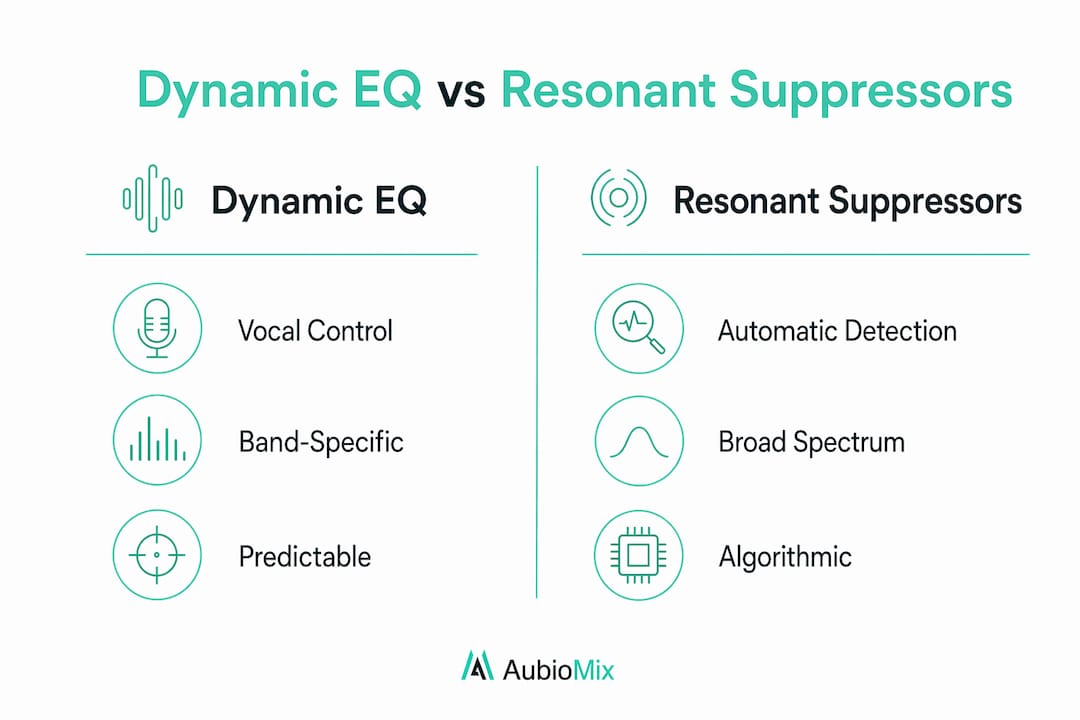
Resonant suppressors automatically detect and reduce many frequency spikes across the spectrum using algorithmic detection. You do not specify which frequencies to target. The plugin scans the signal and makes broad spectral decisions on your behalf. This makes resonant suppressors ideal for room acoustics, instrument body resonances, and situations where you need to clean up a track without knowing exactly where the problems are.
Dynamic EQ, by contrast, gives you predictable, band-specific control. You choose the frequency, you set the threshold, and you decide the range. Nothing happens unless you tell it to. This makes it the right choice for performance-based issues, where the problem is musical and repeatable rather than acoustic and unpredictable.
| Tool | Best For | Control Style | Phase Impact |
|---|---|---|---|
| Dynamic EQ | Vocal resonances, sibilance, kick/bass ducking | Manual, band-specific | Minimal |
| Resonant Suppressor | Room acoustics, broad spectral cleaning | Automatic, algorithmic | Varies |
| Multiband Compressor | Broadband dynamics control per band | Manual, crossover-based | Can introduce shift |
| Static EQ | Fixed tonal shaping | Manual, always active | Minimal |
Modern dynamic EQs include masking features that analyse the surrounding spectral content before applying gain reduction. Empirical Labs ParaDyn uses this approach to avoid unnatural artefacts when turning down a frequency. Rather than simply cutting, the plugin considers what is happening spectrally around the target band and adjusts accordingly. This represents a meaningful step forward in musicality for dynamic processing.
The practical rule is straightforward. Use dynamic EQ when you know exactly which frequency is causing a problem and when it occurs. Use a resonant suppressor when you need broad, automatic spectral tidying without deep manual involvement.
How to set up dynamic EQ: practical workflow and settings
Getting the most from a dynamic equaliser comes down to a clear, repeatable workflow. Here is the process we recommend at Aubiomix for most mixing scenarios.
- Identify the problem frequency. Solo the track and use a spectrum analyser or a narrow Bell band swept slowly across the range to find the offending frequency. Listen for harshness, boxiness, or muddiness that appears only at certain moments.
- Set the Q factor. For vocal resonances, start with a Q of 2–4. For de-essing, use a narrower Q of 4–8 to target the sibilance band precisely without affecting adjacent frequencies.
- Set the range. Range control within -2dB to -5dB is the sweet spot for sounding natural. Going beyond -6dB risks a hollow or unnatural tone, especially on vocals. Think of range as a safety net that keeps your processing musical even with aggressive threshold settings.
- Set the threshold. Play the track and lower the threshold until the band activates only on the problem moments. If it is triggering constantly, the threshold is too low and you are essentially applying a static cut.
- Dial in attack and release. For vocal resonances, use 10–20ms attack and 50–100ms release to maintain natural dynamics. For transient-heavy sources like drums or guitar picks, try a faster attack of 1–5ms. For bass, a slower release of 100–200ms prevents pumping.
- Apply sidechain filtering if needed. If you are using the internal sidechain and the band is triggering on unintended low-frequency energy, high-pass the sidechain signal to focus the detection on the relevant frequency range. This prevents the band from firing on every bass hit when you only want it to react to a mid-range resonance.
- Check in context. Always evaluate the result with the full mix playing. A setting that sounds perfect in solo can disappear or become too aggressive in context.
Common pitfalls include pumping, which usually means the release is too fast, and a hollow or thin sound, which points to the range being set too deep. Both are easy fixes once you know what to listen for. You can find more practical processing ideas in our guide to dynamic contrast techniques that complement this workflow.
Pro Tip: When using an external sidechain for kick/bass ducking, try high-passing the sidechain signal at around 60–80Hz to remove sub-frequency energy. This keeps the dynamic EQ reacting to the body of the kick rather than the sub thump.
What are the best dynamic EQ plugins in 2026?
The plugin market offers excellent options across every budget. Here are the tools worth knowing:
- FabFilter Pro-Q 4. The industry standard for many engineers. It offers dynamic bands alongside static ones, a clean interface, and a masking display that shows frequency clashes between tracks. The dynamic bands are transparent and highly configurable.
- TDR Nova. The best free option available. TDR Nova delivers four dynamic bands with sidechain support and a clear, functional interface. For producers on a budget, it punches well above its price point.
- iZotope Neutron. Combines dynamic EQ with AI-assisted frequency detection. Neutron's spectral shaping and masking features make it particularly useful for producers who want guided assistance alongside manual control.
- Empirical Labs ParaDyn. A hardware-inspired plugin with masking-based dynamic modes that consider spectral context before applying reduction. Excellent for mastering and mix bus work where musicality is the priority.
- Waves F6. A straightforward six-band dynamic EQ with sidechain inputs and a clean layout. Well-suited to live sound and broadcast workflows as well as studio mixing.
Platform compatibility is broadly excellent across all of these. FabFilter, iZotope, and Waves support VST3, AU, and AAX formats, covering Ableton Live, Logic Pro, Pro Tools, and most other DAWs. TDR Nova is available as a free VST and AU download. For a deeper look at how these tools fit into a complete processing chain, our guide to pro-level mixing chains covers the full picture.
Key takeaways
Dynamic EQ delivers transparent, frequency-specific gain control that activates only when needed, making it the most surgical and musical approach to correcting inconsistent frequency problems in a mix.
| Point | Details |
|---|---|
| Dynamic vs static EQ | Dynamic EQ only activates when a threshold is crossed, preserving natural tone the rest of the time. |
| Core parameters | Set threshold, attack, release, range, and Q carefully; range within -2dB to -5dB keeps processing musical. |
| Best use cases | Vocal resonances, de-essing, kick/bass sidechain ducking, and proximity effect control are the primary applications. |
| Plugin options | FabFilter Pro-Q 4, TDR Nova (free), iZotope Neutron, and Empirical Labs ParaDyn cover every budget and workflow. |
| Phase advantage | Dynamic EQ avoids the phase distortion introduced by multiband compressor crossovers, making it preferable on mix buses. |
The case for restraint: a perspective on dynamic EQ
There is a temptation, once you discover dynamic EQ, to use it on everything. I have been there. You hear a resonance, you reach for a dynamic band, and before long you have eight of them stacked on a single vocal and the track sounds like it is being processed rather than performed.
The most important lesson I have learned is that dynamic EQ works best as a scalpel, not a paintbrush. Two or three well-placed dynamic bands on a vocal, each targeting a specific, identified problem, will do more for a mix than a dozen bands set with vague intentions. The moment you start adding dynamic bands because something "might" be an issue, you are no longer mixing. You are second-guessing the performance.
The other thing worth saying plainly: static EQ still has a role. A broad low-mid cut on a vocal is often better served by a static shelf than a dynamic band. Static EQ shapes tone. Dynamic EQ corrects moments. Knowing which job you are doing at any given point is what separates a polished mix from an over-processed one.
My honest recommendation is to commit to learning one dynamic EQ plugin deeply before exploring others. TDR Nova is free and fully capable. Spend a month using only that. Learn to hear what the parameters actually do to the signal. Once your ears are trained, the more advanced features in FabFilter Pro-Q 4 or iZotope Neutron will make immediate sense. The tool is only as good as the ear behind it.
— Aubiomix
Get objective feedback on your dynamic EQ decisions
Knowing the theory is one thing. Hearing whether your dynamic EQ settings are actually working in a finished mix is another challenge entirely.

Aubiomix lets you upload your mix and receive detailed, specific feedback on your equalisation decisions, dynamic processing, and overall balance. If your dynamic bands are over-processing a vocal or your kick/bass relationship needs work, the mix feedback platform will tell you exactly what to address and how. You can also use the evaluation framework to systematically assess your mixes against professional benchmarks. For producers working on vocal-heavy tracks, pairing Aubiomix feedback with guidance on mixing rap vocals professionally gives you a complete picture of where your dynamic processing stands.
FAQ
What is dynamic EQ used for in mixing?
Dynamic EQ is used to correct inconsistent frequency problems that only occur at certain moments, such as vocal resonances, harsh sibilance, and kick/bass frequency clashes. It activates only when the signal crosses a set threshold, leaving the natural tone intact at all other times.
How is dynamic EQ different from a multiband compressor?
Dynamic EQ uses standard parametric filter shapes and avoids the phase distortion introduced by the crossover filters in multiband compressors. This makes it preferable for surgical tasks and mix bus processing where phase relationships must be preserved.
What are good starting settings for dynamic EQ on vocals?
For vocal resonances, start with a 10–20ms attack, 50–100ms release, and a gain reduction range of -3dB to -6dB. These settings maintain natural dynamics while taming the problematic moments.
Is TDR nova a good free dynamic EQ plugin?
TDR Nova is widely regarded as the best free dynamic EQ available, offering four dynamic bands with sidechain support and a clear interface. It is a strong starting point for producers learning dynamic equalisation without a paid plugin budget.
When should i use a resonant suppressor instead of dynamic EQ?
Use a resonant suppressor when you need broad, automatic spectral cleaning across many frequencies, such as for room acoustics or instrument body resonances. Use dynamic EQ when you know the exact frequency and the exact moment the problem occurs.