

Building a mix from scratch is the process of combining individual audio tracks into a balanced, cohesive stereo output using foundational techniques such as gain staging, static balance, EQ, and compression. The industry term for this process is audio mixing, and mastering it separates a muddy, cluttered recording from a polished, professional-sounding track. Every great mix follows the same core sequence: organise your session, set your levels, shape your frequencies, control your dynamics, and add space. Follow these steps consistently and you will produce mixes that translate well across speakers, headphones, and club systems.
What are the essential tools and session preparation steps?
A well-prepared session is the difference between a mix that flows and one that constantly trips you over. Before you touch a single fader, label every track clearly. Use descriptive names like "Kick 1," "Lead Vox," or "Bass DI" rather than "Audio 01." Colour-code your groups so drums, bass, guitars, and vocals are visually distinct at a glance.
The next step is gain staging. Adjust clip gain so your signals average between -18dBFS and -12dBFS before any plugins are inserted. This preserves headroom for processing and prevents internal clipping inside your DAW's signal chain. Skipping this step is one of the most common beginner mistakes, and it causes distortion that no amount of EQ can fix later.

Group related tracks into folders or buses. Drums go into a drum bus, backing vocals into a backing vocal bus, and so on. This gives you macro-level control without touching individual faders every time you need a quick adjustment.
Essential tools at a glance:
| Tool | Function |
|---|---|
| DAW (digital audio workstation) | Hosts and plays back all audio tracks |
| Faders | Set relative volume levels between tracks |
| EQ (equaliser) | Shapes the tonal balance of each track |
| Compressor | Controls dynamic range and adds punch |
| Reverb / delay (send channel) | Adds space and depth without muddying the mix |
Pro Tip: Use clip gain, not the channel fader, to fix level inconsistencies before any plugin processing begins. This keeps your faders sitting near unity gain, which gives you a cleaner, more predictable starting point.
How do you build a mix from scratch using a static mix?
The static mix is where the real work happens, shaping musical balance before any EQ or compression enters the picture. A static mix uses only faders and panning. No plugins, no effects, no automation. Just volume and position in the stereo field.
This matters enormously. Static mix accounts for up to 70% of your final mix quality. That figure should stop you in your tracks. Most beginners rush straight to plugins because they feel productive, but premature plugin use usually masks unresolved level problems rather than solving them.
Start in mono. Collapse your stereo bus to mono and balance your kick, snare, and bass first. These elements form the rhythmic and low-end foundation of any mix. Once they sit well together, bring in the lead vocal and anchor it in the centre of the stereo field. Kick, snare, and lead vocal belong in the centre; everything else gets placed around them.
Here is a practical static mix workflow:
- Mute all tracks and bring them in one by one, starting with kick and bass
- Balance each new element against what is already playing
- Pan supporting instruments outward to create width without losing focus
- Check the full mix in mono regularly to catch any phase or masking issues
- Resist the urge to open a plugin until every fader feels settled
Pro Tip: If a track feels too loud or too quiet even with the fader at a sensible position, go back and fix it with clip gain. Chasing balance with extreme fader positions creates problems downstream.
For a deeper look at this stage, the Aubiomix guide on what a static mix is covers the concept thoroughly.
What are the key processing techniques after static mix?
Once your static mix feels balanced, processing refines and enhances what is already working. Mixers who focus on faders before reaching for EQ and compressors produce more musical, balanced mixes. Plugins should enhance, not compensate.
EQ: creating space in the frequency spectrum
EQ is a subtractive tool first and an additive tool second. Cut before you boost. High-pass filtering removes low-frequency rumble and mud from tracks that do not need it. High-pass vocals below 100Hz and guitars below 150Hz is standard practice in professional mixing. This clears space in the low end for your kick and bass to breathe without competition.
After cutting, use narrow boosts to bring out character. A gentle lift around 3–5kHz adds presence to a vocal. A boost around 60–80Hz adds weight to a kick drum. Keep your boosts subtle and always check them in context with the full mix playing.
Compression: controlling dynamics and adding glue
A compressor reduces the difference between the loudest and quietest parts of a signal. For a snare drum, a fast attack and medium release adds punch and snap. For a vocal, a slower attack lets the initial consonants through before the compressor clamps down, preserving natural expression.
On your mix bus, gentle compression with a low ratio (around 2:1) and a slow attack adds cohesion without squashing the life out of your mix. Think of it as glue rather than a vice.
Reverb and delay: adding depth without mud
Use reverb and delay on send channels, not directly on individual tracks. This means multiple instruments share the same reverb space, which creates a sense of a unified sonic environment. A short room reverb on drums gives them a lively, three-dimensional quality. A longer hall reverb on a lead vocal can feel lush and inviting without washing out the mix.
Pro Tip: Before and after you insert any plugin, level-match the processed and unprocessed signals. Level-matched bypass tests reveal whether a plugin is genuinely improving the sound or just making it louder, which your ears will always mistake for better.
How do you troubleshoot common mixing issues?
Even a well-structured mix throws up problems. Knowing what to listen for and how to fix it is a core skill for any producer or engineer.
Common issues and how to address them:
| Problem | Likely Cause | Fix |
|---|---|---|
| Muddiness | Too much low-mid energy across multiple tracks | High-pass filter non-bass elements; cut around 200–400Hz |
| Frequency masking | Two instruments occupying the same frequency range | Use EQ to carve space; pan competing elements apart |
| Imbalance | Faders set by eye rather than ear | Reset and rebuild the static mix from scratch |
| Over-processing | Too many plugins stacked on one channel | Bypass plugins one by one and remove what does not help |
| Poor mono compatibility | Wide stereo effects collapsing in mono | Check the mix in mono and reduce stereo width on problem tracks |
Referencing is your most reliable troubleshooting tool. Play your mix on at least three different systems: studio monitors, headphones, and a small Bluetooth speaker or phone. A mix that sounds great only on your monitors has not been properly checked. Mono compatibility matters too, especially for club and broadcast playback.
The iterative loop of listen, compare, identify a problem, and act is the professional standard. Do not try to fix everything in one pass. Make one adjustment, listen back, and decide whether it helped.
Pro Tip: Take regular breaks during a long mixing session. Ear fatigue is real, and it causes you to make poor decisions. A 10-minute break restores your perspective more effectively than any plugin.
What are expert tips for building a consistent mixing workflow?
A repeatable workflow is what separates producers who improve steadily from those who spin their wheels. Building a mix works best when you follow a clear sequence: balance first, then pan for spatial clarity, then group tracks for control, and only then apply plugins and effects.
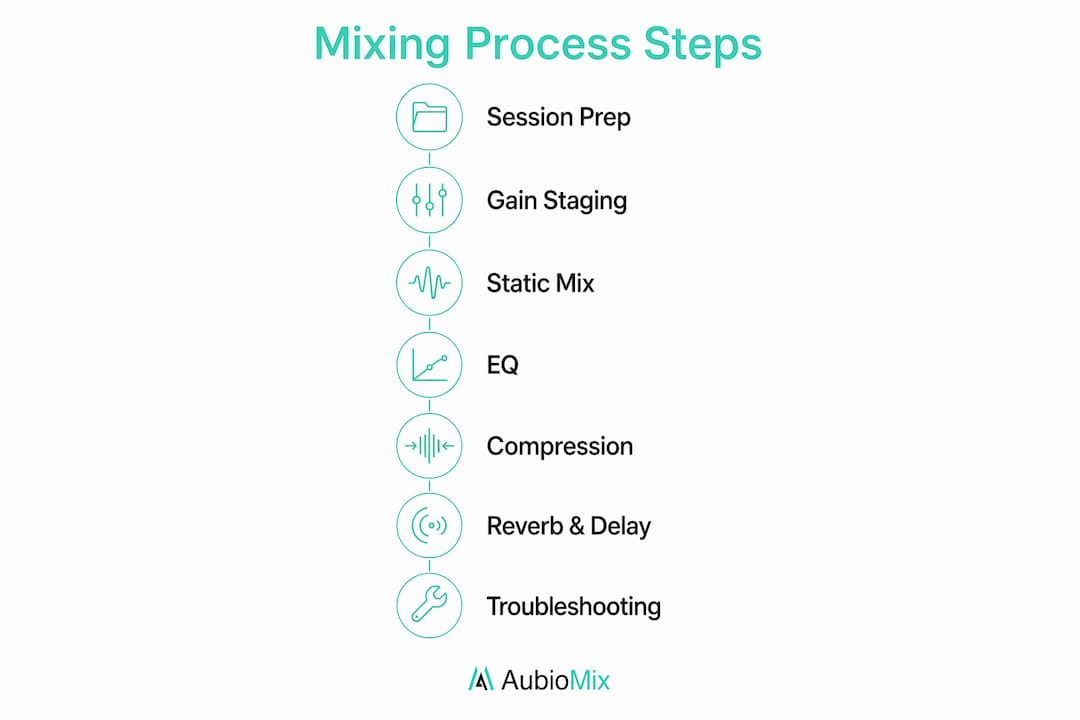
Structure your sessions the same way every time. Prepare your session and organise tracks, build your static mix, apply EQ and compression, add spatial effects, write automation, and do your final checks. This sequence is not arbitrary. Each step builds on the last, and skipping ahead creates problems you will spend hours untangling.
Timed practice sessions accelerate learning. Set a timer for 90 minutes and mix a track start to finish. Do not aim for perfection. Aim for completion. Reviewing what you did and why builds self-awareness faster than endlessly tweaking a single mix.
Mixing tips every beginner should follow:
- Never mix at high volume for extended periods; your ears will lie to you
- Reference a commercial track in the same genre throughout your session
- Record your mix sessions and listen back the next day with fresh ears
- Use automation in your mixes to add movement and keep listeners engaged
- Trust your ears over visual meters; if it sounds right, it probably is right
- Practise on tracks you did not produce so you have no emotional attachment to the sound
Consistent practice leads to steady progress. The craft of mixing rewards patience and repetition above all else.
Key takeaways
A well-balanced mix from scratch requires gain staging, static balance, and disciplined processing before any plugin is inserted.
| Point | Details |
|---|---|
| Gain staging is non-negotiable | Set clip gain to average -18 to -12dBFS before inserting any plugins. |
| Static mix drives mix quality | Faders and panning alone account for up to 70% of your final mix quality. |
| EQ cuts before boosts | High-pass non-bass tracks first to clear space for kick and bass. |
| Level-match every plugin | Bypass-test each plugin at matched levels to confirm it genuinely improves the sound. |
| Repeat a structured workflow | Prepare, balance, process, automate, and check in the same order every session. |
What I have learned from building mixes from scratch
The single biggest shift in my mixing came when I stopped reaching for plugins the moment a track sounded off. For years, I would stack EQ and compression on a vocal that was simply too loud in the mix. The fix was always the fader. Always. Once I committed to spending real time on the static mix before touching a single plugin, my mixes started sounding cleaner and more professional almost immediately.
Gain staging felt tedious at first. Setting clip gain on every track before a session is not glamorous work. But the payoff is enormous. Plugins behave predictably, headroom stays intact, and you never hit that horrible moment where your mix bus is clipping and you cannot work out why.
The other lesson that took me too long to learn is this: trust your ears, not your eyes. Meters are useful, but they do not tell you whether a mix feels right. A mix that looks perfect on a spectrum analyser can still sound lifeless and flat. Spend time listening on different systems, in mono, and at low volume. The problems you hear there are the ones your listeners will hear too. Focus on the fundamentals, practise consistently, and the results will follow.
— Aubiomix
Get objective feedback on your mixes with Aubiomix
Building a great mix takes time, and self-review only gets you so far. Fresh, objective ears reveal problems that familiarity hides.

Aubiomix is an online app that lets you upload your audio file and receive detailed, professional mix feedback within minutes. The feedback covers mixing and mastering, giving you specific, actionable steps to improve your sound rather than vague impressions. Whether you are working on your first track or your fiftieth, Aubiomix gives you the kind of clear direction that accelerates real progress. Visit aubiomix.com and see what your mix is actually doing.
FAQ
What does it mean to build a mix from scratch?
Building a mix from scratch means combining individual recorded or produced audio tracks into a single, balanced stereo output using techniques such as gain staging, EQ, compression, and spatial effects.
Why is the static mix so important?
The static mix, using only faders and panning, accounts for up to 70% of final mix quality. Rushing to plugins before achieving a solid static balance leads to over-processing and masking problems.
What is gain staging and why does it matter?
Gain staging means adjusting clip gain so signals average between -18dBFS and -12dBFS before any plugin processing. It preserves headroom and prevents internal clipping that distorts your sound.
How do I know if my mix translates well across systems?
Play your mix on at least three different playback systems, including in mono. A mix that holds up on monitors, headphones, and a small speaker is translating well.
How long does it take to get good at mixing?
Mixing proficiency develops through consistent, focused practice over months rather than days. Regular weekly practice and deliberate session review build skills far faster than occasional long sessions.