
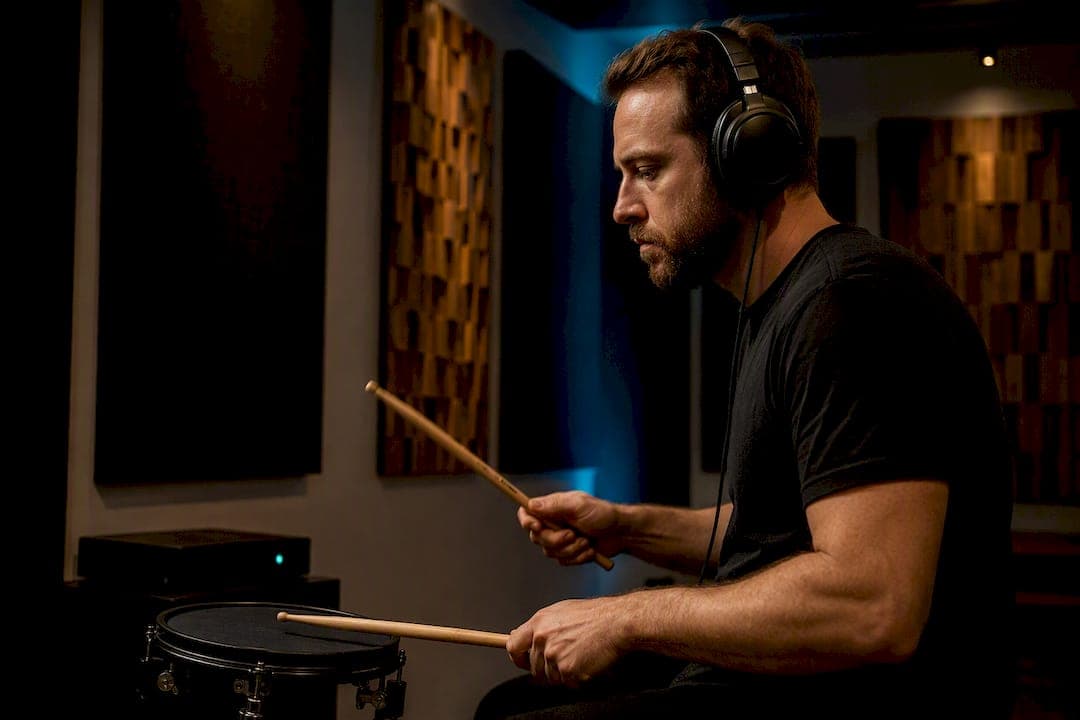
Plugin latency rarely breaks your mix playback. Your DAW compensates for it automatically. What it does break is monitoring during tracking, where any real delay between playing a note and hearing it back becomes distracting fast. If a vocal take feels "off" or a session drags under CPU load, check plugin delay compensation, drop your buffer for tracking, and freeze or bounce anything with heavy lookahead before you commit to mixing.
TL;DR:
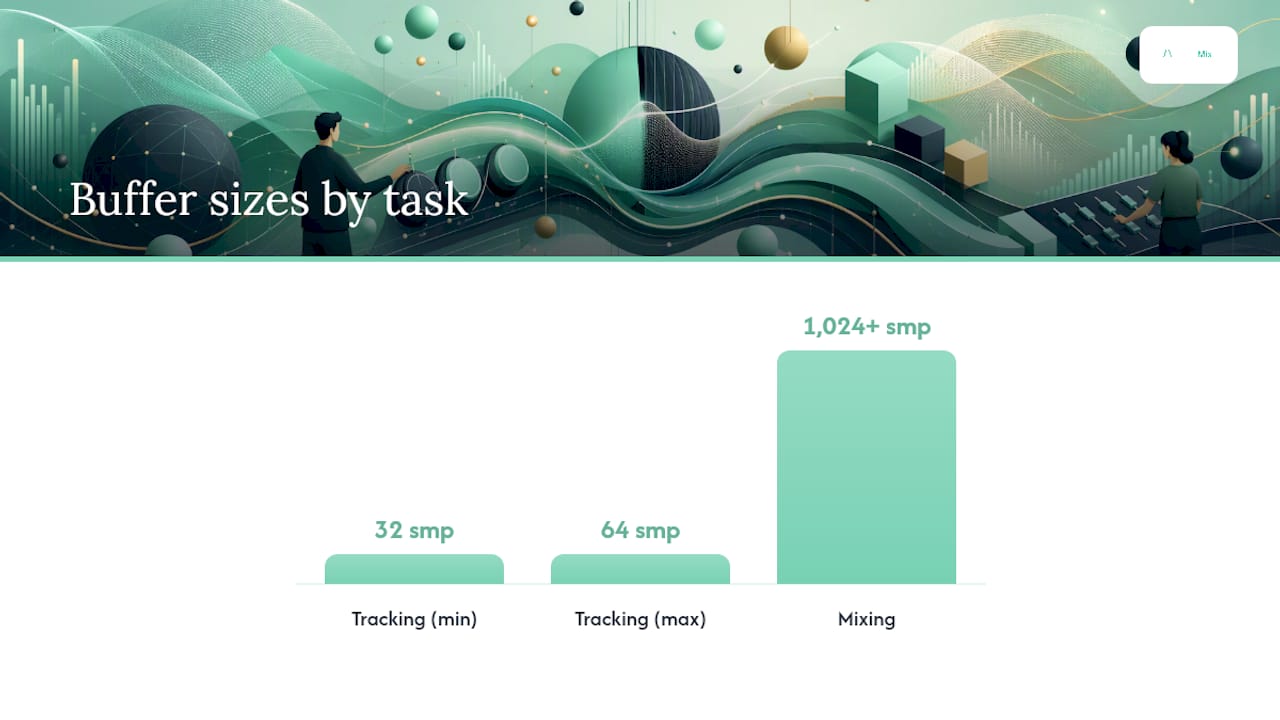
- Maintaining a buffer of 32 to 64 samples during tracking and 1024 samples or higher during mixing helps manage latency effectively.
- Plugin delay compensation aligns tracks during playback but does not address real-time monitoring latency experienced during recording.
- Heavy latency plugins like linear-phase EQs, convolution reverbs, and lookahead compressors should be frozen or replaced in tracking to prevent timing issues.
- Latency over 20 milliseconds is typically noticeable to performers, especially on percussive and vocal sources, requiring adjustment or hardware monitoring.
- Automated tools like AubioMix can identify timing misalignments and overloaded plugin chains, saving time on diagnosing phase and latency problems.
Table of Contents
- What is a plugin latency mix problem, exactly?
- Quick fixes you can apply right now
- How plugin delay compensation actually works
- Tracking versus mixing: when latency matters and when it doesn't
- Which plugin types typically add meaningful latency
- Measuring latency and audible thresholds
- Mixing workflow: best practices to avoid latency problems
- Troubleshooting complex routing, parallel chains and feedback loops
- AubioMix perspective: catching latency problems before they cost you a mix
- Author perspective: sound quality against session speed
- Try AubioMix for objective mix diagnostics
- Authoritative docs and guides to consult next
- Sources
- FAQ
What is a plugin latency mix problem, exactly?
Every plugin reports its processing delay to your DAW in samples, and your DAW converts that figure into milliseconds against your project's sample rate. A linear-phase EQ might report 2,000 samples of latency; a lookahead limiter might report a few hundred. Your DAW reads that number and uses it to keep every track aligned during playback, which is the whole job of plugin delay compensation, or PDC.
The confusion around "plugin latency mix" issues comes from mixing up two entirely different things: the delay a plugin adds to your monitoring path while you're recording, and the reported latency your DAW quietly compensates for during playback and mixdown. They behave differently, they get fixed differently, and treating them as one problem is why so many engineers waste time chasing a "latency issue" that was never actually there during playback at all.
Quick fixes you can apply right now
Start with buffer size. For tracking, drop to 32 to 64 samples so your monitoring path stays tight and responsive. For mixing, push the buffer up to 1024 samples or higher. You gain headroom for plugin-heavy chains and PDC has more room to do its job without strain, as PreSonus notes in its dropout protection and low-latency monitoring guidance.
Beyond the buffer, a handful of habits solve most day-to-day latency complaints:
- Confirm PDC is switched on and set to a compensation mode that covers your full mixer, not just the master bus.
- Freeze or commit any track running a linear-phase EQ, convolution reverb, or lookahead compressor once you're happy with the sound, which removes it from the real-time processing load entirely.
- Bounce a problem submix to audio if a parallel chain keeps fighting your DAW's compensation engine.
- Bypass or remove latency-heavy plugins from anything sitting in the monitoring signal path while a performer is tracking.
- Switch to hardware DSP or direct monitoring when a vocalist or drummer needs a genuinely instant feedback loop.
Pro Tip: Keep two saved buffer presets in your session template, one for tracking and one for mixing, so switching between them is a single click rather than a hunt through preferences every time you change tasks.
How plugin delay compensation actually works
PDC exists to solve one specific problem: keeping every track's audio landing on the same timeline despite plugins adding different amounts of delay. Here's the mechanism in practice:
- Every plugin reports its own latency in samples to the host.
- The DAW finds the track with the highest cumulative latency across its chain.
- It then delays every other track by the difference, so all signals arrive at the output in sample-accurate alignment.
That third step is why a session with one heavy linear-phase EQ can make everything else feel like it starts a fraction later, because Logic Pro's documentation confirms PDC can introduce a slight lag at playback start while it aligns the highest-latency path. Logic also offers a Low Latency Monitoring mode that bypasses plugins above a chosen limit, though this comes at the cost of disabling certain sends, which is a trade worth knowing about before you rely on it mid-session.
What PDC does not do is fix a performer's round-trip monitoring latency. It's a playback and mixdown tool, not a tracking tool. It also runs into trouble with feedback loops, side-chain routing, and heavily parallel processing, where the compensation math simply has nowhere clean to land. ProducerGrid's breakdown of PDC covers these failure modes in detail, and DAW-specific limits vary, so it's worth checking your own host's ceiling before building a session around dozens of high-latency inserts.
Tracking versus mixing: when latency matters and when it doesn't
Input or monitoring latency is the round-trip delay between a performer playing a note and hearing it through their headphones. Plugin-reported latency is the figure a plugin sends to the DAW so PDC can align tracks during playback. These are not the same number, and confusing them leads to a lot of unnecessary buffer-chasing.
A mix can be perfectly sample-aligned on playback while a vocalist, three hours earlier, felt every syllable land late through their cans. That's because PDC only aligns what happens after the signal is recorded. It has no influence over the live monitoring path during tracking.
As a rough guide, round-trip latency under 10ms is generally unnoticeable to most performers. Once you're past 20 to 30ms, vocalists and drummers in particular start to feel it, since percussive and transient-heavy sources expose timing lag far quicker than sustained pads or strings. That sensitivity gap is why a drummer will complain about a setup a keyboard player never notices.
Which plugin types typically add meaningful latency
Some plugin categories are latency-heavy by design, not by accident. Understanding why helps you decide where to accept the cost and where to swap in something faster.
- Linear-phase EQs need to look ahead across the waveform to avoid phase shift, and that windowing process is what generates the delay.
- Convolution reverbs buffer and process a full impulse response, so longer, more realistic spaces mean longer latency.
- Lookahead compressors and oversampled mastering processors deliberately delay the signal so they can "see" a transient coming before they react to it.
- FFT and spectral processors trade window size for latency: a bigger window gives better frequency resolution but adds more delay. A 4,096 sample window at 44.1kHz works out to roughly 93ms, according to KERN Audio's guide to low-latency mixing, though many of these plugins offer a reduced-resolution "LIVE" mode that brings that figure down to around 23ms for tracking.
For tasks where speed matters more than surgical precision, minimum-phase EQs and zero-latency compressors are the sensible swap during tracking, saving the linear-phase and lookahead tools for the final mix pass.
Measuring latency and audible thresholds
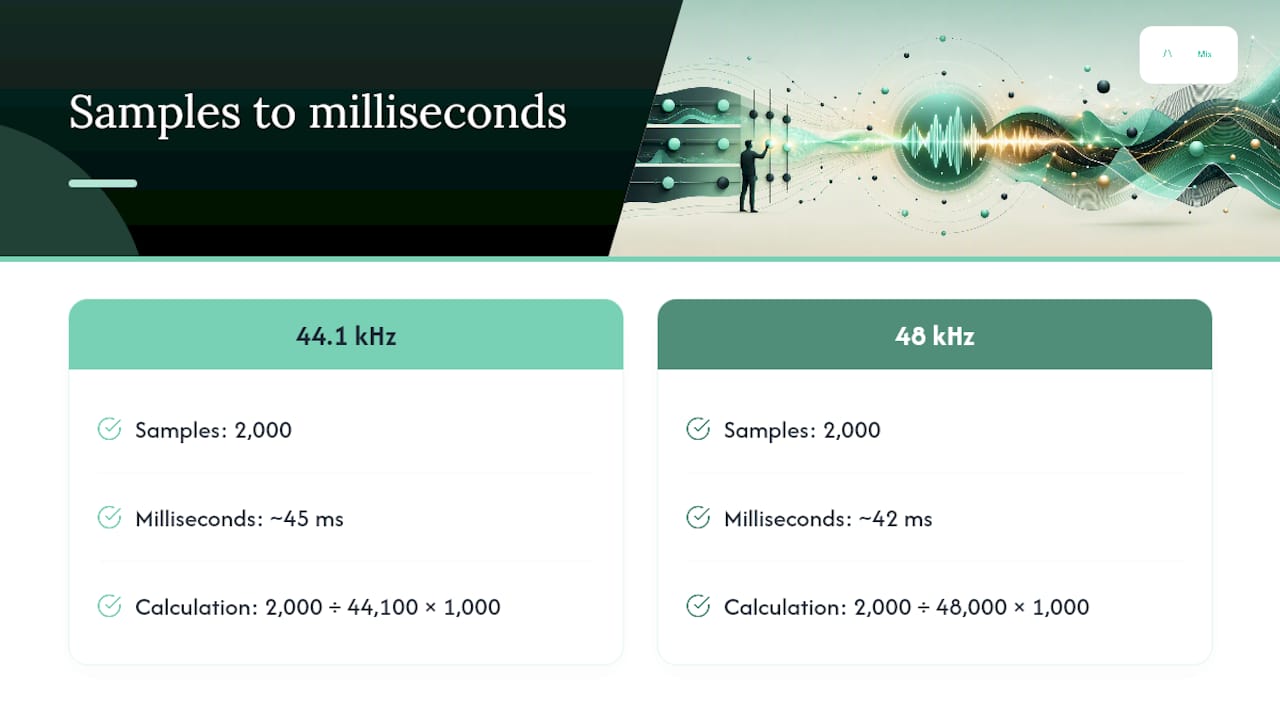
Converting a plugin's reported sample count into milliseconds is simple: milliseconds equals samples divided by sample rate, multiplied by 1,000. At 44.1kHz, 2,000 samples works out to roughly 45ms. At 48kHz, the same 2,000 samples is closer to 42ms, since the higher sample rate packs more samples into each millisecond.
To confirm alignment in practice, RouteNote's guide to plugin latency recommends a simple clap test: record a shared clap or click across multiple tracks, zoom in, and check that the transients line up sample for sample. A phase scope will show you the same thing more precisely if PDC has failed somewhere in the chain.
As a working rule, most engineers won't notice anything under 10ms. Between 10 and 20ms starts to feel slightly "off" on percussive sources. Anything pushing towards 40ms or beyond is firmly in noticeable territory for rhythmic material, and worth fixing rather than tolerating.
Mixing workflow: best practices to avoid latency problems
Complex sessions rarely fail because of one bad plugin. They fail because latency compounds quietly across dozens of tracks until the DAW is struggling and nobody can pinpoint why. A disciplined buffer and commitment routine solves most of this before it becomes a crisis.
The first habit worth building is a deliberate buffer switch between tasks. Keep a genuinely small buffer, 32 to 64 samples, reserved for tracking sessions, and jump to 1,024 samples or higher the moment you move into mixing. There's no reason to run a mix session on a tracking buffer, and doing so is one of the most common self-inflicted causes of CPU strain and audible glitching.
Second, commit early and commit often. Once a linear-phase EQ, convolution reverb, or heavily oversampled processor has done its job on a track, freeze or bounce it. This isn't just about latency, it also frees CPU headroom for the rest of the session, and it means PDC has fewer high-latency paths to reconcile every time you hit play.
A few more habits worth locking into your template:
- Route side-chains through latency-safe paths wherever possible, since a side-chain fed through a heavy plugin chain can introduce timing errors that are genuinely difficult to trace.
- Reserve expensive, high-latency processors for buses and stems rather than individual tracks, so you're paying the latency cost once instead of dozens of times over.
- Limit oversampling on individual channel inserts. It's rarely necessary until the final mastering stage, and it's one of the quietest CPU killers in a session.
- Use your DAW's plug-in load balancing where available. Cakewalk's SONAR documentation notes that distributing DSP load across cores reduces CPU spikes and the dropouts they cause, even though load balancing itself doesn't touch latency directly.
Pro Tip: Build a "mix-ready" template with your go-to latency-heavy processors already frozen on a duplicate bus, so you can A/B the processed and unprocessed versions instantly without re-triggering PDC recalculation every time.
Workflow discipline, more than any single setting, is what keeps a 60-track session from grinding to a halt three hours before a deadline.
Troubleshooting complex routing, parallel chains and feedback loops
Parallel processing is where PDC most often trips up. Running a dry signal alongside a heavily processed parallel chain, then blending them on a bus, gives the compensation engine two different latency paths to reconcile, and it doesn't always get it right. The result is comb filtering or a smeared, phasey low end that's hard to diagnose by ear alone.
The fastest diagnostic is a polarity check. Invert one signal against the other; if they null completely, your alignment is correct. If they don't, you're looking at a timing mismatch that needs a manual sample nudge or a time-align plugin to correct, a method Ardour's community discussion on complex mix environments walks through in real troubleshooting scenarios.
When nudging doesn't resolve it cleanly, render the problem submix to audio and remove the offending plugin from the aux path entirely. Rendering sidesteps the PDC guesswork altogether.
AubioMix perspective: catching latency problems before they cost you a mix
Manual phase-checking and polarity inversion work, but they take time, and it's easy to miss a smeared low end buried under sixty tracks of competing frequency content. Automated analysis fills that gap by flagging timing and phase inconsistencies objectively rather than by ear, which matters most in sessions built around heavy parallel processing or dense side-chain routing.
A useful report will point to specific tracks worth freezing or re-routing first, rather than leaving you to guess which tracks are causing the smear. That prioritisation is the real value: it turns a vague "something feels off" into a shortlist. The sensible approach is treating automated diagnostics as a first pass that flags where to look, with manual phase and polarity checks reserved for confirming what the report finds.
Author perspective: sound quality against session speed
Chasing zero latency at every stage is the wrong goal. Linear-phase EQs and lookahead compressors exist because they sound better at the tasks they're built for, and that's worth the delay once you're mixing rather than tracking. The trade-off isn't a compromise, it's a choice: precision when performance allows for it, speed when a musician is waiting on the other end of the monitor path.
What actually protects a session isn't a magic buffer setting. It's the habit of switching deliberately between tracking and mixing modes instead of running one configuration for both and hoping it holds.
— AubioMix
Try AubioMix for objective mix diagnostics
Manual phase checks and buffer juggling get you far, but they're time-consuming, and it's easy to miss a smeared low end when you've been staring at the same session for six hours. AubioMix gives you an automated second opinion: upload a mix and get a report that flags timing misalignments, overloaded plugin chains, and the other technical issues that latency and phase problems tend to leave behind.

The reports don't just tell you something's wrong, they point to which tracks or sections are worth revisiting first, so you're not guessing your way through a dense session. If you're working in a specific genre, AubioMix's genre benchmark pages let you compare your loudness and mix balance against real measured references, including dedicated pages for techno and deep house sessions where dense parallel processing is common. For readers exploring assisted mixing tools more broadly, AmmarAI's Sound Studio is another option worth a look.
Upload your next mix to AubioMix and get a detailed diagnostic back in minutes, before a hidden phase issue costs you a release.
Authoritative docs and guides to consult next
- Logic Pro: working with plug-in latencies
- PreSonus Studio One: low-latency monitoring FAQ
- RouteNote: understanding plugin latency
- Aubiomix's guide to speeding up your mixing workflow
Sources
- Studio One 5: Audio Dropout Protection and Low-Latency Monitoring FAQ – Knowledge Base | PreSonus
- Work with plug-in latencies — Logic Pro user guide
- low-latency mixing: when 93ms matters and when it doesn't | KERN Audio guides
- Understanding plugin latency and how it affects your mix - RouteNote Create Blog
FAQ
How do I fix latency on plugins?
Increase your buffer size for mixing, confirm plugin delay compensation is active, and freeze or bounce any linear-phase, convolution, or lookahead-heavy tracks once you're happy with them.
Is 75ms of audio delay noticeable?
Yes. At delays well above 20 to 30ms, most listeners and performers will clearly perceive the delay as a separate, distinct echo rather than a natural timing shift.
Is 40ms of latency bad?
For monitoring during tracking, latency at this scale can be disruptive, particularly on percussive or vocal sources, so it's worth reducing via buffer size or hardware monitoring rather than accepting it.
What plugin types cause the most latency in a mix?
Linear-phase EQs, convolution reverbs, lookahead compressors, and FFT-based spectral processors are the most common culprits, largely because each needs to analyse or buffer audio ahead of the current playback point to do its job accurately.
Can AubioMix detect latency-related mixing problems?
AubioMix's automated analysis flags timing misalignments and overloaded plugin chains in an uploaded mix, giving you a prioritised starting point before you run manual phase and polarity checks.