
Speeding up your mixing workflow is defined as reducing the time spent on repetitive setup, decision-making, and administrative tasks without lowering the quality of your final mix. The most effective speed up mixing workflow techniques combine organised DAW sessions, pre-built templates, structured time-blocking, and clear client communication. Together, these methods save hours per project, reduce cognitive fatigue, and keep your creative momentum intact. Whether you are mixing one track a week or juggling multiple clients, the same core principles apply.
How to organise your DAW session for faster mixing
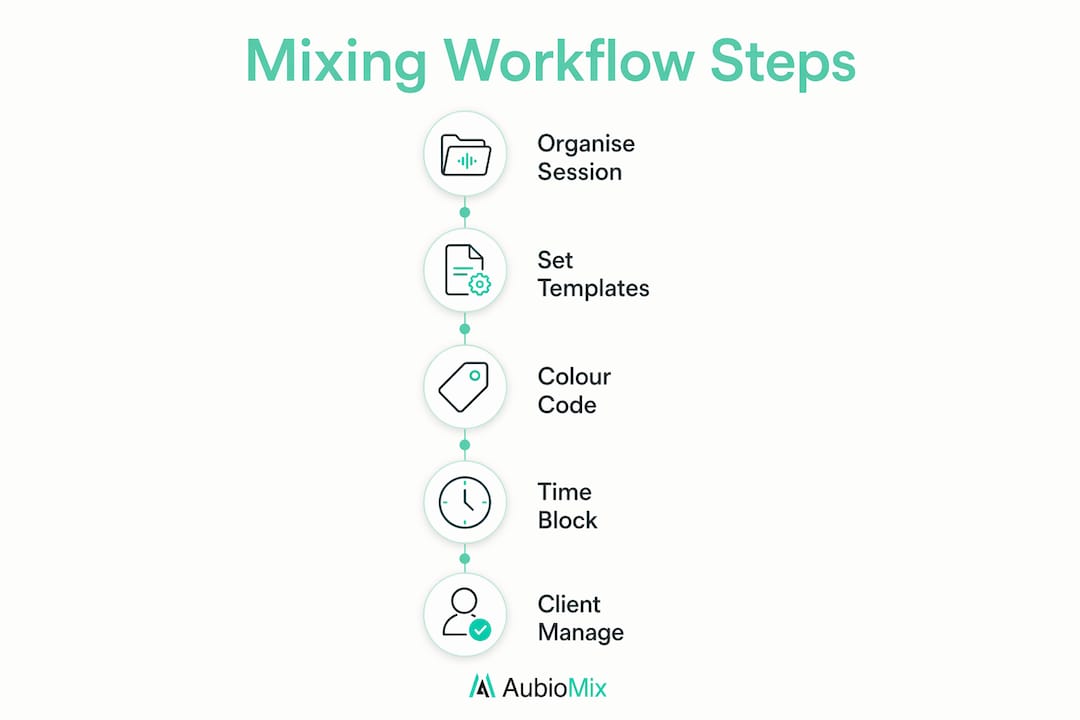
A well-organised DAW session is the single biggest time-saver available to any mix engineer. Organising your session consistently saves two or more hours per mix by eliminating the time lost searching for files or deciphering unlabelled tracks. That initial investment of around 60 minutes pays back every single time you open the project.

Folder structure and naming conventions
Start with a clear folder hierarchy for every project: a root folder containing subfolders for stems, bounces, session files, and client assets. Name every audio file descriptively before you import it. "Kick_main_v2.wav" tells you everything instantly. "Audio_003.wav" tells you nothing and costs you minutes every time you need it.
Track naming inside your DAW follows the same logic. Name every track before you record or import anything. Use consistent abbreviations across all projects so your muscle memory kicks in immediately when you open a session weeks later.
Colour coding and track order
Colour coding tracks by instrument group is the most effective method for maintaining session clarity. Assign drums a consistent dark blue, bass a deep purple, guitars green, keys yellow, and vocals orange. This takes roughly 10 seconds per track and saves significant mental effort in large sessions. Mood-based colour schemes feel intuitive at first but break down the moment a second engineer opens your session.
Track order should reflect signal flow and accessibility. Place drums and bass at the top, then harmonic elements, then leads and vocals. This mirrors how you think about a mix and reduces the time spent scrolling.
- Create a root project folder before opening your DAW.
- Name all audio files before importing them into the session.
- Assign instrument-group colours immediately after creating tracks.
- Arrange tracks in signal-flow order: rhythm, harmony, melody, vocals.
- Add markers for each song section (intro, verse, chorus, bridge, outro).
- Save a version-controlled bounce after every significant change.
Pro Tip: Place markers at every section boundary before you touch a single fader. You will navigate the session three times faster, and clients will find revision timestamps much easier to reference.
Use track stacks or folder tracks to group related elements. Drum submixes, backing vocal stacks, and parallel compression buses all benefit from being collapsed into a single folder when you are not actively working on them. This keeps your session view clean and your attention focused.
Do templates and presets really speed up your mix?
Yes, and the time savings are immediate. Session templates with pre-routed buses, named and colour-coded tracks, and insert presets save 20 minutes or more per session by removing every repetitive setup step. That is 20 minutes of creative energy redirected to actual mixing decisions.
Building a template that works for you
A good template is genre-specific. A rock template needs a parallel compression bus for drums, a high-pass filter on every non-bass track, and a vocal chain with a de-esser and a limiter already inserted. An electronic music template needs sidechain routing pre-configured between the kick and the bass. Build one template per genre you regularly work in, and update it after every session where you find yourself repeating the same setup steps.
Key elements to include in every template:
- Pre-named and colour-coded tracks for all common instrument groups
- Aux sends routed to reverb, delay, and parallel compression returns
- A master bus chain with a reference limiter inserted but bypassed
- Automation lanes pre-configured for master volume and send levels
- A dedicated "scratch" track for quick reference recordings
Pre-configuring automation for common moves in your template accelerates the mix refinement stage. Volume fades, effect send rides, and filter automation are faster to tweak than to draw from scratch every time.
Pro Tip: Keep a "template audit" note in your project folder. After each session, jot down one thing you set up manually that could be pre-built. Update your template monthly and you will notice the setup time shrinking steadily.
One common mistake is overloading a template with every plugin you own. A bloated template loads slowly, confuses collaborators, and tempts you to use processors you do not actually need. Keep your template lean. Insert plugins only when the session calls for them.
| Template element | Time saved per session |
|---|---|
| Pre-routed aux buses | 5–8 minutes |
| Named and colour-coded tracks | 3–5 minutes |
| Insert presets on common channels | 4–6 minutes |
| Pre-configured automation lanes | 3–4 minutes |
| Master bus chain bypassed and ready | 2–3 minutes |
How does time-blocking improve mixing speed?
Time-blocking is the practice of assigning a fixed, uninterrupted window to a single task. Separating your production workflow into distinct phases reduces cognitive friction and accelerates creative progress. When you mix and arrange simultaneously, both tasks suffer.
The 120-minute focused mixing session
A structured 120-minute session is one of the most effective efficient audio mixing techniques available. The recommended breakdown is 0–15 minutes loading your template and reviewing the brief, 15–60 minutes building core balance and tone, 60–90 minutes arranging automation and effects, and 90–120 minutes mixing refinements and bouncing a rough. This structure keeps you moving forward and prevents the common trap of endlessly tweaking the same element.
Auditory fatigue skews your frequency perception towards bright highs and scooped mids. Every decision you make after the 90-minute mark in a long session is less reliable than the ones you made at the start. Shorter, focused sessions with proper rest between them consistently produce better mixes than marathon late-night sessions.
Mixing after 7 or more hours of sleep and limiting sessions to around 90 minutes outperforms longer, fatigued sessions in both quality and speed. This is not a lifestyle suggestion. It is a technical recommendation grounded in how auditory perception degrades with fatigue.
Keyboard shortcuts and muscle memory
Mastering a handful of keyboard shortcuts speeds up editing tasks by 3–4 times. The key word is "handful." Most producers waste time trying to learn every shortcut at once. Start with the five actions you perform most often: looping a region, zooming in and out, splitting a clip, muting a track, and undoing a mistake. Build genuine muscle memory for those five before adding any more.
- Identify your five most-repeated DAW actions this week.
- Look up the keyboard shortcut for each one.
- Disable the mouse-click equivalent for two weeks to force the habit.
- Add five more shortcuts only after the first set feels automatic.
- Review your shortcut list every three months and retire any you no longer use.
Pro Tip: Print your top 10 shortcuts and tape them to your monitor for the first two weeks. The visual reminder removes the hesitation that breaks your flow.
You can find a deeper breakdown of how phase separation reduces cognitive load in this guide to mixing session structure, which covers the full producer workflow from template loading to final bounce.
How do you manage multiple clients without slowing down?
Client management is a workflow issue, not just a communication issue. Time-blocking and batching administrative tasks allows engineers to focus more deeply on mixing, improving both speed and output consistency. Every unplanned client check-in costs you more than the two minutes it takes to reply. It costs you the focus you had before the interruption.
The core principle is maintaining one trusted source of truth for every project's status. A simple spreadsheet with columns for client name, project stage, next action, and deadline is sufficient. You do not need complex project management software. You need a system you will actually use every day.
Practical steps for managing multiple clients without chaos:
- Assign each client a fixed delivery day rather than a vague "end of the week" promise.
- Stagger delivery dates so no two clients expect a bounce on the same day.
- Send a brief status update at each project milestone, not just when something goes wrong.
- Batch all client email replies into one 20-minute window per day, not throughout the day.
- Build a standard intake form that captures stems format, reference tracks, and revision limits before work begins.
A 30-second status email sent at each project stage buys days of silence and client confidence. Clients chase engineers when they feel uncertain about progress. Remove the uncertainty and the interruptions largely disappear.
Pro Tip: Set an out-of-office style auto-reply during your deep mixing blocks. Something simple like "I am in a mixing session until 3PM. I will reply to all messages this afternoon." This sets expectations without requiring you to explain yourself each time.
Knowing when to refer a project out is also part of efficient workflow management. Overcommitting degrades every project in your queue. A full guide to client feedback management covers how to structure revision rounds so they do not spiral into endless back-and-forth.
Key takeaways
The fastest mixing workflows combine organised sessions, lean templates, focused time-blocks, and proactive client communication to save hours per project without sacrificing quality.
| Point | Details |
|---|---|
| DAW organisation saves hours | Consistent session setup saves 2+ hours per mix by eliminating file-search time. |
| Templates remove setup friction | Pre-built templates with routed buses and presets save 20+ minutes per session. |
| Time-blocking protects focus | 120-minute structured sessions with phase separation reduce cognitive fatigue and improve decisions. |
| Shortcuts multiply speed | Mastering 5 core keyboard shortcuts speeds up editing by 3–4 times before adding more. |
| Client systems prevent interruptions | Batched emails and staggered deadlines keep client check-ins from breaking your mixing flow. |
What I have learned about sustainable speed in mixing
Speed without sustainability is just burnout with a faster countdown. I have seen producers chase faster turnarounds by cutting sleep, skipping template maintenance, and saying yes to every client. The result is always the same: mixes that need more revisions, not fewer, and a workflow that grinds to a halt within a few months.
The producers I respect most protect their rest as seriously as they protect their session files. Auditory fatigue is not a myth or an excuse. It is a physiological reality that makes your high frequencies sound too bright and your mids disappear. A mix made at 1AM after a 12-hour session will cost you more time in revisions than the hour you "saved" by not sleeping.
I also think the shortcut obsession is overrated as a starting point. Most engineers I know who are genuinely fast are not fast because they know 200 keyboard shortcuts. They are fast because their sessions are so well-organised that they rarely need to search for anything. Organisation is the foundation. Shortcuts are the polish on top.
The honest truth about mixing speed is that most of the time you lose is not in the mix itself. It is in the setup, the client back-and-forth, and the decision fatigue from poorly structured sessions. Fix those three things first, and the mix itself becomes the easy part.
— Aubiomix
Get faster, clearer feedback on every mix
Getting your mix to a professional standard faster depends on knowing exactly what needs fixing, and knowing it early.

Aubiomix is an online app where you upload your audio file and receive detailed, pro-level mix feedback with specific, actionable steps for both mixing and mastering. Instead of spending hours second-guessing your low-end balance or wondering whether your vocal sits right, you get a clear picture of what to address and in what order. That kind of focused direction cuts your revision cycles significantly and keeps your workflow moving forward. If you want to spend less time guessing and more time making decisions that actually improve your mix, Aubiomix is worth trying today.
FAQ
What is the fastest way to speed up a mixing workflow?
The fastest improvement comes from building a genre-specific DAW template with pre-routed buses and named tracks. This alone removes 20 or more minutes of repetitive setup from every session.
How long should a focused mixing session be?
A 90–120 minute session is the recommended length for maintaining reliable frequency decisions. Auditory fatigue degrades perception after extended periods, leading to poor mix choices.
How many keyboard shortcuts should I learn at once?
Start with five shortcuts covering your most-repeated actions, such as looping, zooming, splitting, muting, and undoing. Build muscle memory for those before adding more.
How do I manage multiple mixing clients without losing speed?
Assign each client a fixed delivery day, batch all email replies into one daily window, and send brief status updates at each project milestone to prevent anxious check-ins.
Does colour coding tracks actually save time?
Yes. Colour coding by instrument group takes around 10 seconds per track and significantly reduces the mental effort of navigating large sessions, particularly when returning to a project after a break.