
Transient shaping drums let you boost or cut the attack and sustain of a hit independently, adding snap or tightening decay without the pumping or breathing artefacts compression can leave behind. It works because the plugin tracks the shape of the envelope rather than a fixed threshold, so it treats loud and quiet hits the same way. The rest of this guide gives you the recipes, the ordering rules, and the safety checks to use it properly.
TL;DR:
- Transient shaping tracks the envelope's rate of change, allowing independent control of attack and sustain without affecting overall volume.
- Use a transient shaper for precise, transparent adjustments to punch and decay, rather than for broad dynamic control or heavily complex signals.
- Start with moderate settings: boost attack by two to four decibels and reduce sustain by four to eight decibels on kick drums, adjusting based on genre and context.
- Employ multiband, mid/side, or parallel shaping techniques to target specific frequency ranges, stereo image, or add subtle depth without overwhelming the mix.
- Always level-match processed signals during A/B comparisons, check phase in mono, and consider expert review to ensure transient modifications sit naturally within your mix.
Table of Contents
- What Is Transient Shaping and How Does It Work?
- Transient Shaper or Compressor: Which Do You Need?
- Practical Recipes for Kick, Snare, Toms, and Bus
- Multiband, Mid/Side, and Parallel Shaping Techniques
- Where to Place a Transient Shaper in Your Chain
- Common Pitfalls When Shaping Drum Transients
- How Did Transient Shaping Technology Develop?
- Comparing the Main Transient Shaping Tools
- How Do Transient Detection Algorithms Actually Work?
- Combining Transient Shaping With Gating and Drum Replacement
- Does Transient Shaping Suit Every Genre?
- A Producer's Take: Transient Shapers Are Scalpels, Not Fixes
- Get Expert Eyes on Your Drum Transients
- Sources
- FAQ
What Is Transient Shaping and How Does It Work?
Every drum hit has two distinct phases: the attack, which is the sharp initial spike of energy, and the sustain, which is everything that follows as the sound decays. A transient shaper gives you direct control over both, usually with nothing more than two knobs.
What makes this different from a compressor is the detection method. Compressors react to absolute level against a threshold you set, so a loud snare hit gets squashed harder than a quiet one. A transient shaper instead tracks the rate of change in the signal, comparing each moment to what came just before it. This is level-independent envelope detection, and it means the plugin responds the same way whether the drum was hit softly or hard, because it's watching the shape of the transition, not the volume. Sound On Sound's breakdown of transient processors explains this distinction well, and it's the reason shapers feel so much more transparent than compression when you're just trying to add punch.
Most plugins on the market share a similar control set, even if they dress it up differently:
- Attack — boosts or reduces the initial spike, controlling perceived punch or click
- Sustain — boosts or reduces the tail, controlling body, ring, or room decay
- Mix or blend — lets you dial in how much of the processed signal returns to the original
- Sensitivity or detection time — adjusts how quickly the algorithm reacts to changes, which matters on fast or overlapping hits
- Focus or frequency — some designs (including multiband tools) let you target specific frequency ranges rather than the full-range signal
Once you understand that attack and sustain are separate dials on the same envelope, the rest of this becomes a matter of taste and restraint.
Transient Shaper or Compressor: Which Do You Need?
Reach for a transient shaper when you want punch or tightness without touching the overall dynamic range of the track. It's the right tool for adding consistent snap to a kick, taming ring on a room mic, or sharpening attack without triggering a compressor's gain reduction and its side effects.
Reach for a compressor when the problem is really about overall dynamic control, taming a snare that swings wildly in level across a performance, or gluing a drum bus together so it sits as one cohesive unit. Sustain control on a shaper is powerful, but it's not built for heavy-handed tail extension on complex, overlapping signals. Sound On Sound's engineers note that shapers often reset too fast on busy material, which is why many mixers still lean on parallel compression for big, sustained tails and save the shaper for attack work and gentler sustain moves.
Often the answer isn't either/or. A common chain uses the shaper first, to define the shape of the hit, then a compressor afterwards to control the overall level once that shape is locked in. Try this ordering test on your next session:
- Insert the shaper and dial in attack/sustain until the hit feels right in isolation
- Bypass the shaper and compare against the raw track at matched loudness
- Re-engage the shaper, add your compressor after it, and listen for pumping or exaggerated transients hitting the compressor too hard
Pro Tip: Do your A/B test with the fader gain matched between bypassed and processed signal. Transient shaping almost always changes perceived loudness, and an uncontrolled level jump will trick your ears into preferring the louder version every time.
Practical Recipes for Kick, Snare, Toms, and Bus
These are starting points, not rules. Every kit, room, and genre shifts these numbers, but they'll get you into the right neighbourhood fast.
-
Kick drum. Start with attack boosted +2 to +4 dB and sustain pulled back -4 to -8 dB to tighten the low end, according to typical starter ranges documented on MusicProductionWiki. Set the mix around 60 to 80% so some of the original low-frequency weight survives. Watch how the tightened decay interacts with your bass part. Cutting sustain too hard can leave a kick sounding clicky and thin against a full-bodied bass line.
-
Snare drum. The same source suggests attack boosts of +1 to +5 dB with sustain reductions of -2 to -4 dB as a sensible range. Push attack further if you want a modern, aggressive crack; go easier for a vintage, roomy feel. Check bleed carefully. If your snare mic is picking up hi-hat or kick, an aggressive attack boost will exaggerate that bleed just as much as the snare hit itself, and if you're blending in room mics, sudden sustain cuts can create a phase mismatch between the close mic and the room signal that's audible as a hollow, flanged quality on the transient.
-
Toms. Toms reward experimentation more than any other drum in the kit. A sustain cut tightens them for fast fills that need to stay articulate; a sustain boost adds weight and drama for arrangements where the toms carry a big moment. There's no universal setting here, it genuinely depends on what the arrangement is asking the tom to do.
-
Overheads and room mics. This is where transient shaping earns its keep on acoustic kits. Sustain reductions in the -4 to -10 dB range tame unwanted ring and room decay that muddies a mix, particularly in smaller or less flattering rooms. Gentle attack lifts, a couple of dB at most, add presence and air without making the overheads feel artificially spiky. Go carefully here, because overheads carry the whole kit's stereo image, and aggressive processing shows up as an obvious, unnatural sheen.
-
Programmed and sample-based drums. Counterintuitively, boosting both attack and sustain together often makes programmed kits feel more alive and less static, adding a sense of physical space that a raw sample sometimes lacks. Keep an eye on your output meter here. Sample-based kits are frequently already peaking close to 0 dB, and stacking attack gain on top will clip fast.
-
Drum bus. Be conservative on the bus. Attack lifts of +1 to +2 dB and sustain trims of -1 to -3 dB are usually enough to add cohesive punch across the whole kit without smearing the balance you've already dialled in on individual channels. Keep sensitivity low so the shaper isn't chasing every hi-hat tick, and consider a multiband approach so you can shape the kick's punch separately from the cymbals' shimmer. Automating the bus shaper's settings across sections, adding a touch more attack in the chorus, easing off in a sparse verse, often does more for a track's dynamic story than any single static setting.
Statistic to keep in mind: the ranges above (kick attack +2 to +4 dB, snare attack +1 to +5 dB) aren't arbitrary. They map to the point where most ears perceive a clear increase in punch without the hit starting to sound processed, per the practical guidance in MusicProductionWiki's transient shaping breakdown. Push much further and you're in diminishing returns territory, where every extra dB buys you less punch and more artefact.
Multiband, Mid/Side, and Parallel Shaping Techniques
Full-range shaping treats the whole signal as one event, which works fine until you need the kick's punch and the cymbal's shimmer to behave differently. That's where these three techniques come in.
- Multiband shaping splits the signal into frequency bands, commonly below 200 Hz, between 200 Hz and 6 kHz, and above 6 kHz, and lets you apply different attack and sustain amounts to each. The Native Instruments guide to enhancing drum beats describes exactly this kind of split for tightening low-end punch on a kick while independently emphasising snare click or hi-hat sheen, all from one processed source.
- Mid/side shaping targets the stereo image rather than frequency. Tightening sustain on the mid channel keeps the kick and snare focused and centred, while treating the sides differently can widen or calm the perceived spread of overheads and room mics without touching the centre image.
- Parallel shaping runs a duplicate signal through an aggressive shaper on a send, then EQs that return (often boosting low end for weight or high end for click) before blending it back under the dry signal. This sidesteps some of the limitations of committing a single plugin's full effect to the main channel, as Sound On Sound's guide to controlling acoustic drum dynamics demonstrates. Watch for phase cancellation between the dry and processed paths, and blend by ear rather than by a fixed percentage.
Vendor tools like iZotope Neutron's transient module build delta and multiband monitoring directly into the plugin, letting you isolate exactly what's changing as you push these controls, which matters enormously once you're stacking more than one technique at a time.
Where to Place a Transient Shaper in Your Chain
A dependable starting order is gate, then transient shaper, then EQ, then compressor. The gate clears out bleed and noise before the shaper has to detect envelopes in a cleaner signal. The shaper defines the punch and decay shape before EQ tonally balances it, and the compressor controls the finished dynamic range last, once it's actually working on the shape you want.
Output gain deserves real attention. Boosting attack raises peak level, sometimes significantly, and Sound On Sound warns that this can push enough extra signal into a downstream bus to clip it or trigger a compressor far harder than intended, producing pumping you'll struggle to diagnose if you don't know where it came from. Always check your output meter after dialling in attack, and turn down the shaper's output stage rather than leaving the surprise for the next plugin in the chain.
Three checks worth running on every drum bus:
- Level-match bypass. Compare processed against unprocessed at matched loudness, never at whatever level the plugin happens to output.
- Mono check. Fold the mix to mono and listen for any hollowness introduced by parallel or mid/side processing.
- Reference track. Play a professionally mixed reference at the same loudness and compare punch and decay character directly against your own drums.
Pro Tip: Automate a temporary gain-reduction plugin after your shaper while you're dialling in settings, just to see the peak levels in real numbers. It's far easier to spot a 6 dB spike on a meter than to catch it by ear in a busy mix.
Common Pitfalls When Shaping Drum Transients
Overprocessed drums tend to sound brittle, clicky, and oddly disconnected from the rest of the mix, a clear sign to back off attack or pull the mix control down rather than reach for more.
Parallel processing introduces its own trap: phase combing between the dry and processed signal, audible as a thin, hollow, or flanged quality. A linear-phase EQ on the processed return, or a tiny manual timing nudge of a few samples, usually resolves it.
Sensitivity and detection-time settings that are mismatched to the material will cause the algorithm to hunt the wrong events entirely, boosting hi-hat bleed instead of the kick, for example. Start with moderate detection times and adjust while soloed before committing to a full mix decision.
- Brittle or artificial sound: reduce attack amount, lower the mix percentage
- Hollow or flanged tone on parallel returns: try linear-phase EQ or a small timing offset
- Shaper reacting to the wrong hits: adjust sensitivity and detection time while soloed
- Need for big, sustained tails on complex material: reach for parallel compression instead of extreme sustain settings
How Did Transient Shaping Technology Develop?
Transient shaping as a dedicated category effectively began with the SPL Transient Designer, a hardware unit built around SPL's patented level-independent detection circuit. Its genius was simplicity: two knobs, attack and sustain, with no threshold, ratio, or make-up gain to configure. Engineers could shape a drum's punch in seconds, which was radical at a time when compressors were the only widely available tool for controlling dynamics.
That hardware unit is still treated as something of a reference point decades later, and plenty of engineers describe its sound as a specific flavour rather than a neutral utility. As digital signal processing matured through the 2000s, plugin developers began recreating and extending that level-independent detection in software, first as close hardware emulations, then as increasingly feature-rich tools adding multiband splits, mid/side processing, and visual envelope displays that the original hardware never offered.
The technology's evolution has tracked the broader shift in mixing itself, from hardware-bound, knob-per-function workflows to software environments where a producer can automate a shaper's settings bar by bar, split it across frequency bands, or run it in parallel with near-zero setup cost. What started as a clever analogue circuit for tightening a snare is now a standard module inside full channel-strip plugins and mixing suites, often bundled alongside EQ and compression rather than sold as a standalone box.
Comparing the Main Transient Shaping Tools
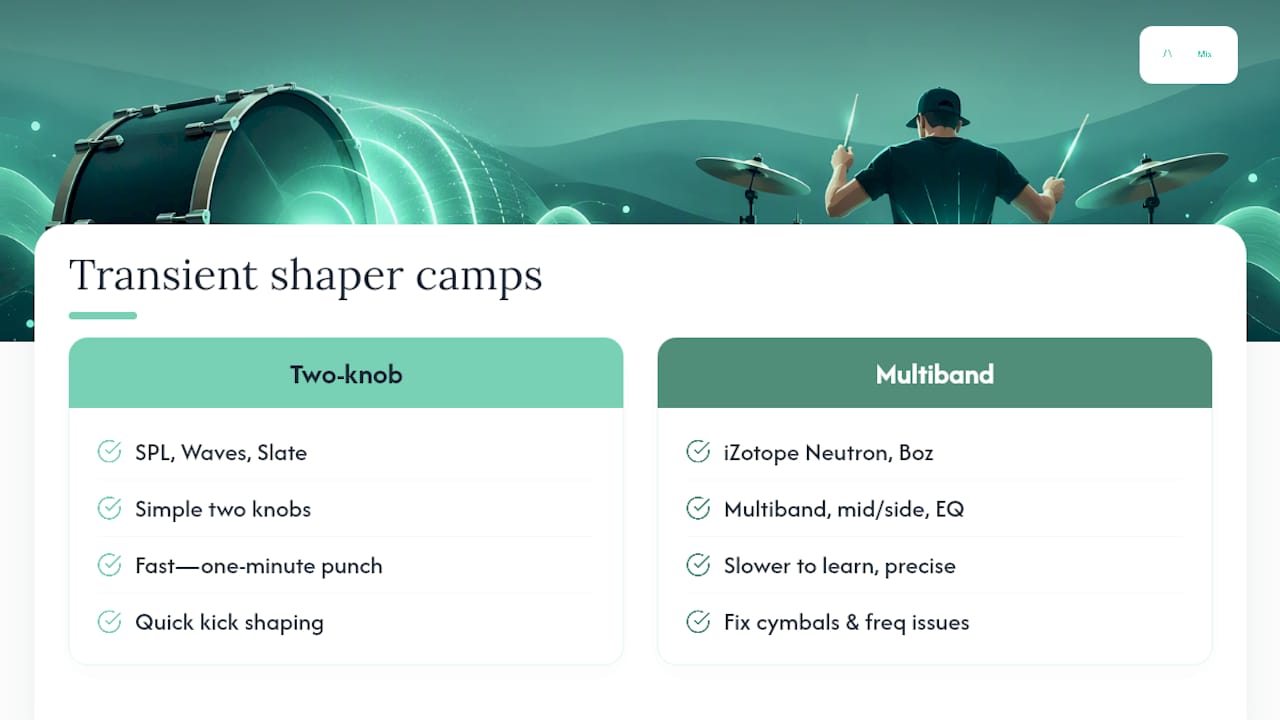
The plugin landscape splits roughly into two camps: simple two-knob designs descended from the original hardware concept, and feature-rich tools that add multiband, mid/side, or EQ-integrated processing.
The SPL Transient Designer remains the reference for the simple approach, a two-knob workflow that's stayed largely unchanged because it doesn't need to change. Waves Smack Attack and Slate Digital Transient Shaper follow a similarly direct philosophy in software form, prioritising speed over depth. Softube Transient Shaper and Kilohearts Transient Shaper sit in the same tradition, favouring a fast, musical result over a deep control set.
At the other end, iZotope Neutron's Transient Shaper module builds in multiband splitting, mid/side processing, and delta or "listen" monitoring so you can isolate exactly what's being added or removed, a workflow iZotope's own tutorial walks through in detail for drum breaks specifically. Boz Digital Transgressor takes a similarly deep approach, adding filtering and multiband options aimed squarely at engineers who want frequency-specific control rather than a single full-range effect.
Neither camp is objectively better. A two-knob tool gets you a punchy kick in under a minute; a multiband tool takes longer to learn but solves problems the simple designs structurally can't touch, like boosting kick punch and taming cymbal harshness from the same plugin instance. Most working mix engineers end up owning at least one from each camp, reaching for whichever fits the specific problem in front of them.
How Do Transient Detection Algorithms Actually Work?
Underneath the two knobs, a transient shaper is running continuous analysis on the incoming signal's envelope, tracking how quickly amplitude rises and falls rather than comparing it against a fixed threshold the way a compressor does.
The detection stage typically produces two separate signals internally: one representing the fast-rising attack portion of each transient, and one representing the slower-decaying sustain portion. The plugin then applies independent gain changes to each of these derived signals before recombining them into the processed output. This is why you can push attack up while pulling sustain down simultaneously and get a tighter, punchier hit rather than a louder one overall, you're reshaping the envelope's proportions, not scaling the whole thing up.
Sensitivity or detection-time controls adjust how the algorithm distinguishes one transient from the next. Set too fast, it can misread rapid hi-hat patterns or drum-fill rolls as one continuous event rather than distinct hits. Set too slow, it may miss quieter transients entirely, particularly on ghost notes or lighter snare hits.
Multiband versions of this algorithm run the same envelope analysis independently within each frequency band after splitting the signal with crossover filters, which is precisely how a plugin can tighten a kick's sub-frequency thump while leaving a cymbal's high-frequency detail completely untouched, two separate detection processes working on two separate slices of the spectrum, recombined at the output stage.
Combining Transient Shaping With Gating and Drum Replacement
Transient shaping works best as one tool in a chain, not a replacement for the others already doing their job on a drum track.
Gating solves a different problem entirely: removing unwanted noise, bleed, or ring between hits rather than reshaping the hits themselves. Running a gate before your transient shaper means the shaper's envelope detection is working on a cleaner signal, free of bleed transients that could confuse its sensitivity settings.
Drum replacement is a more drastic step, swapping the recorded hit for a sampled one entirely, and it solves problems transient shaping simply can't. If a snare's fundamental tone is wrong, too boxy, too thin, no amount of attack or sustain adjustment fixes that, because you're only reshaping the envelope of the existing sound, not changing its tonal character. Transient shaping is the right call when the tone is right but the punch or decay needs adjusting; drum replacement is the right call when the tone itself is the problem.
In practice, many engineers use both in sequence: gate to clean up bleed, transient shaper to refine the punch and decay of the cleaned signal, and reserve full replacement only for hits that are tonally unusable no matter how they're shaped.
Does Transient Shaping Suit Every Genre?
The genre you're mixing changes what "correct" transient shaping even looks like, and applying a rock engineer's settings to an electronic track (or the reverse) is a common way to end up with drums that feel wrong for the style.
Modern pop and hip-hop production often leans into aggressive attack boosts on kick and snare, chasing the kind of hyper-punchy, forward drum sound that cuts through on small speakers and phone playback. Rock and metal mixing tends to favour sustain control on toms and overheads over dramatic attack boosts, tightening a live room's natural ring without stripping the recording of its acoustic character. Programmed genres like house, techno, and trap frequently use transient shaping to add life back into samples that would otherwise sound static and lifeless when looped for four minutes straight, boosting both attack and sustain together for a more organic feel despite the source being entirely synthetic or sampled.
Jazz and acoustic genres generally call for the lightest touch of all, gentle sustain reduction on room mics to control natural reverb tails, minimal attack processing, preserving the dynamic performance rather than flattening it into a uniform, processed shape. There's no universal setting because there's no universal drum sound; the genre defines the target, and the shaper is just the tool that gets you there.
A Producer's Take: Transient Shapers Are Scalpels, Not Fixes
Fix your fader balance before you touch a shaper. Attack and sustain controls solve shape problems, not level problems, and no amount of transient processing rescues a mix where the drums simply aren't balanced against everything else. Automate settings across the arrangement rather than freezing one static value for the whole song, and when a change to the drum bus starts affecting how the rest of the mix sits, that's usually the point to get a second set of ears on the whole picture, not just the drum channel.
— AubioMix
Get Expert Eyes on Your Drum Transients
Once you've dialled in your attack and sustain settings, the hardest question is whether they're actually working in context, not just in isolation against your own ears, which get used to a sound fast. Expert online services can review your uploaded mix and flag whether your transient balance is sitting right against the rest of the arrangement, whether phase issues have crept in from a parallel chain, and how your drum-bus processing is interacting with everything downstream.

A useful review starts with good material. Export a before and after version of your drum bus, note down the specific attack and sustain moves you made, and submit both so the feedback can speak directly to what changed. Aubiomix checks dynamics, transient balance, phase, and EQ interaction across the full mix, the kind of cross-referencing that's genuinely difficult to do accurately on your own monitors after hours of listening to the same eight bars.
A single Mix Review costs £4.99 and gives you that focused pass on one track. If you're refining drum sounds across a full project, the Professional plan runs £19.99 a month and includes a set number of reviews, with Professional + at £34.99 a month for producers running more sessions through the pipeline regularly. Head to the pricing page to see turnaround times and pick the option that fits how often you're mixing.
Sources
For deeper technical grounding, Sound On Sound's guide to transient processors and its piece on controlling acoustic drum dynamics are essential reading. iZotope's drum-break tutorial and Native Instruments' guide to enhancing drum beats cover vendor-specific multiband workflows in practical detail.
- Using transient processors — Sound On Sound
- Transient shaping — MusicProductionWiki
- How to use transient shaper for better drum breaks — iZotope blog
- SPL Transient Designer 4 Mk2 product page
FAQ
What Is Transient Shaping?
Transient shaping is the process of independently boosting or reducing the attack and sustain portions of a sound's envelope, most often used on drums to add punch or control ring. It uses level-independent envelope detection rather than a fixed threshold, which is what separates it from compression, as Sound On Sound explains.
Is a Transient Shaper Just a Compressor?
No. A compressor reacts to absolute signal level against a threshold, squashing loud hits harder than quiet ones, while a transient shaper tracks the rate of change in the envelope regardless of overall level. This lets a shaper add snap or tighten decay far more transparently, without the pumping or breathing artefacts compression can introduce.
What Is the 80/20 Rule in Drumming?
Definitions of this rule vary depending on context, and it isn't a fixed technical standard within transient shaping or drum mixing specifically. If you've encountered it applied to drum programming or performance, it's worth checking the original source's exact framing rather than assuming a single universal meaning.
What Is the Best Transient Shaper Plugin?
There isn't a single best option, because simple two-knob tools like the SPL Transient Designer, Waves Smack Attack, and Slate Digital Transient Shaper solve a different problem than feature-rich tools like iZotope Neutron, Boz Digital Transgressor, or Softube and Kilohearts' transient modules. Choose a simple design for speed on a single element, and a multiband tool when you need frequency-specific control across a busy drum bus. Once you've picked your settings, a mix review through Aubiomix can confirm whether they're translating well against the rest of your arrangement.