

Stereo width is the perceived horizontal extent of sound between two speakers, defined entirely by the differences between the left and right audio channels, not by volume or simple panning. A signal that is identical on both channels is mono regardless of how loud it plays. Width only exists where those channels diverge. Understanding this distinction is the single most important shift a producer can make, because it reframes every widening decision around inter-channel decorrelation rather than just moving a pan knob. Tools like Mid/Side processing, stereo correlation meters, and techniques such as the Haas effect all operate on this same principle: create meaningful differences between channels, and the sound spreads wide.
What is stereo width and why does it matter in mixing?
Stereo width is less about left-right volume balance and more about the degree of decorrelation between channels. Two signals panned hard left and right but carrying identical content will still collapse to a single point when summed to mono. True width requires that the channels carry genuinely different information, whether through phase differences, distinct harmonic content, or complementary spatial cues.
The importance of stereo width in music goes beyond aesthetics. A well-managed stereo field gives each element its own perceptual space, reducing masking and improving clarity without reaching for more EQ or compression. Reverb tails, synthesiser pads, and room ambience are the natural candidates for width, while kick drums, bass lines, and lead vocals typically stay centred to preserve punch and intelligibility.
Width also affects how your mix translates. A track that sounds expansive on studio monitors can collapse, thin out, or lose energy entirely when played through a phone speaker or a mono Bluetooth device. This is why the importance of stereo width is inseparable from mono compatibility. Getting both right is what separates a professional mix from one that only sounds good in one listening environment.
How to measure stereo width in your mix
Measuring stereo width accurately requires two complementary tools: a stereo correlation meter and your own ears in mono. Neither alone is sufficient.
Reading a stereo correlation meter
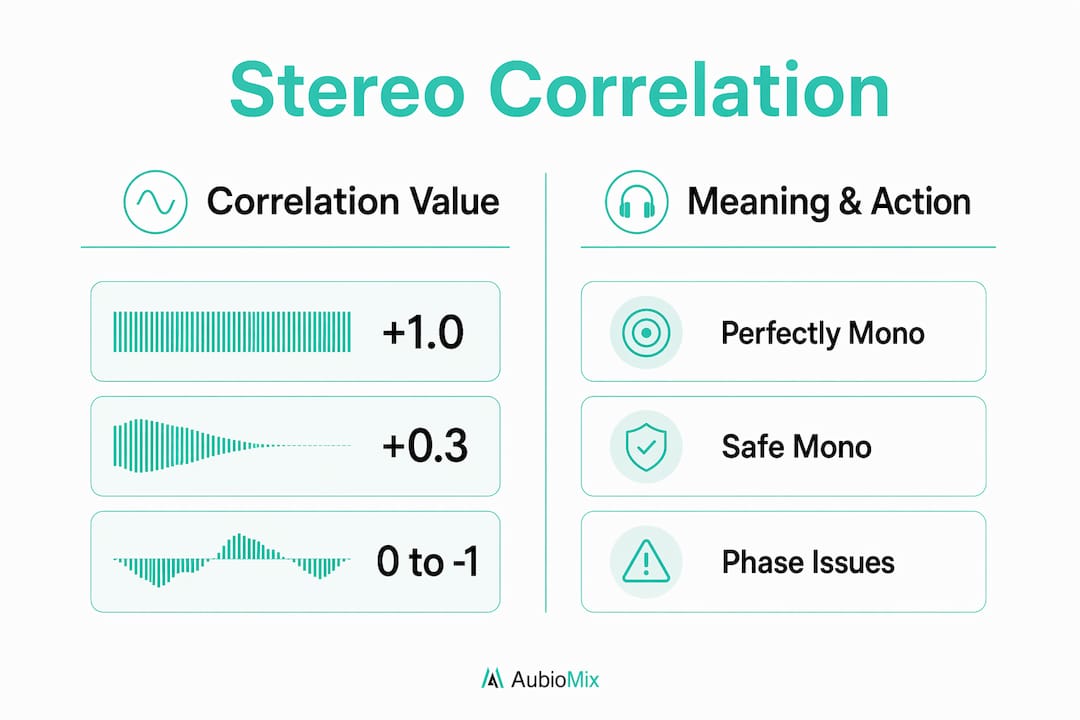
A correlation meter displays a value between +1 and below 0. At +1, the left and right channels are perfectly identical, which means the signal is mono. At 0, the channels are fully decorrelated with no relationship between them. Below 0, phase cancellation becomes likely when the signal is summed to mono, which can cause frequencies to cancel each other out and leave the mix sounding thin or hollow on small playback devices.
For the mix bus, keeping correlation above +0.3 is considered the safe threshold for mono compatibility. This does not mean every element needs to sit there. Individual tracks can run lower, but the combined output should stay in that range.
| Correlation value | What it means | Action required |
|---|---|---|
| +1.0 | Perfectly mono | No width present |
| +0.5 to +1.0 | Healthy stereo, mono safe | Ideal for mix bus |
| 0 to +0.5 | Wide stereo, monitor carefully | Check mono regularly |
| Below 0 | Phase cancellation risk | Narrow side channel or adjust delay |
Using Mid/Side processing for measurement
Mid/Side processing splits a stereo signal into two components: Mid, which is (L+R)/2 and represents everything common to both channels, and Side, which is (L-R)/2 and represents everything that differs. Listening to the Side channel in isolation tells you exactly what is contributing to width. A Side channel full of low-frequency content is a warning sign. A Side channel carrying rich midrange and high-frequency detail is a sign of healthy, perceptually effective width.
- Solo the Side channel to identify which elements are driving width
- Apply a high-pass filter to the Side channel to remove low-frequency phase content
- Compare Mid and Side levels to assess the balance of centred versus wide energy
- Use mono summing alongside the meter to catch narrow-band cancellations the averaged meter reading may miss
Pro Tip: Mono checks and correlation meters together provide the most reliable monitoring. The correlation meter gives you an averaged reading, but mono summing reveals narrow frequency cancellations that the meter can miss entirely.
What are the main stereo width techniques?
There are three primary approaches to creating or enhancing stereo width in a mix, and each carries a different set of trade-offs. Knowing when to use each one is what separates a controlled, professional stereo field from a wide-sounding mess that falls apart in mono.
Haas effect
The Haas effect uses a short delay of 5 to 30 ms between the left and right channels to create a strong perception of width. The brain interprets the delayed signal as coming from a different direction, producing a convincing spatial spread. The problem is that this delay creates comb filtering when the two channels are summed to mono, introducing deep notches in the frequency response that can hollow out the sound significantly. The Haas effect is bold and immediately impressive in stereo, but it is the least mono-compatible technique on the stereo width techniques list.
Allpass decorrelation
Allpass decorrelation filters shift the phase of a signal across frequencies without changing the overall magnitude. The result is a natural, transparent widening effect that produces only a mild spectral ripple of less than 2 dB on mono summing, compared to the deep comb-filter notches produced by Haas delay. This makes allpass decorrelation the preferred technique in modern professional mixing, particularly for elements that need to sit wide without compromising mono playback. Plugins like Ozone Imager and iZotope's stereo tools use allpass-based approaches for exactly this reason.
Mid/Side processing for width control
Mid/Side processing does not create new width from a mono signal. What it does is allow you to independently boost or attenuate the existing Side content of a stereo signal, giving you precise control over how wide an already-stereo element appears. Boosting the Side channel of a stereo reverb return, for example, pushes it further into the periphery of the mix without touching the centred Mid content. This is a surgical tool, not a creative widening engine.
| Technique | Stereo effect | Mono compatibility | Best use case |
|---|---|---|---|
| Haas effect | Very wide, bold | Poor, comb filtering | Stereo-only content |
| Allpass decorrelation | Natural, transparent | Good, minimal ripple | Pads, reverbs, ambience |
| Mid/Side processing | Precise, controlled | Excellent | Adjusting existing stereo content |
| Frequency-dependent widening | Targeted, clean | Very good | Midrange enhancement |
Frequency-dependent widening targets the 300 to 3000 Hz range where human auditory spatial perception is strongest. Widening below this range adds phase problems without any perceptual benefit, while widening above it can create harshness. Multiband stereo imagers like Waves S1 or Brainworx bx_stereomaker allow you to apply width selectively across the frequency spectrum.
Pro Tip: Never apply a single widening technique to your entire mix. Treat stereo width as a frequency-specific tool: keep bass mono, widen the midrange selectively, and let high-frequency content breathe naturally.
How to apply stereo width effectively when mixing
Applying stereo width well is about restraint and targeting. The goal is perceptual spaciousness, not maximum width on every element. Here is a practical workflow for applying width without compromising your mix.
- Identify your width candidates. Reverb returns, stereo synthesiser pads, room microphones, and chorus effects are natural sources of width. Kick drums, bass guitars, lead vocals, and snare drums should stay centred or close to it.
- Keep low frequencies mono. Apply a high-pass filter to the Side channel of any widened element below 120 Hz. This preserves punch, prevents phase cancellation, and keeps the low end feeling solid on any playback system.
- Use M/S processing to balance side energy. After applying widening, check the Side channel content in isolation. If it sounds cluttered or carries too much low-mid energy, pull back the Side gain or apply targeted EQ to clean it up.
- Check correlation regularly. Aim to keep the mix bus correlation above +0.3 throughout the session, not just at the end. Width decisions compound across a mix, and catching a problem early is far easier than untangling it at the mastering stage.
- Mono check before you commit. Before printing any mix, sum to mono and listen critically. If an element loses body, thins out, or disappears, the widening technique is causing phase cancellation and needs adjustment.
Managing phase issues is the most overlooked part of applying stereo width. Over-widening creates a mix that sounds impressively large in stereo but loses its impact the moment it plays through a single speaker. The mix engineer workflow that produces consistent, professional results always includes both stereo and mono listening at every stage.
Pro Tip: When using allpass decorrelation on a stereo pad, try applying it only to the Side channel via an M/S insert chain. This adds decorrelation to the already-wide content without touching the centred Mid signal, giving you width that is both convincing and mono-safe.
Common stereo width problems and how to fix them
Even experienced producers run into stereo width issues. Most problems fall into a small number of categories, and each has a clear fix.
- Phase cancellation on mono summing. The most common issue. The fix is to narrow the Side channel using M/S processing, reduce the delay time if using the Haas effect, or switch to allpass decorrelation entirely. Check the correlation meter and aim to bring the reading above +0.3.
- Thin or hollow sound after widening. This is the signature of comb filtering from Haas delay or excessive Side channel boosting. Reduce the widening amount, apply a high-pass filter to the Side channel, or replace the Haas-based plugin with an allpass decorrelation tool.
- Width that disappears on small speakers. This usually means the widening is phase-based and not surviving mono summing. Use the M/S decode technique to isolate the Side channel and identify which elements are collapsing. Apply selective narrowing or frequency filtering to those elements.
- Correlation meter reading below 0. This is a red flag requiring immediate attention. Solo individual tracks to find the source, then either narrow the Side content, adjust delay times, or apply a high-pass filter to remove low-frequency phase content from the Side channel.
- Artefacts or unnatural movement in the stereo field. Often caused by over-processing with multiband stereo imagers. Reduce the widening amount on the offending frequency band and check whether the artefacts persist in mono.
Pro Tip: When diagnosing a mix that sounds wide but collapses on small speakers, decode to M/S and listen to the Side channel solo. Whatever you hear there is what is causing the problem. Reduce it, filter it, or replace the widening method.
Key takeaways
Stereo width is defined by inter-channel differences, and managing those differences with precision across frequency and technique is what produces mixes that sound wide, clear, and consistent on every playback system.
| Point | Details |
|---|---|
| Width comes from channel differences | Identical L and R signals are always mono, regardless of volume or panning. |
| Correlation above +0.3 is the safe threshold | Keep the mix bus above this value to maintain mono compatibility across playback devices. |
| Allpass decorrelation beats Haas for mono safety | Allpass filters produce less than 2 dB of mono ripple versus deep comb-filter notches from Haas delay. |
| Keep low frequencies mono | Widening below 120 Hz adds phase problems without any perceptual benefit to the listener. |
| Measure with both meters and ears | Correlation meters give averaged readings; mono summing catches narrow-band cancellations meters miss. |
The misconception that costs producers the most
Here at Aubiomix, we have analysed a huge number of mixes, and the single most common stereo width mistake is not using too little width. It is using too much of the wrong kind, in the wrong places, and then wondering why the mix sounds great on headphones but thin and lifeless on a phone or a club system.
The instinct to chase width is understandable. Wide mixes feel exciting and professional in the moment. But width that relies entirely on phase differences, particularly Haas delay applied broadly, is borrowed energy. It sounds impressive until the moment it is summed to mono, and then it collapses. I have heard mixes where the entire midrange disappears on mono playback because a stereo imager was applied to the full mix bus without any frequency filtering on the Side channel.
The producers who get this right are not the ones with the most plugins. They are the ones who safely apply stereo widening with intention, check correlation throughout the session, and treat mono as an equal listening environment rather than an afterthought. The technical tools are straightforward once you understand what width actually is. The discipline to use them consistently is what takes practice.
Do not chase extreme width. Chase width that survives every playback scenario. That is the standard worth aiming for.
— AubioMix
Get objective feedback on your stereo width with Aubiomix
Knowing the theory is one thing. Hearing exactly how your mix performs across stereo and mono playback is another.

Aubiomix is an online mix analysis tool built for producers and engineers who want clear, objective feedback on their mixes without waiting for a mastering engineer to tell them something is wrong. Upload your audio file and get detailed analysis covering stereo correlation, Side channel energy, mono compatibility, and overall mix balance, along with specific steps to fix what is not working. If you want to know whether your stereo width is holding up across all playback systems, try Aubiomix and get the kind of feedback that actually moves your mixes forward.
FAQ
What is the stereo width definition in audio production?
Stereo width is the perceived horizontal spread of sound between two speakers, created by differences between the left and right audio channels. A signal with identical left and right content is mono regardless of its volume.
How do I measure stereo width in my mix?
Use a stereo correlation meter alongside mono summing. A correlation reading above +0.3 on the mix bus indicates safe mono compatibility, while values below 0 signal phase cancellation risk.
What is the Haas effect and is it safe to use?
The Haas effect uses a 5 to 30 ms delay between channels to create width, but it introduces comb filtering on mono summing. It is best used sparingly on stereo-only content, with allpass decorrelation preferred for mono-safe widening.
Why does my mix sound wide in stereo but thin in mono?
This is typically caused by phase-based widening, such as Haas delay or excessive Side channel boosting, creating cancellation when channels are summed. Decode to M/S, solo the Side channel, and reduce or filter the content that is causing the collapse.
What is the difference between stereo panning and stereo width?
Panning moves a signal's volume between left and right channels. Stereo width is created by inter-channel differences in content, phase, or harmonic character. You can pan a signal hard left and right and still have no real width if both channels carry identical audio.