
Mid-Side EQ is defined as the independent equalisation of a stereo signal's centre (Mid) and stereo difference (Side) components, giving mix engineers surgical control that standard stereo EQ cannot match. Where stereo EQ applies identical processing to both left and right channels, Mid-Side equalization treats them as separate sonic spaces. The Mid channel carries everything panned to the centre, including lead vocals, kick, and bass. The Side channel holds the stereo ambience, reverb tails, and wide-panned elements. Tools like FabFilter Pro-Q 3, Brainworx bx_digital V3, and iZotope Ozone have made Mid-Side processing accessible to producers at every level, and in 2026 it is a standard part of professional mixing and mastering workflows.
How does mid-side EQ differ from stereo EQ?
Mid-Side EQ encodes a stereo signal into two new channels before any processing begins. The Mid channel is calculated as (L+R)/2, capturing everything shared between left and right. The Side channel is (L-R)/2, capturing only what differs between them. This encoding and decoding is mathematically lossless, meaning no audio information is lost in the process unless you actively alter the signal.
Standard stereo EQ applies the same filter curve to both channels simultaneously. If you boost 10 kHz on a stereo EQ, you brighten the lead vocal and the room reverb equally. Mid-Side equalization breaks that link entirely. You can boost vocal presence in the Mid channel without touching the Side channel reverb tails at all. That precision is why mastering engineers consider it indispensable.
The encoding process does introduce one consideration worth knowing: phase coherence. If you apply minimum-phase EQ filters to the Mid and Side channels independently, you can create frequency-dependent phase shifts that blur the stereo image. Using linear-phase EQ mode on the master bus avoids this, though it adds latency and CPU load. For mixing rather than mastering, minimum-phase mode is often fine.
Here is a quick breakdown of what each channel controls:
- Mid channel: Lead vocals, kick drum, bass, centred synths, and any mono-panned element
- Side channel: Room reverb, stereo pads, wide-panned guitars, chorus effects, and stereo ambience
- Mid EQ moves: Affect clarity, presence, and body of the core mix
- Side EQ moves: Affect perceived width, air, and spatial depth
Pro Tip: Solo the Mid and Side channels independently using a utility plugin like Voxengo MSED before you EQ. Hearing each channel in isolation reveals problems you would never catch on a standard stereo bus.
What are the best mid-side EQ settings in 2026?

Getting your settings right is where most producers either unlock the technique or get into trouble. The good news is that the professional standard is built around restraint, not aggression.
The most widely used starting point is a high-pass filter on the Side channel set between 40 Hz and 100 Hz at a 12 dB/octave slope. Low-frequency stereo information is almost always problematic. It creates phase issues on mono playback and makes the low end feel loose and undefined. Filtering it out tightens the bass and gives the mix more punch without touching the Mid channel at all.
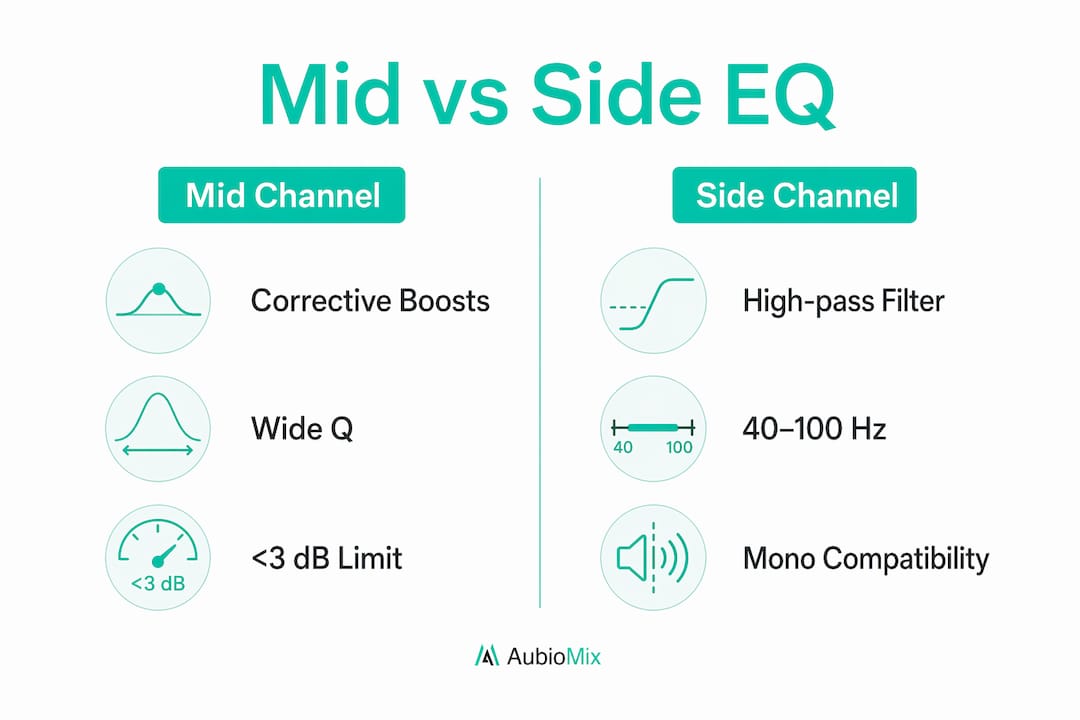
For the Mid channel, corrective boosts and cuts should stay within 3 dB, with a wide Q value between 0.6 and 1.2. Wide Q settings affect a broad frequency range gently rather than carving a narrow notch. This keeps the Mid channel sounding natural while addressing muddiness or boxiness around 300–400 Hz.
The table below summarises the key settings used by professional mastering engineers:
| Parameter | Mid Channel | Side Channel |
|---|---|---|
| High-pass filter | Not typically applied | 40–100 Hz at 12 dB/oct |
| Corrective boost/cut | Max 3 dB, Q 0.6–1.2 | Max 1 dB, Q approx 1.0 |
| Air/presence boost | 2–5 kHz for vocal clarity | 2–7 kHz for stereo width |
| EQ mode (mastering) | Linear-phase preferred | Linear-phase preferred |
| Compression ratio | 2:1–3:1 | 1.5:1–2:1 |
The compression ratios listed above apply when you combine M/S EQ with M/S compression, which is common on the master bus. The Mid channel gets slightly more compression because it carries the loudest, most dynamic elements. The Side channel is treated more gently to preserve the natural feel of the stereo field.
Pro Tip: Always check mono compatibility after any Side channel EQ move. Fold your mix to mono and listen for elements that disappear or sound thin. If they do, your Side channel boost is too aggressive.
How can mid-side EQ enhance different elements in a mix?
The real power of Mid-Side audio techniques shows up when you apply them to specific mix problems. Here are the most effective use cases, drawn from real mixing scenarios across pop, electronic, and indie rock productions.
- Lead vocal clarity: A narrow boost around 3–5 kHz on the Mid channel brings the vocal forward without brightening the reverb tails sitting in the Side channel. The vocal cuts through without the mix sounding harsh or over-brightened.
- Bass tightness: The Side channel high-pass filter at 60–80 Hz removes low-frequency stereo information that causes the kick and bass to feel loose. This is one of the fastest ways to add punch to a mix at the mastering stage.
- Stereo width and air: A gentle 1 dB bell boost on the Side channel between 2 kHz and 7 kHz adds shimmer and perceived width without smearing the centre image. This works particularly well on electronic and pop productions where the stereo field needs to feel expansive.
- Removing boxiness: A cut around 300–400 Hz on the Mid channel clears up the boxy, congested quality that often builds up from multiple centred instruments. Guitars, pianos, and vocals all compete in this range.
- Taming harsh room sound: A narrow cut on the Side channel around 2–4 kHz reduces the harsh, metallic quality of room reverb without dulling the overall mix.
You can read more about applying stereo widening safely to understand how Side channel EQ fits into a broader approach to stereo imaging. The key principle across all these applications is that Mid-Side equalization works best as a precision tool applied to a mix that is already well-balanced.
What are the common pitfalls of mid-side EQ?
Mid-Side processing is not a fix for a poorly organised mix. This is the most important thing to understand before you reach for it. M/S EQ is not a shortcut for fixing bad panning or out-of-phase sources. If your mix has phase problems at the source, M/S EQ will make them more audible, not less.
Here are the most common mistakes and how to avoid them:
- Boosting beyond 3 dB on either channel. Gains beyond 3 dB almost always signal a mix problem that needs fixing at the source. Pushing past this threshold creates spatial artefacts and phase incoherence that degrade the stereo image.
- Treating M/S EQ as a stereo widener. Aggressive Side channel boosts do not create width from nothing. They amplify whatever is already in the Side channel, including noise, bleed, and artefacts. The result is often an unnatural, phasey sound.
- Ignoring mono compatibility. Aggressive Side channel processing risks mono collapse, where elements that sound wide in stereo disappear or become thin when the mix is summed to mono. Always check with a correlation meter.
- Skipping A/B testing. Without comparing your processed version against the original at matched levels, it is easy to convince yourself that a change sounds better simply because it sounds different.
- Using M/S EQ before fixing the mix balance. If the vocal is buried because it is too quiet in the arrangement, no amount of Mid channel boosting will fix it properly. Sort the mix first, then use M/S EQ for refinement.
For a deeper look at where producers go wrong, the guide on common M/S mixing mistakes covers these pitfalls in detail with practical solutions.
Pro Tip: Use a phase correlation meter like the one in ADPTR Metric AB or iZotope Insight while you work. A reading consistently below +0.5 on the correlation meter suggests your Side channel processing is becoming too aggressive.
How to integrate mid-side EQ into your mixing workflow
Getting M/S EQ working smoothly in your sessions comes down to a few practical setup decisions. The technique is available in most modern DAWs and plugins, but the workflow varies depending on your tools.
- DAW setup: Pro Tools, Logic Pro, Ableton Live, and Reaper all support M/S-capable EQ plugins. FabFilter Pro-Q 3 lets you switch individual bands between stereo, Mid, and Side modes directly within the plugin, which makes it the most flexible option for in-session use.
- Independent monitoring: Use Voxengo MSED as a utility plugin to solo and monitor the Mid and Side channels separately before and after EQ. This gives you a clear picture of what each channel contains.
- Combining with M/S compression: Place your M/S EQ before your M/S compressor in the signal chain. EQ shapes the frequency content first, then compression controls the dynamics. This order gives you the most predictable results.
- Metering: ADPTR Metric AB and iZotope Insight both provide stereo width and phase correlation metering. Keep these visible while you work so you can catch over-processing before it becomes a problem.
- Iterative adjustments: Make one small move at a time, then reference against your unprocessed signal. M/S EQ rewards patience. Small, deliberate changes accumulate into a noticeably cleaner, wider, and more balanced mix.
For genre-specific guidance, the 2026 electronic music mixing guide covers how M/S EQ settings shift depending on whether you are working on a dense club track or a sparse ambient production.
Key takeaways
Mid-Side EQ delivers precise, independent control over the centre and stereo elements of a mix, making it the most targeted equalisation approach available to mix engineers in 2026.
| Point | Details |
|---|---|
| Core function | Mid-Side EQ processes the centre (Mid) and stereo difference (Side) channels independently for surgical control. |
| Essential Side channel move | Apply a high-pass filter at 40–100 Hz on the Side channel to tighten bass and improve mono compatibility. |
| Restraint is the rule | Keep boosts and cuts within 3 dB on both channels to avoid spatial artefacts and phase problems. |
| Linear-phase for mastering | Use linear-phase EQ mode on the master bus to preserve stereo integrity during M/S processing. |
| Fix the mix first | M/S EQ is a refinement tool, not a repair tool. Address source balance before applying M/S techniques. |
Why subtlety is the real skill in m/s EQ
I have worked with Mid-Side processing long enough to say this with confidence: the engineers who get the best results are the ones who do the least. When I first started using FabFilter Pro-Q 3 in M/S mode, I was tempted to push the Side channel wide open and carve aggressively at the Mid. The mixes sounded exciting for about thirty seconds, then they fell apart in mono and felt unnatural on headphones.
The shift that changed everything for me was treating M/S EQ the way a surgeon treats a scalpel. You use it because nothing else gives you that precision, not because you want to make a dramatic change. A 0.8 dB boost on the Side channel at 5 kHz can open up a mix in a way that feels effortless and natural. A 3 dB boost in the same spot sounds forced and brittle.
My go-to starting point for any master is the Side channel high-pass at around 60 Hz, followed by a gentle presence lift on the Mid channel if the vocal needs to cut through. Everything else comes from listening carefully and making the smallest move that solves the problem. If you find yourself reaching for more than 2–3 dB anywhere in M/S, stop and go back to the mix. The answer is almost always there, not in the mastering chain.
For anyone starting out, I genuinely recommend spending a session just monitoring the Mid and Side channels in isolation without touching the EQ at all. What you hear will tell you more about your mix than any meter.
— Aubiomix
Get precise feedback on your mid-side EQ decisions
Knowing whether your M/S EQ moves are actually improving your mix is harder than it sounds. That is exactly where Aubiomix comes in.

Aubiomix analyses your uploaded audio and delivers pro-level mix feedback covering stereo width, frequency balance, phase coherence, and overall mix clarity. You get specific, actionable steps rather than vague suggestions, so you know exactly where your Mid and Side channels need attention. Whether you are checking for over-processing, mono compatibility issues, or imbalanced stereo spread, Aubiomix gives you the clarity to make confident decisions. Upload your mix today and see how your stereo image holds up.
FAQ
What is mid-side EQ in simple terms?
Mid-Side EQ separates a stereo signal into a centre channel (Mid) and a stereo difference channel (Side), then applies equalisation to each independently. This gives you precise control over the centre and stereo elements of your mix without affecting both simultaneously.
Is mid-side EQ only for mastering?
Mid-Side EQ is most common on the master bus, but it can be applied to individual stereo tracks such as drum buses, reverb returns, and stereo synth pads during mixing. The technique is useful anywhere you need to treat the centre and stereo content of a signal differently.
How much EQ gain is safe on the side channel?
Professional mastering engineers recommend a maximum of 1 dB for bell-shaped boosts on the Side channel, particularly in the 2 kHz–7 kHz range. Gains beyond 3 dB on either channel typically indicate a mix problem that needs fixing at the source rather than in the mastering chain.
Does mid-side EQ affect mono compatibility?
Yes. Aggressive Side channel processing can cause elements to thin out or disappear when the mix is summed to mono. Always check mono compatibility with a correlation meter after any Side channel EQ move, and keep Side channel boosts subtle to preserve natural stereo spread.
Which plugins support mid-side EQ?
FabFilter Pro-Q 3, Brainworx bx_digital V3, and iZotope Ozone all support Mid-Side equalization natively. Voxengo MSED is a free utility plugin that lets you monitor Mid and Side channels independently in any DAW, including Pro Tools, Logic Pro, Ableton Live, and Reaper.