

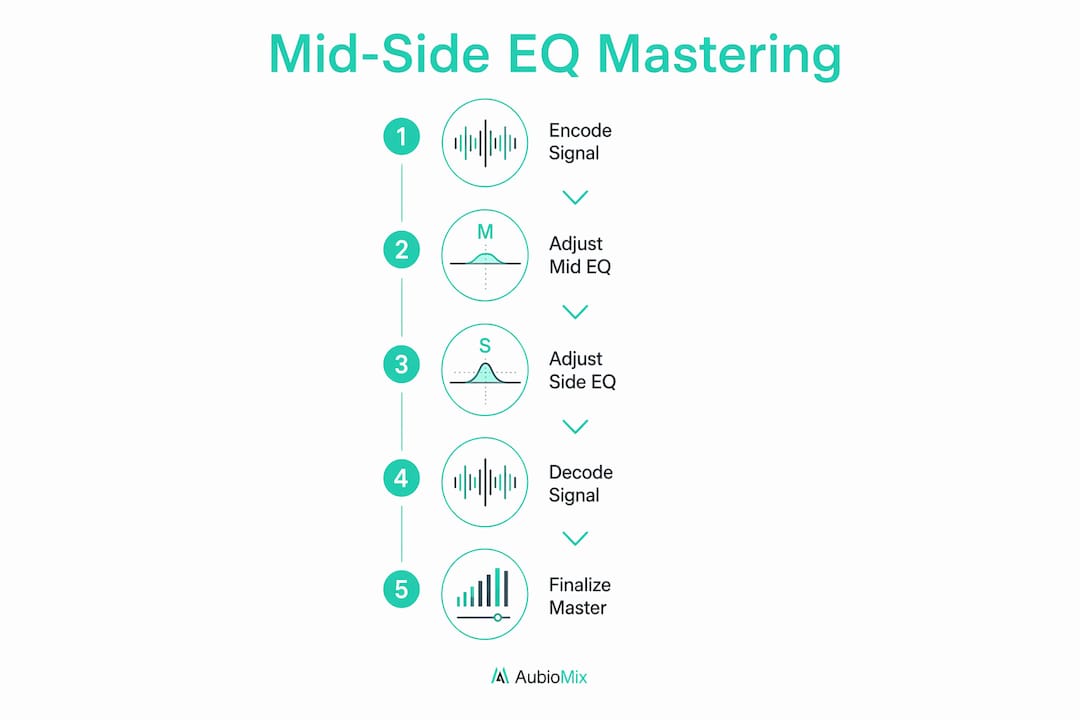
Mid-side EQ is the single most precise tool available to a mastering engineer. It works by splitting your stereo signal into two separate components, the Mid (the sum of L+R, carrying your kick, bass, and lead vocal) and the Side (the difference of L−R, carrying reverb, stereo pads, and panned instruments), and letting you EQ each one independently before decoding back to stereo. That level of control is simply not possible with conventional stereo EQ, which applies the same boost or cut to both channels simultaneously.
The role of mid-side EQ in mastering comes down to a few core tasks:
- Tighten the low end by high-passing the Side channel between 40Hz and 150Hz, keeping subs centred and punchy without touching the kick or bass in the Mid.
- Enhance vocal and lead element presence with gentle boosts in the Mid channel around 1–3kHz, shaping the centre without brightening the stereo field.
- Add subtle stereo width via small boosts of 0.5–1dB between 2kHz–7kHz on the Side channel, opening up the image without sounding hyped.
- Clear low-mid muddiness with cuts in the low-mid range on the Mid channel, removing boxiness from vocals without thinning the stereo instruments living in the Side.
- Maintain mono compatibility and phase coherence throughout, checking the fold-down after every adjustment.
Keep gain moves subtle. Small adjustments are the norm in professional mastering; large moves usually signal a mix problem that needs addressing at the source, not at the mastering stage.
How the mid-side signal flow actually works
Understanding the maths behind M/S encoding is what separates engineers who use this technique confidently from those who apply it nervously and hope for the best. The encoding is lossless and entirely invertible. Your stereo L/R signal is converted to Mid = (L+R) and Side = (L−R). After processing, a decoder reverses the operation and you get stereo again. No audio is lost; you are simply looking at the same signal from a different angle.

What lives in each channel is worth knowing precisely. The Mid channel isolates centre-panned elements like kick drum, bass, lead vocal, and snare body. The Side channel carries everything that differs between left and right: room reverb, stereo synth pads, panned guitars, overhead shimmer. Think of it like a photograph where Mid is the subject and Side is the background. EQ one without touching the other.
Conventional stereo EQ cannot do this. If you want to boost vocal presence at 3kHz with a standard stereo EQ, you also brighten every cymbal, reverb tail, and panned guitar at the same frequency. M/S EQ lets you target the Mid only, leaving the Side untouched. That is a categorically different level of control, and it is why mastering engineers have made M/S processing a fundamental part of their chains since the 1980s.

Pro Tip: Before touching any EQ, solo the Mid and Side channels individually using a utility plugin like Voxengo MSED. Listen to what actually lives in each channel. You will often discover low-frequency content in the Side that you did not expect, or a harsh frequency in the Mid that is easy to locate in isolation.
Practical mid-side EQ techniques for mastering in 2026
These are the moves that appear on professional masters, with the frequency ranges and gain values that experienced engineers actually use.
Step-by-step application
- Load an M/S-capable EQ such as FabFilter Pro-Q 3, iZotope Ozone 11, or Brainworx bx_digital V3. Switch it to M/S mode.
- Solo the Side channel and apply a high-pass filter at 100–120Hz with a 12dB/octave slope. This single move tightens the low end on mono speakers without touching the kick or bass.
- Switch to the Mid channel. Sweep a narrow bell in the low-mid frequency region and cut slightly to clear boxy buildup from the vocal or kick. Use a wide Q to keep the move musical.
- Back on the Side channel, apply a gentle bell boost in the higher midrange frequencies with modest gain and Q. This opens the stereo image without sounding artificial.
- Add a high-shelf boost above the upper frequency range on the Side for air and sparkle with gentle gain. This lifts reverb tails and stereo ambience without making the vocal sibilant.
- Check in mono. Fold the master to mono and listen for low-end collapse, phase cancellation, or any element that disappears. A correlation meter reading below 0.0 is your warning sign.
- A/B the full chain against the unprocessed master at matched loudness. If the improvement is not obvious, the moves are probably too large or unnecessary.
Frequency reference for M/S mastering
| Frequency range | Channel | Typical move | Purpose |
|---|---|---|---|
| 40–150Hz | Side | High-pass filter | Tighten low end, improve mono compatibility |
| 200Hz | Mid | Cut 1–2dB, wide Q | Remove boxy buildup from vocal and kick |
| 2–7kHz | Side | Boost 0.5–1dB | Subtle stereo width enhancement |
| 8kHz+ | Side | Shelf boost +0.5–1dB | Add air and sparkle to reverb tails |
| 1–3kHz | Mid | Boost 0.5–1dB | Enhance vocal and lead presence |
Recommended M/S EQ plugins
FabFilter Pro-Q 3 is the go-to for most engineers working in 2026. Its per-band M/S mode lets you switch any band between stereo, Mid-only, or Side-only, and its linear-phase mode is switchable per band rather than globally. That flexibility is genuinely useful when you want linear phase on the Side but minimum phase on the Mid for a more musical character.
iZotope Ozone 11 integrates M/S EQ with M/S dynamics in a single module, which is convenient when you want to follow an EQ move with frequency-dependent compression on the same channel. Its Tonal Balance Control also gives you a real-time reference against genre targets.
Brainworx bx_digital V3 includes a Mono Maker feature that forces frequencies below a user-set threshold to mono, effectively automating the Side high-pass in a single control. Set it at 100–150Hz for most genres and the low-end tightening is immediate.
Common pitfalls when mastering with mid-side EQ
Getting M/S EQ wrong can damage a master in ways that are genuinely difficult to diagnose. Here are the mistakes we see most often, and how to avoid them.
- Thinking Side boosts create stereo width. They do not. Boosting the Side channel amplifies existing stereo differences; it does not manufacture width from nothing. If a mix is essentially mono, boosting the Side channel does nothing audible because there is no Side content to amplify.
- Pushing beyond 3dB. Exceeding roughly 3dB of M/S EQ risks phase issues, unnatural stereo imaging, and mono compatibility problems. If you need that much correction, the mix needs to go back to the engineer.
- Setting the Side high-pass too high. Filtering above 200Hz on the Side channel starts removing stereo information from instruments that genuinely live there, like rhythm guitars and keyboard pads. The Side channel carries integral musical information, not just room noise. A high-pass at 100–150Hz is safe for most genres; pushing it to 250Hz or above gets destructive.
- Using minimum-phase EQ on the Side channel. Minimum-phase EQ introduces frequency-dependent phase shifts. When Mid and Side bear different phase responses, the recombined stereo signal develops spatial artefacts that are hard to hear in isolation but degrade playback on mono or portable devices. Linear-phase EQ is preferred for M/S mastering, particularly on the Side channel.
- Skipping the mono check. Always fold to mono after every significant M/S adjustment. If the low end collapses or an element disappears, you have phase cancellation in the Side processing.
- Treating M/S EQ as a mix repair tool. It is a precision polish tool for masters that are already close. Applying it to a broken mix tends to make the problems more obvious, not less.
Pro Tip: Use a correlation meter alongside A/B testing after every M/S move. A reading that dips below +0.3 is the caution zone; below 0.0 means mono playback will produce audible cancellation. Catch it before the master leaves your session.
How to integrate mid-side EQ into your mastering workflow
Placement in the signal chain matters as much as the EQ moves themselves. Get the sequencing wrong and you are shaping a signal that will change character once the compressor engages downstream.
- Position M/S EQ early in the mastering chain, before compression and limiting. This way you are shaping the tonal character that the compressor will then glue, rather than EQing a signal that has already been dynamically altered.
- Follow with M/S compression for refined dynamic control. Combining M/S EQ with M/S compression lets you compress the Mid harder for punch while leaving the Side to breathe, keeping reverb tails open and stereo pads wide.
- Use a second, lighter M/S EQ pass after compression if needed, for subtle width adjustment before the limiter. The full recommended sequence is: M/S EQ for tonal shaping, M/S dynamic EQ or multiband compression for density control, then a stereo limiter last.
- Never automate M/S parameters across a track. Changing M/S settings mid-master creates width modulation that sounds like an effect, not mastering. Set your parameters once and leave them.
- Troubleshooting degraded stereo image: if the image feels unstable after M/S processing, check the Side high-pass first. If it is set above 200Hz, it may be filtering centre-relevant frequencies, creating phase behaviour in the low-mids on decode. Check for excessive Side boosts next, particularly in the midrange.
For a practical deep-dive into mid-side EQ techniques beyond the mastering chain, the Aubiomix guide covers mixing applications in detail. And if you want to understand the dynamic side of this processing, the mid-side compression guide is worth reading alongside this one.
Mid-side EQ as parallel processing: the deeper concept
There is a conceptual frame that changes how you think about M/S EQ once you grasp it. You are not EQing a stereo file. You are running two parallel EQ chains on two complementary signals, then recombining them. The Mid and Side are processed independently, and the maths of their recombination means any frequency-dependent gain or phase difference between them shows up as a spatial change in the decoded stereo output.
This is why phase linearity matters so much in M/S mastering. If your Mid EQ and Side EQ introduce different phase responses at the same frequency, the recombined L/R signal will have complex spatial artefacts that are difficult to diagnose by ear alone. The artefacts are most problematic below 200Hz, where phase interactions between Mid and Side can cause bass buildup or cancellation on mono playback systems.
Mid-side EQ's primary value lies in sculpting existing stereo fields with precision, not in artificially creating stereo width. Used well, it shapes frequency content and stereo placement simultaneously. Used carelessly, it creates phasey width, a hollow mono fold-down, and a mix that sounds impressive for twenty seconds and tiring after two minutes. The technique reflects how listeners actually perceive a mix: not just by frequency, but by position, focus, and depth.
The dynamic implications are equally worth understanding. Boosting the Side channel raises the level of stereo difference information, which can increase perceived loudness and width simultaneously. A +1dB Side shelf above 10kHz does not just add air; it shifts the perceived spatial scale of the master. That is a powerful tool when used with intention, and a liability when applied without monitoring the correlation meter.
Before and after: what mid-side EQ actually changes in a master
The clearest way to understand M/S EQ's impact is through specific before-and-after scenarios that engineers encounter regularly.
Scenario 1: Boomy, unfocused low end. A mix arrives with the sub bass feeling smeared across the stereo field. The kick loses punch on mono speakers. Applying a high-pass to the Side channel at 100Hz tightens the image immediately. The kick and bass lock into the centre, and the mix gains definition on smaller playback systems without any change to the Mid channel's low-end character.
Scenario 2: Cloudy vocal in a dense arrangement. The lead vocal sits in the Mid channel. A cut of 1–2dB at 300Hz on the Mid channel only clears the boxy buildup around the vocal without dulling the stereo guitars, which live partly in the Side. The vocal gains intelligibility and the guitars keep their body. A conventional stereo EQ cut at the same frequency would have thinned both.
Scenario 3: Narrow mix that needs scale. The mix translates well tonally but feels tight and small on headphones. A gentle +0.5dB shelf boost above 8kHz on the Side channel lifts the reverb tails and stereo ambience, adding perceived width and depth without touching the centre. The vocal stays focused; the mix gains scale.
Scenario 4: Harsh upper-mids in the centre. The vocal and snare are pushing too hard in the 3–5kHz range, making the master feel fatiguing. A gentle cut on the Mid channel in the upper midrange reduces the harshness without dulling the stereo sparkle in the cymbals and overheads, which live in the Side. The master becomes easier to listen to at volume without losing presence.
These are not hypothetical examples. They are the four most common M/S mastering scenarios, and they illustrate why mastering audio with EQ in M/S mode gives you options that stereo EQ simply cannot offer.
Key takeaways
Mid-side EQ in mastering gives engineers independent control over the centre and stereo field, enabling surgical tonal corrections that conventional stereo EQ cannot achieve without affecting the whole mix.
| Point | Details |
|---|---|
| Signal flow is lossless | Mid = L+R, Side = L−R; encoding and decoding introduce no audio loss when done correctly. |
| Keep gain moves subtle | Adjustments of 0.5–2dB are standard; exceeding 3dB usually signals a mix problem, not a mastering one. |
| Side high-pass tightens low end | Filtering the Side channel at 100–150Hz keeps subs centred and improves mono compatibility without touching the Mid. |
| Linear-phase EQ protects the image | Minimum-phase EQ on the Side channel introduces phase shifts that cause spatial artefacts on mono playback. |
| Always verify in mono | A correlation meter reading below 0.0 means mono playback will produce audible cancellation; check after every M/S move. |
Want instant feedback on your M/S decisions?

Knowing the theory is one thing. Hearing whether your M/S EQ moves are actually improving your master is another. Aubiomix lets you upload your mix or master and receive detailed, actionable feedback on your EQ decisions, stereo balance, mono compatibility, and overall translation across playback systems. No waiting, no guesswork.
Get pro-level feedback on your next master with Aubiomix and hear exactly what needs adjusting before you send it out.