
Frequency masking happens when one sound covers another sound sitting in the same frequency range, so your ear physically cannot separate the two. It is not a compression problem, not a volume problem, and turning things up almost never fixes it. Here are three things to try right now, before you read another word:
- Solo your kick and bass together at matched levels. If the bass disappears when the kick hits, they are fighting for the same 60 to 120 Hz territory.
- High-pass everything that isn't a bass instrument. Guitars, vocals, and synth pads rarely need anything below 100 Hz, and removing it frees space instantly.
- Sweep a narrow, boosted EQ band slowly across a busy section. When a frequency suddenly sounds harsh or crowded, you've found a masking hotspot worth investigating.
Pro Tip: Never solve masking by turning something up. Raising the level of a masked element usually just pushes the volume war one notch higher, and you end up with a louder, still-muddy mix.
Key Takeaways
Frequency masking occurs when a louder sound obscures a quieter one sharing its frequency range, and fixing it requires subtractive EQ, high-pass filtering, and arrangement discipline rather than raised volume.
| Point | Details |
|---|---|
| Masking is psychoacoustic, not loudness | A louder sound hides a quieter one in the same frequency band regardless of overall mix volume. |
| Kick and bass clash most often | Conflicts in the low-frequency range, roughly between 60 and 120 Hz, are among the most common masking issues in modern mixes. |
| Detect before you fix | Use level-matched soloing, mono checks, and narrow EQ sweeps to locate conflicts before reaching for a plugin. |
| Cut before you boost | Subtractive EQ on the masking element usually resolves clarity issues faster than boosting the masked one. |
| Arrangement beats EQ | Muting, octave shifts, and thinning parts solve masking at the source with zero tonal trade-off. |
Table of Contents
- What is frequency masking in psychoacoustic terms?
- Why does frequency masking wreck mix clarity?
- Which instruments clash and where do conflicts hide?
- How do you actually find masking before it ruins the mix?
- What are the best techniques to fix frequency masking?
- What's a fast workflow to unmask a mix?
- Which plugins and visual tools help you spot masking?
- What do experienced mix analysts get right that others miss?
- Where to learn more about frequency masking
- Frequently asked questions
- Sources
What is frequency masking in psychoacoustic terms?
Your ear doesn't hear pure, isolated frequencies. It processes sound through auditory filters, bands of frequencies your cochlea groups together and can't fully tell apart. When two sounds land inside the same filter, the louder one dominates and the quieter one gets partially or completely hidden. That's auditory masking in a sentence, and frequency (or spectral) masking is simply the version that happens when both sounds occur at the same time, in the same frequency zone.
Harvey Fletcher's research into critical bands laid the groundwork here, showing that masking strength tracks the shape of the auditory filter rather than a flat frequency scale. The MIT lecture notes on masking go further, distinguishing straightforward excitation-based masking from suppression effects, where one sound actively dampens the neural response to another rather than simply drowning it out.
A few essentials worth locking in:
- On-frequency masking is strongest: a masker and a signal at the exact same pitch clash the hardest.
- Off-frequency masking weakens as the frequency gap widens, which is exactly why narrow EQ moves separate instruments far more effectively than broad tonal shifts.
- Temporal masking is a cousin worth knowing about, where a loud sound hides a quiet one that arrives just before or after it in time, not just at the same moment. It's a different mechanism, but it explains why some clarity problems aren't frequency issues at all.
A louder sound doesn't just compete with a quieter one nearby in pitch. It can genuinely prevent your ear from registering it exists, because the auditory system processes frequencies in overlapping bands rather than as clean, separate channels.
If you're a visual learner, sketch (or search for) an auditory filter curve, a bell shaped response centred on a given frequency. Anything falling under that curve is a masking candidate.
Why does frequency masking wreck mix clarity?
Masking is the invisible hand behind most "my mix sounds muddy" complaints. It's rarely one glaring mistake. It's dozens of small frequency collisions stacking up until nothing has room to breathe.
The perceptual damage shows up in specific, recognisable ways:
- Elements sound thin or absent, even though they're clearly present in the session and metering fine.
- Vocals lose intelligibility, particularly in the 1 to 4 kHz presence range where consonants live and guitars or synths often crowd in.
- Low end loses punch, because a masked bass and kick blur into an undefined rumble instead of two distinct hits.
- Transients get swallowed, so snares and plucks feel soft even when their attack is technically sharp on the waveform.
Here's a case worth internalising: a lead vocal buried under rhythm guitars. Nine times out of ten, the guitars aren't too loud overall, they're simply occupying the same 2 to 5 kHz band the vocal needs for consonant clarity. Turning the vocal up doesn't help much, because the masking guitars rise in perceived loudness too, chasing the vocal upward in a war neither side wins.
Genre matters enormously here. Dense electronic productions with layered pads can tolerate, and sometimes benefit from, a degree of masking. It creates a wash of sound that reads as lush rather than cluttered, and Aubiomix's own guidance on electronic music mixing leans into that texture deliberately. Pop and vocal-led acoustic tracks demand the opposite discipline, because every masked syllable is a lyric the listener misses. Translation across playback systems compounds the issue too: a mix that sounds fine on studio monitors can fall apart on a phone speaker, where a narrower frequency window makes masked elements disappear entirely.
Which instruments clash and where do conflicts hide?
Some pairings cause trouble in almost every genre, and knowing them in advance saves you hours of guesswork.
- Kick vs bass – both want 60 to 120 Hz, and this is the single most common masking fight in modern production.
- Vocal vs synth pads or keys – the 1 to 4 kHz presence band is prime real estate for both.
- Guitars vs piano – midrange instruments naturally overlap around 200 to 800 Hz.
- Snare vs cymbals – the crack of a snare and the shimmer of hi-hats fight in the 3 to 8 kHz range.
- Pads vs lead synths – wide, sustained pads can smother a lead's harmonic detail if they share the same octave.
Three bands deserve extra scrutiny whenever a mix feels congested. Low mids, roughly 200 to 500 Hz, are where boxiness and mud accumulate across almost every instrument. Presence, 1 to 4 kHz, decides whether vocals and lead lines cut through or vanish. The 5 to 10 kHz zone governs air and detail, and overcrowding it makes a mix sound harsh rather than open.
Genre context still matters. A trance producer stacking supersaw layers can accept some masking in exchange for density. A folk mix built around one voice and one guitar has almost no excuse for letting the two collide, because there's nowhere else in the arrangement for clarity to come from.
How do you actually find masking before it ruins the mix?
Detection is a discipline, not a guess. Run through these steps in order every time a mix feels congested:
- Level-matched solo comparison. Solo the two suspect elements together, matched for loudness, and listen for one swallowing the other.
- Mono check. Sum the mix to mono and listen for elements that shrink or disappear, since masking often gets worse once stereo width no longer helps separate sounds.
- Mute and solo swapping. Mute one element at a time across a busy section and note exactly what opens up in the frequency spectrum.
- Narrow EQ sweep. Boost a tight Q band by 6 to 10 dB and sweep it across the range while soloing the pair. Where it sounds harshest is usually your conflict point.
- Visual confirmation. Pull up a spectrum analyser or RTA and overlay the two elements to see where their energy genuinely overlaps rather than just guessing by ear.
Educational resources like CCRMA's work on simultaneous masking demonstrate exactly this kind of narrow-band testing, and it translates directly into a DAW session. A correlation meter is worth adding to your toolkit here too, since it flags phase issues that often masquerade as masking but actually stem from cancellation.
Pro Tip: Boost, don't cut, when you're hunting. A temporary narrow boost reveals a masked element by exaggerating the clash, whereas cutting first can hide the very problem you're trying to find.
What are the best techniques to fix frequency masking?
Once you've located the conflict, you've got six real categories of fix. Work through them roughly in this order, because the earlier ones cost you nothing tonally and the later ones ask for more careful judgement.
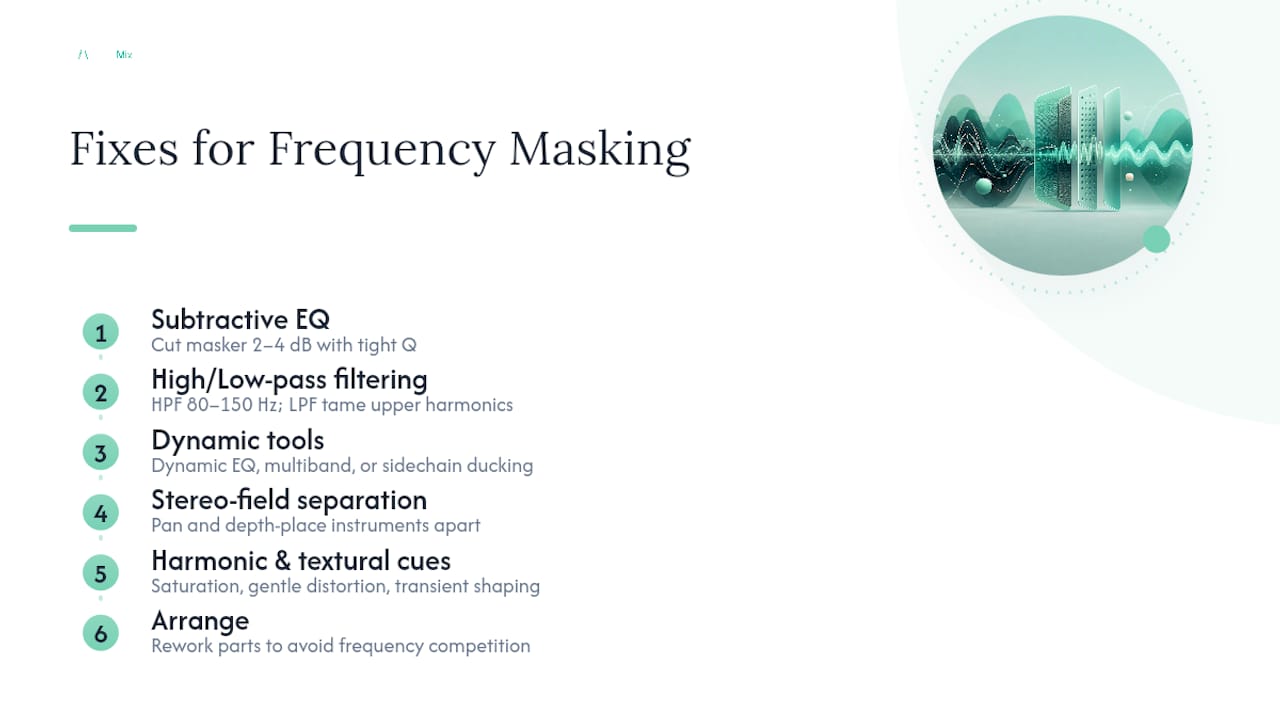
Subtractive EQ first. Rather than boosting one instrument to make it audible, cut the masking instrument at the exact frequency where the clash lives. A narrow, moderate cut, say 2 to 4 dB with a tight Q, in the guitar's 2.5 kHz region often does more for vocal clarity than any amount of vocal boosting. Cuts preserve headroom; boosts eat into it. Reach for a cut as your default and save boosts for genuinely thin material.
High-pass and low-pass filtering next. Every non-bass element should get a high-pass filter, typically somewhere between 80 and 150 Hz depending on the instrument, to clear space for the kick and bass to own the low end without competition. Low-pass filtering on pads or rhythm parts prevents their upper harmonics from creeping into presence and air bands where lead instruments need room. This single habit, applied consistently across a session, solves more masking than any plugin.
Dynamic tools for time-dependent conflicts. Static EQ assumes the clash is constant, but it often isn't. A bassline might only mask the kick on certain notes. Dynamic EQ or multiband compression lets you apply a cut only when the conflicting energy actually appears, leaving the rest of the performance untouched. Sidechain compression, ducking the bass slightly whenever the kick hits, is the classic version of this and remains one of the most effective low-end fixes available. The trade-off is subtlety: overdone sidechaining produces an audible pumping effect that's harder to undo than a bad EQ cut.
Stereo-field separation. Panning two similar-timbred instruments away from each other reduces the perceived masking even when their frequency content genuinely overlaps, because spatial separation gives the ear an extra cue to distinguish them. Aubiomix's guide to panning strategy covers this in more depth, and depth placement, pushing one element back with reverb while keeping another dry and forward, works alongside panning for the same effect.
Harmonic and textural cues. Saturation and gentle distortion add upper harmonics that help a part cut through a dense mix without raising its fader level at all. A vocal running through light tape saturation often needs less EQ boost to sit above guitars, because the added harmonics give the ear something distinct to latch onto. Aubiomix's saturation guide explains the mechanics if you want to go deeper. Transient shaping and parallel processing serve a similar purpose for percussive elements, sharpening the attack so a snare or pluck registers even when its sustain sits inside a masked band.
Arrangement fixes last resort, but often first choice. Sometimes the honest answer is that two parts simply shouldn't play the same notes in the same octave at the same time. Moving a pad up an octave, muting a guitar during the chorus vocal line, or thinning an arrangement during the busiest section solves masking at the source rather than papering over it with processing. Experienced engineers often reach for this before touching an EQ, because it's the only fix with zero tonal side effects.
Low-end masking deserves one extra note: clearing bass conflicts properly also depends on your room and monitoring setup, and subwoofer placement has more influence on how accurately you judge low-frequency masking than most producers assume.
What's a fast workflow to unmask a mix?
Run this in order, and don't skip steps just because the mix "sounds fine" on first listen.
- Quick audit (5 to 10 minutes). Listen through the full track once, noting any section that feels congested or where an element seems to disappear.
- Mono check (2 minutes). Sum to mono and re-listen to the flagged sections, checking for anything that shrinks further.
- Carve critical conflicts (15 to 20 minutes). Apply subtractive EQ and high-pass filters to the worst offenders identified in your audit.
- Dynamic and sidechain fixes (10 to 15 minutes). Address anything time-dependent, particularly kick and bass interaction.
- Stereo and depth adjustments (10 minutes). Pan and place remaining clashes to give overlapping timbres spatial separation.
- Final translation check (5 minutes). Listen on at least two other systems, phone speaker and car if possible, to confirm the fixes hold up.
Aubiomix's own step mixing workflow follows a similar staged logic if you want a template to build sessions around.
Pro Tip: Always A/B your before and after at matched loudness, and write down any gain changes you make. A masked element often "sounds better" purely because your fix made the mix louder overall, not because you actually solved the clash.
Which plugins and visual tools help you spot masking?
You don't need an expensive plugin folder to fix masking, but a few tool categories genuinely speed up the process.
- Spectrum analysers and overlay tools show two tracks' frequency content stacked on top of each other, making overlap visible rather than guessed at. Most DAWs ship a basic version stock.
- Dynamic EQ and multiband compressors handle the time-dependent conflicts static EQ can't touch, and they're worth prioritising over static plugins once you've identified a moving target.
- Correlation and mono-check meters catch phase-related masking that a spectrum view alone will miss, particularly on wide stereo synths and doubled guitars.
- Real-time analysers (RTAs) are ideal for the sweep-and-locate method described earlier, letting you watch a frequency spike as you find it by ear.
Dedicated automated unmasking tools are still niche, but not theoretical. A recent prototype using real-time psychoacoustic modelling drove a dynamic EQ to compensate for masking automatically, and user testing suggested the concept works, even if it hasn't reached mainstream DAW toolchains yet. For now, manual technique plus a good analyser gets you most of the way there.
What do experienced mix analysts get right that others miss?
The biggest trap is treating masking as a loudness problem. It isn't. Turning up a masked vocal just starts an arms race that ends in a fatiguing, overly loud mix with the same clarity issue it started with.
The pros who consistently nail clarity tend to fix arrangement before reaching for EQ, and they prioritise transient definition and vocal presence over chasing a "full" low end. They also treat spectrum analysers as a starting point for investigation, not a final verdict, because the ear catches masking a screen can't always show.
If you want an objective second opinion on where your own mix is masking itself, uploading it to Aubiomix gives you a structured read on exactly which frequency zones are colliding, alongside the other 15-plus areas that shape a finished mix.
Where to learn more about frequency masking
- Auditory masking (Wikipedia) covers the core psychoacoustic theory behind why louder sounds hide quieter ones.
- MIT's masking lecture notes explain Fletcher's critical-band research and the excitation versus suppression distinction in more technical depth.
- CCRMA's simultaneous masking resource demonstrates practical narrow-band testing methods you can adapt for your own sessions.
- Peak Studios' guide to frequency masking offers producer-focused heuristics, including the reminder that masking isn't always a mistake worth fixing.
Audition every technique above against your own tracks, and consider a guided upload to Aubiomix if you want a frequency-by-frequency read on where your mix is fighting itself.
Frequently asked questions
What is frequency masking in simple terms? Frequency masking is when a louder sound makes a quieter sound in the same frequency range harder or impossible to hear, because your ear processes sound in overlapping bands rather than as isolated frequencies.
How does frequency masking differ from loudness problems? Loudness is about overall level, while masking is about frequency overlap. Turning up a masked element rarely helps, since the masking sound usually rises in perceived loudness too, keeping the clash unresolved.
What's the difference between frequency masking and temporal masking? Frequency masking happens when two sounds occur in the same frequency range at the same time. Temporal masking happens when a loud sound hides a quiet one that arrives just before or after it, a timing issue rather than a frequency one.
Can frequency masking ever be a good thing? Yes. Dense electronic productions often use masking deliberately to create a thick, layered texture, and forcing total separation in every band can actually strip a mix of its character.
What's the fastest way to check for masking in a mix? Solo the suspect elements at matched levels, then check the mix in mono. If something shrinks or disappears in mono, you've likely found a masking or phase issue worth investigating further.
Sources
- Auditory masking
- Masking (MIT OpenCourseWare lecture notes)
- Real-time psychoacoustic frequency masking compensation (prototype, VST3)
- Addition and simultaneous masking (CCRMA/Stanford)
- Frequency masking: recognise, correct & consciously avoid (Peak Studios)