

LUFS (Loudness Units relative to Full Scale) is the industry-standard unit for measuring perceived audio loudness, defined by the ITU-R BS.1770 standard and numerically identical to LKFS. Unlike peak metering, which simply catches the loudest sample in your signal, LUFS reflects how human ears actually experience volume. That distinction matters enormously when your music lands on Spotify, Apple Music, or broadcast television, because every major platform uses LUFS-based normalisation to level the playing field between tracks. Get your head around this measurement, and you gain real control over how your music sounds to listeners everywhere.
What does LUFS actually measure?
LUFS measures perceived loudness using K-weighting, a frequency-response curve that mirrors human hearing sensitivity, particularly in the 1–4 kHz range where our ears are most sensitive. A pure peak meter tells you nothing about how loud something feels. LUFS tells you exactly that. The ITU-R BS.1770 standard, adopted by bodies including the EBU (European Broadcasting Union) and ATSC (Advanced Television Systems Committee), defines how this measurement is calculated and applied across broadcast and streaming.
K-weighting is what separates LUFS from older methods like RMS. It applies a high-frequency shelf boost and a low-frequency roll-off before calculating the average power, so a bass-heavy mix and a bright mix with the same RMS reading will produce different LUFS values. That accuracy is why LUFS replaced RMS as the professional standard for loudness control.
How are the three LUFS time windows used in mixing?
LUFS has three time windows, each serving a distinct purpose in your workflow. Mixing engineers who understand all three make far better decisions than those who only watch the integrated reading.
- Momentary LUFS averages loudness over 400 milliseconds. Use it to monitor transients and short bursts of energy, such as a snare hit or a vocal consonant. It responds quickly enough to catch dynamic peaks without being as erratic as a peak meter.
- Short-term LUFS averages over 3 seconds. This is your go-to window for balancing sections of a track, checking whether your chorus genuinely hits harder than your verse, or whether a breakdown drops far enough to create contrast.
- Integrated LUFS measures the entire programme from start to finish, using a gating algorithm that ignores audio below -70 LUFS absolute and anything more than 10 LU below the running average. That gating prevents silences and fade-outs from dragging your reading down artificially. Integrated LUFS is the number that streaming platforms and broadcast engineers care about for compliance.
Pro Tip: Watch momentary and short-term LUFS during the mix, and only check integrated LUFS once you are close to a final master. Using integrated LUFS as a real-time mixing guide is one of the most common mistakes novice engineers make.
LUFS vs RMS vs dBFS: which metric does what?
These three measurements answer three different questions, and confusing them leads to poor decisions at the mix bus.
| Metric | What it measures | Frequency weighting | Best used for |
|---|---|---|---|
| dBFS | Peak sample level | None | Headroom and clipping prevention |
| RMS | Average signal power | None | Rough loudness estimate, legacy workflows |
| LUFS | Perceived loudness | K-weighted | Platform compliance, loudness normalisation |
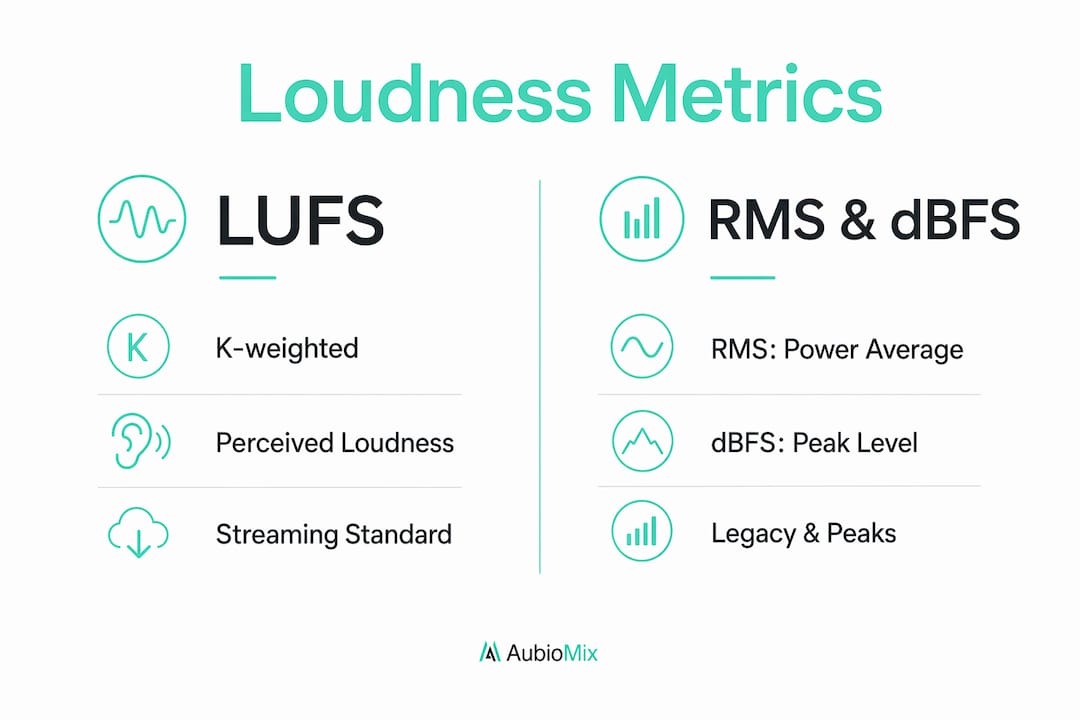
dBFS (decibels relative to Full Scale) tells you the highest sample value in your signal. It is essential for preventing clipping, but it says nothing about how loud a track sounds. A heavily compressed track can sit at -1 dBFS peak and feel deafeningly loud, while an orchestral recording at the same peak level can feel quiet and spacious.
RMS averages signal power over time without any frequency weighting. It was the standard loudness reference before LUFS arrived, and you will still find it in many older DAW meters. The problem is that RMS treats a 60 Hz bass rumble and a 3 kHz vocal the same way, even though your ears do not.
LUFS applies K-weighting before calculating average power, making it a far more accurate reflection of perceived loudness. For any work destined for streaming or broadcast, LUFS is the only metric worth targeting for loudness compliance. Use dBFS alongside it to manage your true peak ceiling.
What are the loudness targets for streaming and broadcast in 2026?
Every major distribution platform and broadcast standard publishes a loudness target. Hitting these numbers means your track plays back at the intended level without being turned up or down by the platform's normalisation engine.
Spotify and YouTube target approximately -14 LUFS integrated loudness. Apple Music aligns closer to -16 LUFS integrated. These are not hard walls; they are normalisation reference points. If your master comes in louder, the platform turns it down to match. If it comes in quieter, most platforms leave it as is rather than boosting it.
European broadcast must comply with EBU R128 at -23 LUFS integrated, while US broadcast follows ATSC A/85 at -24 LKFS integrated. Both standards also specify a maximum true peak limit to prevent inter-sample distortion after encoding. These broadcast targets are significantly quieter than streaming targets, which is why broadcast masters and streaming masters are often separate deliverables.
True Peak level, measured in dBTP, is controlled separately from integrated LUFS. EBU R128 specifies a maximum true peak of -1 dBTP. Streaming platforms typically recommend keeping true peaks at -1 dBTP or lower to prevent distortion introduced by lossy encoding codecs such as AAC or MP3.
Pro Tip: If you are mastering for multiple platforms, create separate masters rather than one compromise file. A broadcast master at -23 LUFS and a streaming master at -14 LUFS will each sound their best in their respective context.
For a deeper look at how these targets fit into a full mastering workflow, the mastering producer's guide covers the complete process from gain staging to final delivery.
What pitfalls should mix engineers avoid when targeting loudness levels?
The single biggest mistake is treating a loudness target as a goal rather than a ceiling. Chasing a specific LUFS target by over-compressing and hard-limiting ruins dynamics and musical impact. Streaming platforms normalise loud mixes downward but do not boost quieter ones, so a dynamic master at -16 or -18 LUFS often sounds more powerful than a brick-walled master at -9 LUFS after normalisation brings both to the same playback level.
Here are the key pitfalls to avoid:
- Over-limiting for loudness. Heavy limiting to push integrated LUFS higher destroys transient punch. After normalisation, your track sounds flat compared to a more dynamic mix at the same playback volume.
- Ignoring Loudness Range (LRA). LRA describes dynamic variation within a track. Two tracks with identical integrated LUFS can feel very different in perceived loudness depending on their LRA. A high LRA track sounds quieter on average despite matching the target. Mastering engineers balance LRA to maintain perceived energy without sacrificing dynamics.
- Neglecting true peak separately. Compliant integrated LUFS does not guarantee freedom from distortion. Managing LUFS and true peak together is critical because a track can pass loudness normalisation and still clip after codec conversion if the true peak ceiling is not set correctly.
- Using integrated LUFS during mixing. Integrated LUFS only makes sense once a track is nearly complete. Checking it mid-mix gives you a misleading reading that changes every time you play from a different point.
For more on mixing decisions that affect loudness and dynamics, the mixing tricks guide covers practical techniques worth adding to your workflow.
How to measure and set loudness levels effectively
A practical loudness workflow does not require expensive hardware. Most modern DAWs include a built-in LUFS meter, and dedicated metering plugins give you all three time windows plus true peak in a single view.
- Gain-stage your mix first. Before touching a limiter, set your mix bus level so the loudest sections sit around -18 to -16 LUFS short-term. This gives your limiter headroom to work without destroying transients.
- Monitor all three LUFS windows during mixing. Watch momentary LUFS for transient control, short-term LUFS for section balance, and save integrated LUFS for the mastering stage.
- Set your true peak limiter before your loudness limiter. Place a true peak limiter at the end of your master chain and set the ceiling to -1 dBTP. This prevents inter-sample peaks from causing distortion after streaming codec processing.
- Check integrated LUFS on a full-length export. Do not rely on real-time readings during playback. Export the full track and analyse it with a loudness meter to get an accurate integrated reading.
- Create platform-specific masters where needed. A streaming master targeting -14 LUFS integrated and a broadcast master at -23 LUFS will each serve their platform better than a single compromise file.
The mix and master in one session workflow guide covers how to integrate these steps efficiently when you are working on tight deadlines.
Key takeaways
LUFS is the definitive loudness measurement standard for music production, and using all three of its time windows correctly, alongside true peak control, is what separates compliant, dynamic masters from flat, over-limited ones.
| Point | Details |
|---|---|
| LUFS defined | LUFS measures perceived loudness using K-weighting, based on the ITU-R BS.1770 standard. |
| Three time windows | Use momentary for transients, short-term for section balance, and integrated for final delivery compliance. |
| Platform targets | Spotify and YouTube target -14 LUFS; Apple Music targets -16 LUFS; EBU R128 broadcast requires -23 LUFS. |
| True peak is separate | Always set a true peak ceiling of -1 dBTP independently of your integrated LUFS target. |
| Avoid over-limiting | Dynamic mixes at -16 to -18 LUFS often sound more powerful after normalisation than brick-walled masters. |
Why I think the loudness war is already over
Here is my honest take: the loudness war ended the moment streaming normalisation became universal, but a surprising number of producers still mix as though it is 2008. I see mixes come through Aubiomix where the limiter has been pushed so hard that the waveform looks like a brick. The integrated LUFS reading is impressive on paper, but the track sounds lifeless at playback volume because the platform has already turned it down to match everything else.
The producers who get this right treat LUFS as a consistency tool, not a competition. They mix for dynamics first and check loudness last. A track with genuine punch and contrast at -16 LUFS integrated will feel louder and more exciting than a squashed master at -9 LUFS after normalisation brings them to the same level. That is not a theory. We hear it repeatedly in the feedback Aubiomix provides.
My advice is to trust your ears more than your meters. Meters tell you where you are. Your ears tell you whether it sounds good. Use the integrated LUFS reading to confirm compliance, use the short-term reading to shape your mix, and use the momentary reading to protect your transients. But never let a number override what you are actually hearing. The best masters I have encountered are the ones where the engineer clearly stopped chasing a target and started listening.
— Aubiomix
Get professional loudness feedback on your mixes
Knowing your LUFS targets is one thing. Hearing exactly where your mix falls short is another.

Aubiomix analyses your uploaded track and delivers detailed feedback on loudness, dynamic range, true peak levels, and mix clarity, giving you specific steps to fix what is not working. Whether you are preparing a streaming master or a broadcast deliverable, get mix feedback from Aubiomix and hear your track the way a mastering engineer would. Upload your mix, get your report, and know exactly what to adjust before your final export.
FAQ
What does LUFS stand for?
LUFS stands for Loudness Units relative to Full Scale. It is the industry-standard unit for measuring perceived audio loudness, defined by the ITU-R BS.1770 standard and numerically equivalent to LKFS.
What is the difference between LUFS and RMS?
RMS averages signal power without frequency weighting, while LUFS applies K-weighting to reflect how human ears perceive loudness. LUFS is the current professional standard for loudness compliance on streaming platforms and broadcast.
What LUFS level should I target for Spotify?
Spotify targets approximately -14 LUFS integrated loudness. Tracks louder than this are turned down to match; tracks quieter are generally left as is, so a dynamic master at -14 to -16 LUFS is a solid target.
What is true peak and why does it matter for LUFS?
True Peak (measured in dBTP) captures inter-sample peaks that standard peak meters miss. True peak must be controlled separately from integrated LUFS because codec processing during streaming can push inter-sample levels into distortion even when your LUFS reading is compliant.
Can I use one master for all streaming platforms?
You can use a single streaming master targeting -14 LUFS integrated with a -1 dBTP true peak ceiling for most platforms. Broadcast deliverables require a separate master at -23 LUFS (EBU R128) or -24 LKFS (ATSC A/85).