
True Peak is defined as the maximum amplitude of an audio signal's reconstructed analogue waveform, including peaks that occur between digital samples. Standard peak meters only read discrete sample values in dBFS, which means they routinely miss the highest points in your signal. Those hidden peaks, called inter-sample peaks, are exactly where distortion creeps in during playback and codec encoding. Understanding True Peak measurement is not optional for professional delivery. It is the difference between a master that sounds clean on every platform and one that clips on Spotify before a listener even hits play.
What is True Peak and how does it differ from sample peak?
Sample peak meters measure discrete digital sample values expressed in dBFS, while True Peak meters estimate the maximum analogue waveform amplitude expressed in dBTP. That distinction is more significant than it sounds. A file that reads a clean -0.1 dBFS on a standard peak meter can simultaneously read +0.3 dBTP on a True Peak meter because of inter-sample peaks sitting between those measured samples. The meter you trust most in your session may be showing you an incomplete picture.
The reason this gap exists comes down to how digital audio works. When a digital file is converted back to analogue for playback, a reconstruction filter interpolates the waveform between samples. That interpolated curve can peak higher than any individual sample value. Standard peak meters never see this reconstructed waveform. True Peak meters do, and that is precisely why they were built.
The ITU-R BS.1770 standard formalises True Peak measurement as the correct method for broadcast and streaming compliance. Every major streaming platform and broadcaster now references this standard when setting delivery requirements. If your metering workflow does not include a True Peak meter, you are flying blind on the most critical part of your master.
How is True Peak measured and detected?
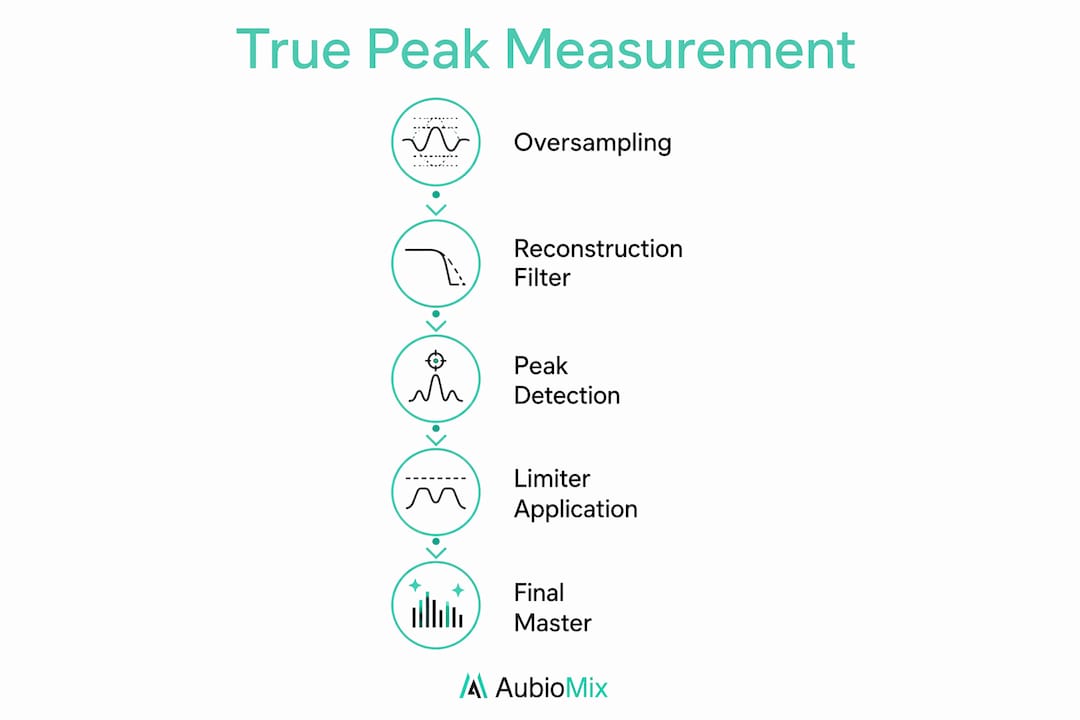
True Peak measurement works by oversampling the audio signal and then applying a reconstruction filter to predict where the analogue waveform would peak between samples. ITU-R BS.1770-4 sets 4x oversampling as the minimum baseline for accurate True Peak detection. Professional limiters and meters often run at 8x, 16x, or even 32x oversampling for greater accuracy.
Higher oversampling rates produce a more detailed reconstruction of the waveform. At 4x oversampling, the meter inserts three additional sample points between each original sample. At 32x, it inserts 31. Each additional point gives the filter a finer view of where the waveform actually peaks. The trade-off is CPU load, which increases proportionally with the oversampling rate.
High-quality True Peak limiters use linear phase FIR filters at the oversampling stage to predict reconstructed waveform peaks without introducing latency or phase issues. This is the technical foundation that separates a True Peak limiter from a standard brick-wall limiter. The FIR filter does the heavy lifting of waveform reconstruction, and the limiter applies gain reduction based on what that reconstruction reveals.
Pro Tip: If your DAW or metering plugin allows you to choose the oversampling rate, 4x is the minimum you should accept. Use 8x or higher for final masters where accuracy matters most. The CPU cost at 8x is modest on modern hardware, and the improvement in detection accuracy is worth it.
Why True Peak limiting is non-negotiable for streaming and broadcast
True Peak limiting is essential infrastructure for any master targeting streaming platforms. The risk is not just clipping during playback. The real danger is what happens when your lossless WAV or AIFF gets re-encoded into a lossy codec like MP3 or AAC. Codec encoding reconstructs the waveform mathematically, and that reconstruction can push inter-sample peaks above 0 dBFS even if your sample peak was safely below it. The result is audible distortion on the listener's end, and there is nothing you can do about it after delivery.
Every major platform publishes its own True Peak ceiling. Here is what the key platforms currently specify:
- Spotify: Maximum True Peak of -1 dBTP
- Apple Music: Maximum True Peak of -1 dBTP
- Amazon Music: Maximum True Peak of -2 dBTP
- YouTube: Maximum True Peak of -1 dBTP
- Broadcast (EBU R128): Maximum True Peak of -1 dBTP
"True Peak limiting is not a cosmetic effect but a strict delivery standard mandated by streaming platforms and broadcasters to prevent clipping after codec encoding." — MusicProductionWiki
Typical True Peak ceilings in professional mastering practice are -1.0 dBTP for lossless streaming, -1.5 dBTP for lossy codec delivery, and -2.0 dBTP for conservative multi-platform masters. Amazon Music's -2 dBTP request is the strictest of the major platforms, and it reflects a sensible caution around aggressive codec reconstruction. If you are delivering a single master to multiple platforms, -1.5 dBTP is a solid middle ground that satisfies most requirements without sacrificing too much headroom.
The misconception worth addressing here is that a True Peak limiter sounds different from a standard limiter. It does not. True Peak limiters apply oversampling detection and gain reduction without altering the sonic character of the limiting process. The oversampling happens at the detection stage, not the output stage. Your master will not sound softer, brighter, or more compressed simply because you switched on True Peak mode.
How to apply True Peak analysis in your mastering workflow
Getting True Peak control right is about placement, timing, and target selection. The following steps reflect how professional mastering engineers integrate True Peak metering and limiting into a clean, compliant workflow.
-
Enable True Peak metering early in gain staging. Enabling True Peak limiting early in your production workflow catches inter-sample peaks consistently before they compound through the chain. Do not wait until the final limiter to discover you have been running hot.
-
Place your True Peak limiter last in the mastering chain. The True Peak limiter must sit at the very end of your signal chain, after EQ, compression, saturation, and any other processing. Anything placed after it can reintroduce peaks above your ceiling.
-
Set a conservative ceiling for loud masters. Masters louder than -14 LUFS Integrated risk inter-sample clipping at 0 dBTP. If your integrated loudness target is above -14 LUFS, set your True Peak ceiling to -2.0 dBTP to protect transient integrity. For more moderate loudness targets, -1.0 to -1.5 dBTP is appropriate.
-
Read True Peak and LUFS together. True Peak analysis gives you the ceiling. LUFS gives you the average loudness. Neither metric alone tells the full story. A master with a compliant True Peak reading but an excessively high LUFS value will still get turned down by streaming platform normalisation algorithms. Use both readings together to make informed decisions about your final gain structure. Check out the mastering music guide for a deeper look at loudness targets.
-
Check your True Peak reading after export, not just in the DAW. Some DAWs apply dithering or sample rate conversion on export, which can introduce new inter-sample peaks. Always verify your True Peak reading on the exported file using a dedicated metering tool before delivery.
Pro Tip: If you are preparing a mix for mastering, leave at least -6 dBFS of headroom on your mix bus output. This gives the mastering engineer room to work without immediately hitting True Peak ceilings. Read more about preparing your mix before it goes to the mastering stage.
Common misconceptions about True Peak measurement
Several persistent myths around True Peak metering lead producers to make avoidable mistakes. Here is what the evidence actually says.
-
"Sample peak metering is good enough." It is not. A file reading -0.1 dBFS on a standard peak meter can read +0.3 dBTP on a True Peak meter. That 0.4 dB gap is enough to cause audible clipping after codec encoding.
-
"True Peak limiters colour the sound differently." They do not. True Peak limiters operate by detecting peaks on the oversampled signal and applying gain reduction accordingly. The sonic character of the limiter is unchanged by enabling True Peak mode.
-
"Higher oversampling always means better results." Not unconditionally. Very high oversampling rates (32x) increase CPU load significantly and can introduce latency in real-time monitoring contexts. For most mastering scenarios, 8x delivers excellent accuracy without the overhead.
-
"A True Peak ceiling of -1 dBTP is always safe." For most platforms, yes. But for very loud masters pushing above -9 LUFS Integrated, even -1 dBTP may not provide enough margin. In those cases, -2 dBTP is the more conservative and reliable choice.
-
"True Peak only matters at the mastering stage." Monitoring True Peak during mixing, especially on the mix bus, helps you catch problems before they reach the mastering engineer. Good gain staging practices throughout the mix session make True Peak compliance at mastering much easier to achieve.
Key takeaways
True Peak is the correct measurement standard for professional audio delivery, and every master you release should be checked and limited against platform-specific dBTP ceilings before submission.
| Point | Details |
|---|---|
| True Peak vs sample peak | A file at -0.1 dBFS sample peak can read +0.3 dBTP, causing real clipping after codec encoding. |
| Oversampling baseline | ITU-R BS.1770-4 requires minimum 4x oversampling; use 8x or higher for final masters. |
| Platform ceilings | Spotify and Apple Music require -1 dBTP; Amazon Music requires -2 dBTP. |
| Loud masters need more headroom | Masters above -14 LUFS Integrated should use a -2.0 dBTP ceiling to protect transients. |
| True Peak limiters do not colour sound | They detect peaks via oversampling and apply gain reduction without changing limiter character. |
The part most producers skip until it is too late
From working closely with producers across a wide range of genres, the pattern I see most often is this: True Peak gets treated as a final checkbox rather than an active part of the workflow. Someone finishes a mix, sends it to mastering, and only then discovers the inter-sample peaks that have been sitting quietly above 0 dBTP the entire time. By that point, the mastering engineer has to work around a problem that should have been caught at the mix stage.
What I find genuinely useful is treating True Peak monitoring the same way you treat clip indicators on individual channels. You would not ignore a clipping channel strip. You should not ignore a True Peak reading that is creeping above your ceiling on the mix bus. Catching it early means you are making gain decisions with full information, not patching problems at the end of the chain.
The other thing worth saying plainly: streaming platform standards are not going to get more lenient. If anything, platforms are becoming more specific about their loudness and peak requirements as catalogue quality expectations rise. Building True Peak awareness into your workflow now means you are already ahead of where the industry is heading. It is not extra work. It is just the right way to work.
— Aubiomix
Get professional feedback on your mix before it reaches mastering
Catching True Peak issues before mastering starts with knowing exactly where your mix stands technically. Aubiomix is an online mix analysis tool where you upload your track and receive detailed, professional mix feedback covering technical compliance, balance, dynamics, and more.

Whether you are checking peak levels, loudness targets, or overall mix balance, Aubiomix gives you a clear picture of what needs attention before the mastering stage. Upload your mix, get your report, and go into mastering with confidence. You can also explore the Aubiomix evaluation framework to understand exactly what the analysis covers.
FAQ
What is True Peak in audio mastering?
True Peak is the maximum amplitude of an audio signal's reconstructed analogue waveform, measured in dBTP. It accounts for inter-sample peaks that standard peak meters in dBFS cannot detect.
Why does True Peak matter for streaming platforms?
Streaming platforms re-encode audio into lossy codecs like MP3 or AAC, and that process can push inter-sample peaks above 0 dBFS. Platforms like Spotify and Apple Music specify a maximum True Peak of -1 dBTP to prevent this distortion.
What oversampling rate should I use for True Peak measurement?
ITU-R BS.1770-4 sets 4x oversampling as the minimum for accurate True Peak detection. For final masters, 8x oversampling delivers better accuracy with manageable CPU cost.
Does enabling True Peak mode change how my limiter sounds?
No. True Peak limiters apply oversampling detection and gain reduction without altering the sonic character of the limiting process. The output sound of the limiter remains the same.
What True Peak ceiling should I use for my master?
Use -1.0 dBTP for lossless streaming, -1.5 dBTP for general lossy codec delivery, and -2.0 dBTP for loud masters above -14 LUFS Integrated or for conservative multi-platform delivery.