

Parallel compression is defined as a technique where a heavily compressed signal is blended with the original, unprocessed audio to add density and sustain without sacrificing transient impact. Also known as New York compression in drum processing circles, it sits at the heart of professional mixing because it solves a problem serial compression cannot: you get the punch of the dry signal and the glue of the compressed signal at the same time. Plugins from Waves, UAD, and FabFilter all offer ways to apply this technique, whether through a simple wet/dry mix knob or a dedicated aux bus routing. Understanding how to use it well separates flat, lifeless mixes from ones that genuinely hit.
How does parallel compression work?
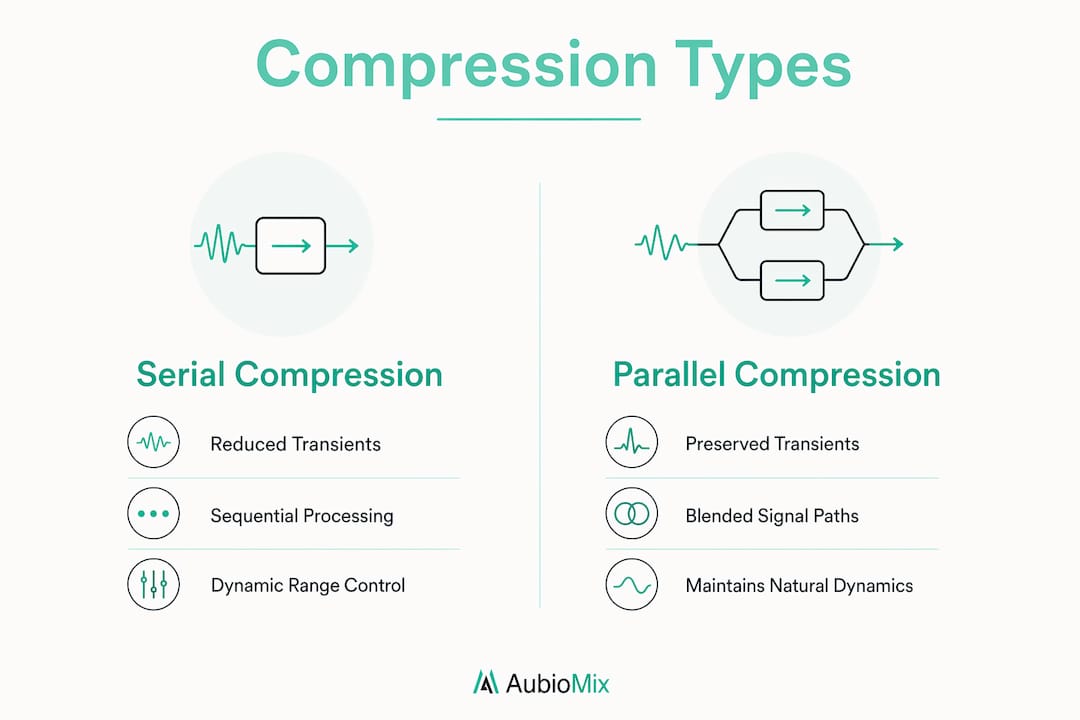
Parallel compression mixes a heavily compressed signal with the original uncompressed audio, preserving natural transients while adding density and sustain. Think of it like this: the dry path keeps the sharp crack of a snare hit intact, while the compressed path fills in the body and tail beneath it. Together, they create something neither signal could achieve alone.
Serial compression, by contrast, runs the entire signal through a compressor in sequence. That approach reduces the dynamic range of the whole signal, which often dulls transients and makes drums sound squashed. Parallel processing keeps the compressor working on a copy of the signal, so the original attack is never touched.

| Feature | Serial compression | Parallel compression |
|---|---|---|
| Transient impact | Reduced | Preserved |
| Sustain and body | Moderate | Enhanced |
| Dynamic range | Narrowed | Balanced |
| Risk of over-compression | High | Lower |
| Creative flexibility | Limited | Greater |
One nuance worth flagging early: phase coherence. When you split a signal into two paths and process one of them, even a tiny latency difference between the two paths can cause phase cancellation. Phase cancellation often results from linear phase processing or delay mismatch. The result is a hollow, thin sound that no amount of EQ will fix. We will cover how to avoid this in the setup section below.
NYC, Meat, and Spank: which style suits your mix?
Different parallel compression flavours serve distinct sonic goals: NYC for drums, Meat for midrange fullness, and Spank for transient punch. Knowing which one to reach for saves a lot of time and keeps your mix decisions intentional rather than accidental.
Here is a breakdown of each approach:
-
NYC compression. New York City compression fattens drums by blending heavy compression while preserving transients. You typically use a high ratio (8:1 or above), a fast attack, and a medium release. The compressed bus sits underneath the dry drum bus, adding weight and sustain without dulling the initial crack of the kick or snare.
-
Meat compression. This style targets vocals, bass, and mid-range elements where you want more body and warmth rather than pure punch. Use a slower attack to let the transient through, a medium ratio (4:1 to 6:1), and a longer release. The result is a fuller, more present sound that sits confidently in the mix.
-
Spank compression. Spank is all about presence and transient accentuation. It uses an extremely fast attack and release, often with a high ratio, to create an almost distorted, aggressive quality on the compressed bus. Blend it low beneath the dry signal and it adds a satisfying crack and energy without sounding overworked.
Pro Tip: Never judge your parallel bus in solo. The compressed signal will sound unnatural, even unpleasant, on its own. Always blend it back into the full mix and make adjustments there. What sounds wrong in isolation often sounds exactly right in context.
The choice of compressor character matters too. Analogue-modelled plugins like the UAD 1176 or the Waves CLA-76 bring a particular harmonic saturation to the compressed bus that adds colour as well as control. That colour is part of what makes the technique sound musical rather than clinical.
How to set up parallel compression in your DAW
True parallel bus processing uses dedicated aux return buses rather than plugin dry/wet mix controls, enabling independent processing on the compressed path. This is the correct way to do it if you want full creative control. A plugin's built-in mix knob is a shortcut, not a substitute.
Here is a step-by-step drum bus setup using true parallel routing:
- Create a drum bus. Route all your drum channels to a single drum bus channel in your DAW (Ableton Live, Logic Pro, or Pro Tools all handle this the same way).
- Create a parallel compression bus. Set up a second aux bus and send the drum bus signal to it at unity gain. This is your compressed path.
- Insert your compressor. Place your chosen compressor on the parallel bus. Set a high ratio (8:1 or above), fast attack, and medium release. Drive it hard so the gain reduction meter is working significantly.
- Add supporting processing. This is where true parallel buses allow more sonic shaping. Add a touch of saturation or a gentle high-pass filter on the parallel bus to keep low-end mud from building up.
- Check latency compensation. In your DAW settings, confirm that automatic delay compensation (ADC) is active. If your DAW does not compensate automatically, manually nudge the parallel bus forward in time to align it with the dry path.
- Blend in the full mix. Bring the parallel bus fader up gradually while listening to the full mix. Stop when the drums feel bigger and punchier without sounding squashed.
Pro Tip: Insert a high-pass filter at around 80–100 Hz on your parallel compression bus. Compressors react strongly to low-frequency energy, so filtering it out before the compressor keeps the compression behaviour more consistent and prevents the kick drum from pumping the entire bus.
Understanding mix bus routing before you start will save you a lot of confusion when setting up parallel paths for the first time.
Common mistakes and instrument-specific tips
Adjust parallel compression only in the context of the full mix, as the compressed bus sounds unnatural if soloed. This is the single most common mistake producers make, and it leads to over-compressed, cluttered mixes that lose the very dynamics the technique is meant to protect.
Here are the most frequent pitfalls and how to sidestep them:
-
Over-blending the compressed bus. When the parallel bus is too loud relative to the dry signal, the mix loses its transient definition. The drums start to sound squashed even though you are using parallel processing. Keep the compressed bus sitting underneath the dry signal, not competing with it.
-
Phase cancellation from linear phase plugins. Engineers should verify latency compensation and avoid linear phase compressors on parallel channels to maintain sound integrity. Linear phase EQs and compressors introduce pre-ringing and latency that can cause subtle but damaging phase issues when summed with the dry path.
-
Ignoring instrument-specific settings. Drums respond well to fast attack and high ratios. Vocals need a slower attack to preserve the natural consonants at the start of words. Bass benefits from a medium attack and a longer release that follows the note decay. Percussion, like shakers and tambourines, can take a very fast attack and release for a tight, controlled feel.
-
Skipping EQ on the parallel bus. Adding a gentle presence boost (around 3–5 kHz) on the parallel bus for drums can add snap and definition. For vocals, a subtle warmth boost in the 200–400 Hz range on the compressed path adds body without muddiness.
Dynamic EQ on the parallel bus is a particularly useful tool for controlling frequency-specific build-up that standard compression might miss.
Advanced techniques for professional-sounding mixes
Inserting an expander on the dry signal path isolates transients, avoiding masking from the compressed sound and achieving a cleaner, punchier result. This is a technique most producers have not encountered, and it makes a significant difference on dense drum arrangements. The expander essentially tightens the dry signal so only the sharpest transient peaks come through, while the compressed bus handles everything underneath.
Routing drums through bus sends with a compressor and expander on parallel channels yields approximately 0.6 LUFS loudness gain compared to standard parallel methods. That might sound modest, but in mastering terms it is a meaningful improvement in perceived loudness without any additional limiting.
| Technique | Benefit | Best used on |
|---|---|---|
| Expander on dry path | Tighter transient isolation | Drums, percussion |
| Saturation on compressed bus | Harmonic colour and warmth | Vocals, bass, guitars |
| Dynamic EQ on parallel bus | Frequency-specific control | Full mix bus, drums |
| Mid-side on parallel bus | Stereo width without phase risk | Mix bus, room mics |
Combining parallel compression with mid-side processing opens up another level of control. You can apply heavier compression to the mid channel of the parallel bus to add density to the centre of the mix, while leaving the sides relatively uncompressed to preserve stereo width and air.
Pro Tip: Gain stage your parallel bus carefully. The compressed signal will be louder than the dry signal after heavy gain reduction. Trim the output of the compressor so the parallel bus fader sits at unity gain when blended. This keeps your gain structure clean and makes the blend much easier to control.
Iteration is the real secret here. The best parallel compression settings come from repeated listening across different playback systems, not from hitting a target number on a meter. Trust your ears, and keep returning to the full mix context every time you make an adjustment.
Key takeaways
Parallel compression works because it preserves dry transient impact while the compressed path adds sustain, density, and perceived loudness to the mix.
| Point | Details |
|---|---|
| Preserve transients | Keep the dry signal path unprocessed so attack and impact remain intact. |
| Use true bus routing | Set up a dedicated aux bus rather than relying on a plugin's wet/dry knob. |
| Choose the right style | NYC suits drums, Meat suits midrange, and Spank suits transient accentuation. |
| Check phase alignment | Verify latency compensation and avoid linear phase compressors on parallel channels. |
| Mix in full context | Always blend the parallel bus while listening to the full mix, never in solo. |
What I have learned from years of parallel compression
Parallel compression is one of those techniques that sounds simple on paper but takes real time to hear properly. When I first started applying it, I made the classic mistake of blending the compressed bus too high because it sounded impressive in solo. The result was a mix that felt dense but lifeless, like all the air had been squeezed out of it.
The shift came when I started treating the compressed bus as a supporting character rather than the lead. Its job is to fill in what the dry signal leaves behind, not to take over. Once I understood that the balance between dry transient impact and compressed sustain is the whole point, everything clicked.
I also think producers underestimate how much the character of the compressor matters. A clean, transparent compressor on the parallel bus gives you control. A vintage-modelled compressor gives you colour and personality. Neither is wrong, but they are very different tools. Experiment with both on the same source and you will hear immediately which one serves the song.
The technique rewards patience and careful listening. If your mix is not improving, the answer is rarely "more compression." It is almost always a phase issue, a gain staging problem, or a blend that is slightly too high. Fix those first, and the results will follow.
— Aubiomix
Take your mix further with Aubiomix
Getting parallel compression right is one of the most satisfying moments in mixing. But knowing whether it is actually working in your full mix is a different challenge entirely.

Aubiomix is an online app where you can upload your track and receive detailed, professional feedback on your mix and master, including how your dynamics, compression, and balance stack up against professional standards. Whether you are applying NYC compression to your drums or experimenting with Meat-style processing on your vocals, get expert mix feedback and find out exactly what is working and what needs attention. You can also explore how hit records are analysed to see how professional engineers handle dynamic processing at the highest level.
FAQ
What is parallel compression in simple terms?
Parallel compression blends a heavily compressed copy of a signal with the original unprocessed audio. The result is a mix that sounds fuller and punchier without losing the natural transient impact of the dry signal.
How does parallel compression differ from serial compression?
Serial compression processes the entire signal through a compressor in sequence, which reduces transients along with everything else. Parallel compression keeps the dry signal intact and only blends in the compressed version, preserving the original attack and dynamics.
Why does my parallel compression sound thin or hollow?
A thin or hollow sound almost always points to phase cancellation from latency mismatch. Check that your DAW's automatic delay compensation is active, and avoid using linear phase compressors on the parallel bus.
Should I use a plugin mix knob or a dedicated aux bus?
A dedicated aux bus is the preferred method. True parallel bus processing allows you to add independent processing such as EQ or saturation on the compressed path, which a plugin mix knob does not permit.
Which instruments benefit most from parallel compression?
Drums benefit most, particularly with the NYC style. Vocals, bass, and mid-range instruments respond well to Meat-style processing, while percussion and snares suit the Spank approach for added transient presence.