
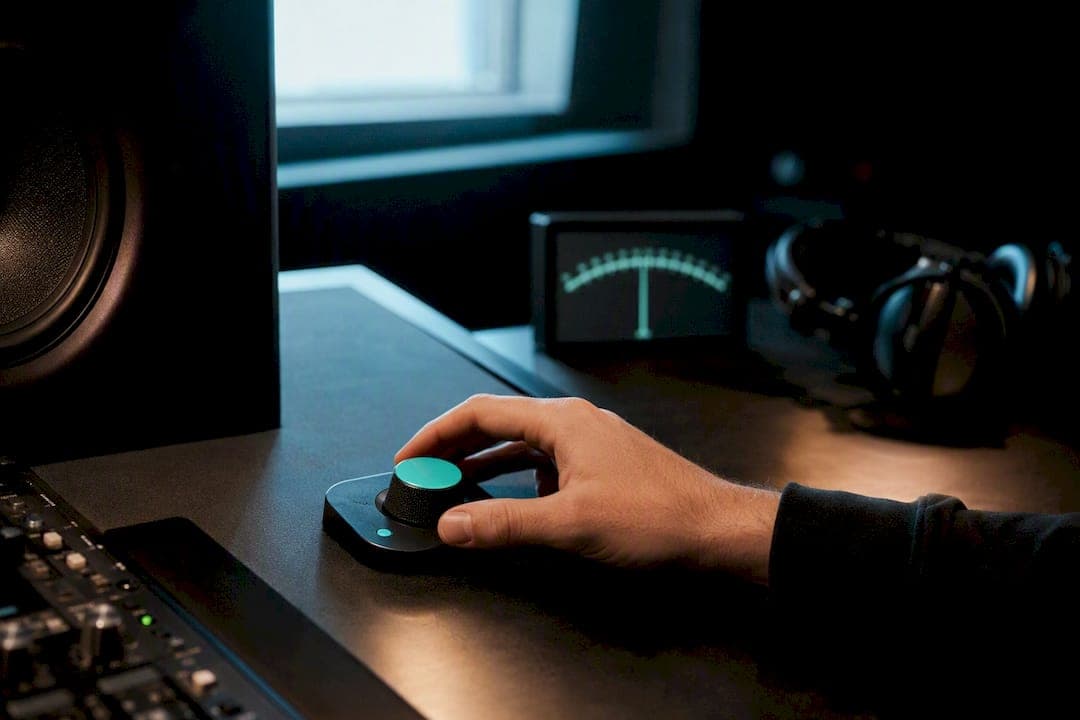
Mono compatibility means your mix holds together, in balance and without dropouts, when everything gets summed to a single channel. The usual cause of a mix falling apart is phase cancellation between your left and right signals. The fix starts now, not at mastering: hit the mono button on your monitor controller or DAW, watch your correlation meter, and listen for what disappears.
TL;DR:
- Most mono issues stem from phase cancellation caused by timing offsets, decorrelation effects, or microphone placement problems.
- Using a correlation meter and soloing kick and bass in mono can quickly pinpoint problematic elements before mixing progresses.
- Applying mono compatibilization techniques like polarity inversion, sample nudging, and mid-side EQ early improves overall phase coherence.
- Summing the low end below 80 to 150Hz to mono reduces risks of phase cancellation without perceptible loss in deep bass clarity.
- Regular mono checks on various playback devices are essential to ensure your mix translates well across common listening systems.
Table of Contents
- How to check mono compatibility in your mix
- Why mixes collapse in mono
- Fixing mono problems and building a better workflow
- Where to draw the line on low-end mono
- Should you mix in mono or check stereo mixes often?
- What tools and meters actually diagnose mono issues
- Testing mono on real playback devices
- How AubioMix flags mono problems automatically
- How mono compatibility shapes what listeners actually hear
- Why mono compatibility has mattered since the earliest days of recording
- Common culprits behind mono compatibility problems
- Why mono compatibility still shapes every mix I make
- Get an automated mono check on your next mix
- Sources
How to check mono compatibility in your mix
You can find most mono problems in under five minutes if you run the checks in the right order. Do this early in a session, not the night before you bounce a master.
- Sum to mono first. Use your DAW's mono button, a monitor controller with a mono sum switch, or a simple utility plugin on the master bus. Listen at a sensible volume, not a whisper.
- Watch the correlation meter while you listen. Readings run from +1 to -1. A steady reading near +1 means your signal is well in phase and mono-safe. Values drifting toward 0 mean wide, potentially risky material. Anything dipping negative means active phase cancellation is already eating your signal.
- Solo the kick and bass together in mono. This pairing causes more mono disasters than anything else in the mix. If the low end thins out or the kick loses its punch, you've found your first suspect.
- A/B toggle stereo against mono on the full mix. Flip back and forth in short bursts. You're listening for vocals dropping in level, cymbals vanishing, or the whole mix suddenly sounding thin and distant.
- Run a real-device smoke test. Bounce a rough mix and play it on a phone speaker, a cheap Bluetooth speaker, a smart speaker, and your car stereo if you can. These are mono or near-mono systems in disguise, and they don't lie.
Pro Tip: Keep a correlation meter visible on your master bus for the entire session, not just at the mixing stage. Catching a dip the moment it appears saves you from chasing a phantom problem three hours later.
A correlation meter reading that hovers around a moderately positive value across a full mix is common and usually fine. It's a sustained negative reading, or a sharp dip whenever a specific element plays, that tells you exactly where to look.
Why mixes collapse in mono
Phase cancellation is the root cause behind almost every mono compatibility issue, and it comes from a handful of predictable sources. Once you know what to listen for, you stop treating symptoms and start fixing causes.
- Timing and polarity offsets. Two near-identical signals arriving even a few milliseconds apart, or with one polarity flipped, will partially or fully cancel when summed.
- Decorrelation effects on the stereo bus. Haas-style short delays, stereo wideners, chorus, and flange all work by making the left and right channels different on purpose. That's exactly what causes collapse in mono, and stacking several wideners across different tracks compounds the risk fast, according to sonible's analysis of stereo-to-mono conversion.
- Spaced microphone recordings. Drum overheads, room mics, or dual-tracked guitars recorded without careful placement or later alignment often carry built-in phase problems before you've touched a single plugin.
- Frequency masking once width disappears. When two instruments are separated by panning alone rather than by EQ, they can occupy the same frequency space. In stereo, panning hides that overlap. In mono, it all lands in the same spot and turns to mush.
Vocal doubles and dual-tracked guitars are frequent offenders because producers often stack them without checking phase relationships. It sounds enormous in stereo and disappears the moment you sum it. Read more on the mechanics in this explainer on phase cancellation.
Fixing mono problems and building a better workflow
Once you've found where the cancellation happens, the fixes themselves are usually quick. The bigger win is building a workflow that catches these issues before they compound.
- Flip the polarity. Most DAW channels have a polarity invert button. Try it on the suspect track while soloing against the bass or kick in mono. Sometimes this alone restores what you lost.
- Nudge with a tiny sample delay. If two mic sources or doubled parts are close but not aligned, shifting one by a handful of samples can bring them back into phase without audibly changing the sound.
- Narrow the channel with M/S processing or an imager. You don't need full stereo width on every element. Pulling in the sides on a wide pad or synth often solves the mono problem outright, and you barely notice the narrower image in context.
- Bulletproof the bass early. Keep your bass and kick close to mono from the start rather than trying to rescue them later. It's far easier to widen a clean mono foundation than to uncancel a phase mess.
- Use EQ for separation instead of leaning on panning. If two instruments compete for the same frequency range, carve space with EQ rather than relying on stereo position to keep them apart. Panning hides overlap; it doesn't remove it.
The mid/side approach deserves special attention here. Narrowing the side channel below your chosen crossover point, and collapsing it entirely below the low end, protects your foundation without gutting the width you've built elsewhere in the mix. If you're new to this, this guide to mid-side mixing mistakes covers the errors that trip up most producers on their first attempts.
Pro Tip: Check mono the moment your kick and bass first sit together in the mix, not after you've built the whole arrangement around them. A phase problem at the foundation only gets more expensive to fix as you add layers on top.
The workflow rule that actually matters more than any individual fix: check mono early, and check it often. Toggle it every time you add a new stereo effect, especially a widener or a doubled part. This habit, treated as routine rather than a last-minute QA step, prevents small phase issues from compounding into a mix that needs rebuilding.
Where to draw the line on low-end mono
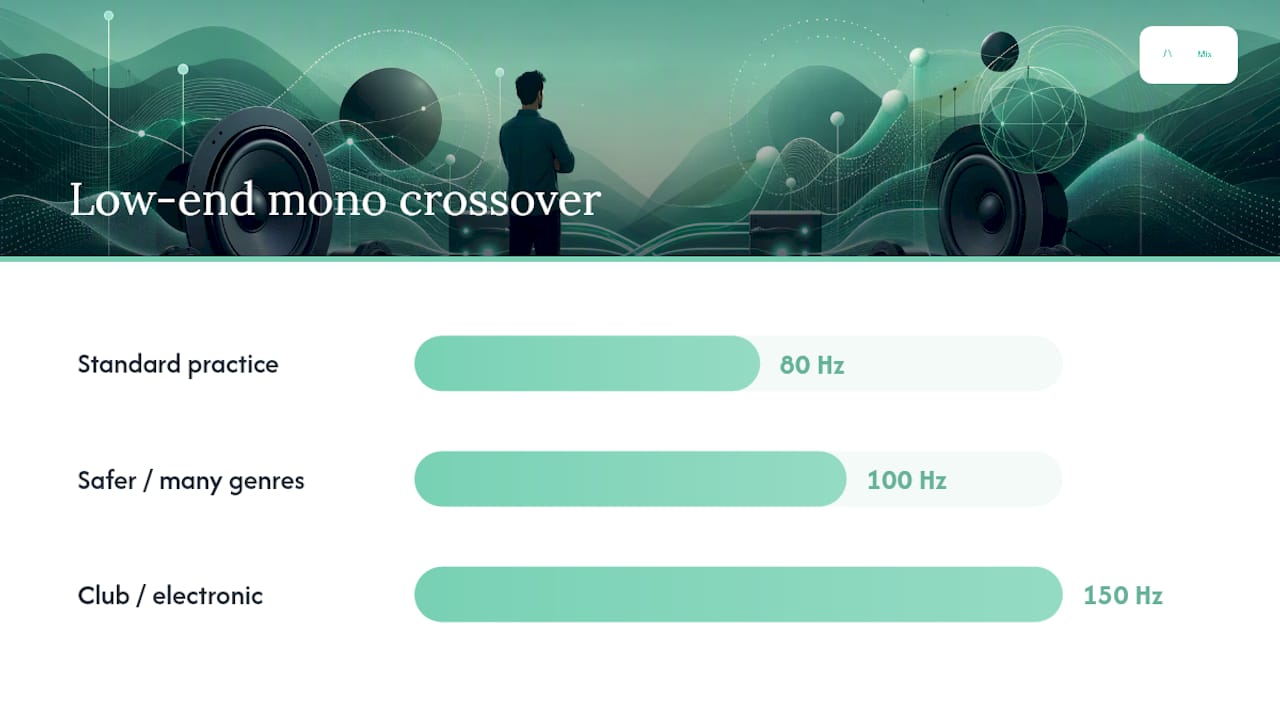
Your low end is the single biggest risk zone for destructive mono cancellation, and it's also the easiest to protect. Human hearing struggles to localise deep bass, so collapsing the sub and low bass to mono costs you nothing perceptually while removing your biggest cancellation risk outright.
The standard advice is to sum everything below roughly 80Hz to mono. Depending on genre and delivery format, many engineers push that crossover up to 100 to 150Hz for extra safety, particularly on club-focused electronic music where sub content carries most of the energy.
| Method | How it works | Best suited to |
|---|---|---|
| M/S EQ crossover | Cuts the side channel below a set frequency, leaving only mid content in the low end | Mastering stage, final width control |
| Mono maker plugin | Dedicated tool with a single frequency slider to collapse everything below it | Fast, single-knob fixes on the master bus |
| Stereo imager crossover | Multiband imaging tool narrows width band by band, mono below the lowest band | Mix bus work with more granular control |
Whichever method you choose, verify it. Solo just the low end in mono and listen for thinness or dropouts, then check a spectrum analyser for unexpected notches that suggest partial cancellation slipped through your crossover point. If you want a deeper dive into implementation, this guide on mid-side EQ in mastering walks through crossover placement in more detail.
Should you mix in mono or check stereo mixes often?
Both are legitimate professional approaches, and the right one depends on your workflow and the material you're mixing.
- Mono-first, the "tree" method: you build your entire balance in mono before adding any stereo processing. This forces phase-coherent decisions from the start and reveals cancellation problems immediately rather than after the fact. The trade-off is less immediate spatial feedback while you work, which can feel restrictive on stereo-heavy productions.
- Stereo-first with frequent mono checks: you mix in full stereo from the outset and toggle to mono regularly to catch problems as they appear. This suits electronic and pop productions built around wide synths and stacked layers, but it only works if you actually run the checks rather than treating them as optional.
The mono-first method has particular appeal for mastering-focused engineers, since a mix built phase-coherent from the ground up translates more reliably across the widest range of playback systems.
A hybrid routine works well for most producers: build your core balance, especially kick, bass, and lead vocal, in mono. Once that foundation feels solid, switch to stereo and add width conservatively, checking mono again after every significant stereo decision. You get the phase-coherent foundation of the tree method without sacrificing the creative feedback of working in stereo.
What tools and meters actually diagnose mono issues
You don't need an expensive plugin bundle to catch mono problems. Simple stock tools, used consistently, catch nearly everything.
- Correlation meter: your primary diagnostic tool. Readings near +1 mean safe, in-phase material; readings drifting toward or past 0 flag risk, and negative readings confirm active cancellation.
- Vectorscope display: gives you a visual read on stereo width and phase relationships, useful for spotting problems at a glance rather than waiting to hear them.
- Stock polarity invert: built into virtually every DAW channel strip, and often all you need to fix a two-mic phase clash.
- Stock mono button or utility plugin: the fastest way to sum your monitoring path without touching your session.
- Sample delay: a few samples of offset can realign two sources that are close but not quite locked together.
- M/S EQ: lets you narrow or collapse the side channel independently of the mid, which is where most low-end mono fixes happen.
A hardware monitor controller with a dedicated mono sum button is worth the investment if you mix regularly, because it lets you check outside your plugin chain entirely, removing any doubt about whether a software bug is skewing your test. Watch correlation on individual elements too, not just the master bus. Parallel compression or a stereo effect on only one signal path can shift an element's correlation dynamically, causing cancellation that only appears during certain parts of the song.
Testing mono on real playback devices
Your DAW checks catch most problems, but nothing replaces hearing your mix on the systems your listeners actually own. Run this short routine before you call a mix finished.
- Play it on a phone speaker. This exposes low-end dropouts and thin midrange faster than any plugin, because phone speakers are essentially mono and have almost no bass extension.
- Try a cheap Bluetooth speaker. These often sum to mono internally even when marketed as stereo, and they reveal element dropouts that a full studio monitor setup can mask.
- Check a smart speaker. Single-driver smart speakers are a genuinely mono sound system, and they're now a huge share of casual listening. If your mix survives here, it will survive almost anywhere.
- Listen in the car. Set the volume to a normal, comfortable level and sit at your usual driving distance rather than leaning in close. Road noise and cabin acoustics will expose anything still hiding.
Keep these checks quick and consistent. You're listening for the same things every time: does the low end hold up, does anything vanish, and does the mix still feel balanced without its stereo width to lean on.
How AubioMix flags mono problems automatically
Manual listening checks are essential, but they take time and experience to run well. AubioMix's automated mix analysis builds mono diagnostics directly into its report, so you get a second opinion the moment you upload a file.
- Phase and correlation analysis: the report flags sections where correlation drops toward zero or negative, pointing you to the exact timestamp rather than leaving you to scrub through the whole track.
- Stereo width cohesion checks: AubioMix highlights where wideners or decorrelated effects may be pushing width beyond what's safe for mono playback.
- Low-end mono assessment: the analysis checks whether your sub and bass content sits safely centred, flagging risk if it detects wide low-frequency energy.
- Visual and written reports: findings come with plain-language explanations and specific next steps, so you know what to fix, not just that something is wrong.
Automated analysis works best as your first pass and your final safety net, catching issues fast so you spend your listening time fixing problems rather than hunting for them. Manual checks on real devices still matter for the final call, particularly for genre-specific decisions a report can't fully judge on its own.
How mono compatibility shapes what listeners actually hear
A mix that fails mono compatibility doesn't just sound "different" on mono systems, it sounds worse in ways that directly cost you listeners. A vocal that sits proudly in a stereo mix can drop several decibels in perceived level once summed, because part of its energy has cancelled against itself. A kick drum that felt tight and controlled in the studio can turn thin and papery through a mono Bluetooth speaker if its transient content was smeared across the stereo field.
This matters because most casual listening happens on systems that are mono or close to it. A phone speaker, a laptop speaker, a smart speaker on a kitchen counter, even many television sets, all collapse or nearly collapse your carefully built stereo image into one channel. If your mix depends on stereo separation to sound balanced, it will sound unbalanced the moment that separation disappears.
Mix translation, the idea that your mix should sound recognisably good across different systems, depends heavily on mono compatibility. A mix that translates well doesn't sound identical everywhere; it sounds coherent everywhere. The kick still hits, the vocal still sits up front, the arrangement still makes sense. A mix that fails mono compatibility loses that coherence exactly where it matters most: on the ordinary devices where most people actually listen to music.
Why mono compatibility has mattered since the earliest days of recording
Mono compatibility isn't a modern concern invented for Bluetooth speakers. It has roots in the earliest decades of recorded music, when mono was the only format available and every mix decision had to work within a single channel by necessity.
When stereo recording became commercially viable through the 1950s and 1960s, radio broadcast remained mono for years afterwards in many markets, and record labels routinely required mono-compatible mixes so a single release could serve both stereo listeners at home and mono broadcast simultaneously. Engineers of that era developed many of the techniques still in use today, centring bass and lead vocals, using EQ rather than panning to separate instruments, because a mix that failed mono compatibility simply failed to get played on the radio at all.
The concern never went away, it just changed shape. Club sound systems, television broadcast, voice assistants, and budget earbuds have each introduced new mono or near-mono playback contexts over the decades. What's changed is the sheer variety of devices a single mix now needs to survive, from a festival PA stack to a $30 Bluetooth speaker. The underlying physics, phase cancellation between two channels, hasn't changed at all. Only the number of places it can go wrong has grown.
Common culprits behind mono compatibility problems
Certain elements cause mono trouble far more often than others, and knowing the usual suspects speeds up your diagnosis considerably.
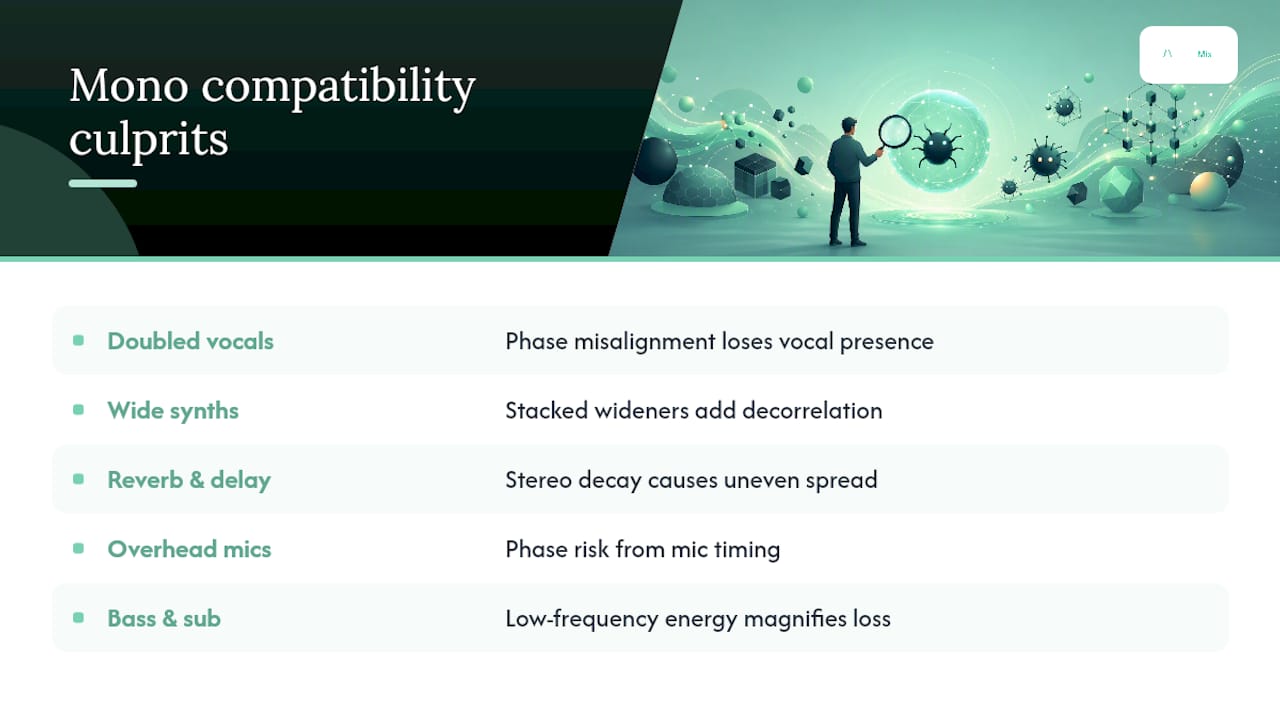
Doubled or stacked vocals are a frequent offender. Producers often layer two or three takes of the same vocal line, pan them wide, and add a touch of delay or chorus to build width. That width can vanish entirely in mono if the takes aren't phase-aligned, sometimes taking a chunk of the vocal's presence with it.
Wide synth pads and stacked stereo wideners cause similar problems, particularly when several wideners get applied across different layers of the same patch. Each one adds a small amount of decorrelation; stacked together, they can push the signal well past what sums safely.
Reverb and delay returns, especially stereo reverbs with heavy width settings, frequently introduce cancellation because their decay tails spread information unevenly across the stereo field. Overhead and room mics on drum recordings carry inherent phase risk from the moment they're captured, long before any processing touches them. Bass and sub content mixed wide, whether through a stereo synth patch or an unprocessed DI signal, remains one of the most damaging causes simply because low frequencies carry so much of a track's total energy.
Why mono compatibility still shapes every mix I make
Mono compatibility isn't a checkbox you tick before mastering. It's a discipline that shapes decisions from the first fader move, because the alternative, discovering a phase problem after the mix is "finished", costs far more time than checking early ever will.
The habit worth building is simple: keep a mono sum available on your monitor controller or a hardware switch, not buried three clicks deep in a plugin menu. Make checking mono as automatic as checking your levels. Document what you find, too, especially on tracks with heavy stereo processing, so you're not relitigating the same phase decision three sessions later.
Manual listening and automated analysis aren't competing approaches. Your ears catch nuance a meter can't quantify; a correlation meter or an automated report catches the moment a fader move you didn't notice tipped a channel from safe to cancelling. Use both, every time.
— AubioMix
Get an automated mono check on your next mix
AubioMix gives you a faster, more consistent alternative to guessing whether your mix will translate, upload a file and get a full report covering phase, stereo width, and low-end cohesion alongside more than a dozen other mixing and mastering checks, without waiting for studio time or a second opinion from another engineer.

The workflow is simple: upload your mix, and the report flags exactly where correlation drops, where width might be risky on mono systems, and whether your low end is sitting safely centred. Each flag comes with a written explanation and a specific next step, so you're not left guessing what a meter reading means for your actual mix. If you're working in a genre with well-defined loudness and translation expectations, AubioMix's genre-specific benchmark pages show you how measured mixes in styles from techno to worship compare on the metrics that matter. Run your next mix through an AubioMix benchmark check before you commit to a final master, and catch mono issues while they're still a two-minute fix.
Sources
For deeper technical grounding, Adrian Milea's guide to mono compatibility covers the phase mechanics in detail, and Sonarworks' phase-fixing guide is a solid reference for correlation meter readings and simple polarity fixes.
On the AubioMix blog, the guide to correlation metering expands on the interpretation covered above, while the mid-side mixing mistakes and stereo widening guides tackle the two techniques most responsible for mono collapse in modern productions.
- Mono Compatibility: Make Sure Your Mix Does Not Fall Apart
- Low End Mono Compatibility: 5 Fast Fixes for Phase Loss | LordReverb
- Fixing phase issues (Sonarworks blog)
- Musicproductionwiki